Security rules and recommendations
The security guidelines included below are meant to help you securely perform most common user actions, like authentication, file transfer, and more within the Infobip platform and through the Infobip APIs.
Account security
Once you create an Infobip account, you will use your username and password to sign in to the Infobip account (also referred to as the Infobip web interface). Note that your username cannot contain special characters and cannot be changed once generated.
Password management [#password-management-account-security]
Infobip password strength is set by default to very strong. The general password requirements are:
- Lowercase letter
- Uppercase letter
- Number
- 10 to 50 characters
- Symbol
- No 3+ repeated characters
- Allowed characters A to Z, a to z, 0 to 9 and symbols
Follow these important password tips to help protect your account:
- Do not use the same password for different users.
- Do not use passwords that you use elsewhere, especially for other online channels/services.
- Change passwords periodically, on a quarterly basis at least.
- Never share your passwords or the API keys with 3rd parties, including Infobip staff. Instead, use the Infobip web interface password reset form or manage API keys over the appropriate interface.
Account users [#account-users-account-security]
Here's how to manage account user credentials for maximum security:
- Within the Infobip web interface, navigate to Settings → User & Teams.
- Leave the admin user as the Account Manager role and remove all roles that allow for traffic broadcast. For other users, remove the Account Manager role and assign roles for traffic broadcast.
- Verify the user’s GSM and email address.
- Navigate to Settings → My Account. Use the list below as a reference, and visit the Security Settings topic for more details on how to configure each setting.
- Two-factor authentication is enabled by default, configurable options are “Remembered” or “On Each Login”. 2FA will not impede API connectivity.
- Set up password validity duration.
- Set up max login attempts.
- Set up user inactivity days.
Traffic security
Support for TLS [#support-for-tls-traffic-security]
As of July 5, 2021, we only support TLS v1.2. The support for previous versions has been discontinued. If you are using a TLS version lower than 1.2, you will not be able to send any requests to our platform. If you are not sure which TLS version you are currently on or need assistance with upgrading to a new version, contact [email protected].
Entry point-specific users [#entry-point-specific-users-traffic-security]
User credentials can be used via web interface or via API. It is important not to mix the API users and the users who interact with Infobip through the web interface connectivity.
Keep the user for API (accessible solely from the IP Safelist), use the rest of the users for web interface to prevent connectivity issues. API users should only be able to use the API through URLs that belong to the IP Safelist to prevent connectivity issues.
Traffic broadcast [#traffic-broadcast-traffic-security]
If you use the API over the SMPP, create a dedicated user for broadcasting traffic and use their credentials over an SSL connection to broadcast traffic. If you use the API over the HTTP, avoid broadcasting traffic with user credentials. Use an API key instead.
Increase security for API connectivity by using an API key or token authorization type, as suggested in the Create API Key topic. This is to mitigate the risk of network data transfer interception.
Set up an IP safelist of allowed IP addresses, by IP or by the whole IP range on API keys. To do it through the Infobip web interface, log in and navigate to Manage API Keys. To do it via the API, use a POST API request when creating an API key.
Here is an example of the allowed IPs and IP ranges you can use:
- Allowed IP list:
192.168.1.1;192.168.1.2;192.168.1.3 - IP ranges:
192.168.1.0/24
Use the SSL protocol to always broadcast traffic over an encrypted connection.
- For SMPP SSL endpoint, visit SMPP specification
- For HTTP SSL endpoint, visit Base URL
IP safelisting [#ip-safelisting-traffic-security]
IP safelisting allows you to create lists of trusted IP addresses or IP ranges from which human users or APIs can access Infobip platform.
When using IP safelisting, keep in mind the following conventions and best practices:
IP safelisting can be set up at a user level or at an API key level:
-
User level
- IP addresses defined in the safelist will be recognized once a user logs into the web interface and once their credentials are used to broadcast traffic.
-
API key level
- IP addresses defined in the safelist will be recognized once that API key is used when broadcasting traffic.
- IP Safelist on an API key can be set up via the web interface (Manage API keys) or when creating an API key over the API.
IP safelist can be set for a specific IP or for an IP range of addresses:
- API - typically using static IP addresses or company/ISP ranges.
- Web interface - might originate from dynamic-source IP addresses (e.g., users working from home, connecting via mobile network, or when traveling).
IP safelist for HTTP API key and basic authentication are complementary (different restrictions apply, depending on the authentication method used).
API-related security controls
This section provides information on how to increase security for API connectivity.
To mitigate the risk of network data transfer interception:
- Never use a combination of unsecured HTTP and SMS over URL parameters due to a high risk of network data transfer interception.
- Never use the unencrypted HTTP/SMPP connection and switch to the following:
- SSL/TLS encrypted connections - This is a preferred option due to a faster setup and more robust failover mechanism.
- an IPsec VPN connection - This is less preferred because of the need for manual setup and more complex incident management in case of availability issues. This will provide an encrypted data path between your platform and Infobip.
- Refrain from using GET methods for sending messages
Password abuse [#password-abuse-api-related-security-controls]
To mitigate the risk of password abuse, use a time-constrained API key or token authorization type.
API sessions expire one hour after the last successful token, and this option cannot be modified on the client's account level.
API keys, on the other hand, are sessionless and sent with each request. They have a validity period that can be set per API key after which the API key is considered invalid/expired.
Potential risks if controls are not implemented
Credentials leak due to traffic interceptions when using unencrypted HTTP/SMPP traffic. This can happen in the following circumstances:
- When using insecure HTTP combined with basic authorization (username and password included in the encoded form in the Authorization header) - which might have occurred on any node in between your network, ISPs and proxy services (if used), and the Infobip web interface.
- When applying MITM methods between the client network and the Infobip platform.
- When used in an insecure (plaintext) format in any kind of storage (digital and analog). Infobip stores user passwords in a one-way hashed format with access privileges limited to only a few trusted employees; access is not granted to any 3rd party.
- When used in an insecure (plaintext) format during exchange/communications (via electronic channels, telephone, even live discussions).
- When you have not changed your password in a long time.
General security recommendations
- Always use longer and complex passwords, differentiated per user. Reinforce internal credentials storage and management to mitigate the potential cause of data leakage in the future.
- Avoid hard coding user credentials on a public code repository.
- Treat your tokens like passwords and keep them secret. When working with the API, use tokens as environment variables instead of hard coding them into your programs.
Verify the authenticity of login page to prevent phishing attacks
Pay close attention to the URL and site content:
-
Check Favicon. Websites can put whatever icon they want in the tab.
-
Look at the domain name. The domain name can help confirm that you are landing on a legitimate Infobip site.
-
Check the site's security status in your browser's address bar. For most browsers, a safe website will display a green padlock icon to the left of the website's URL. You can click the padlock icon to verify the details of the website (e.g., the type of encryption used). For example:
- Multiple dashes or symbols in the domain name.
- Domain names that imitate an actual businesses (e.g., "inf0bip", "infoblp" or "infob1p").
- Domain extensions like ".biz" and ".info". These sites tend not to be credible.
- Keep in mind as well that ".com" sites, while not inherently unreliable, are the easiest domain extensions to obtain.
-
Check the website's connection type. The Infobip web interface website has an
httpstag which is more secure and therefore more trustworthy than a site using the more commonhttpdesignation. This is because most illegitimate sites would not bother going through the security certification process a typical https site would. -
Look at the file path. Infobip web interface has straightforward file paths depending on the part of the web interface you want to visit. In case you have any doubts related to any path, contact our Support.
-
Evaluate the URL. A website's URL consists of the connection type ("HTTP" or "HTTPS"), application (e.g., "portal"), domain name (e.g., "infobip"), extension (".com"), and the file path (e.g. "/dashboard"). Even if you have verified that the connection is secure, remain on the lookout for the following red flags:
- The Favicon – websites can put whatever icon they want in the tab.
- Domain Name – this is a part of the URL and it’s trustworthy, as long as you know what you are looking for.
- File Path/Directory – this is a part of the URL and it is trustworthy, as long as you know what you are looking for.
- Web content area – this can be whatever the attacker wants it to be, including a very convincing spoof of an Infobip's legitimate website.
-
Look for broken English on the website. If you notice a large number of poorly spelled (or missing) words, generally bad grammar, or awkward phrasing, you should question the site's authenticity. Even if the site in question is technically legitimate insofar as it is not a scam, any inaccuracies in language will also cast doubt on the accuracy of its information, thereby making it a poor source.
-
Review Certificate details: Most browsers allow you to view the certificate by clicking the padlock icon in the address bar.
For Firefox:
- Select the padlock icon.
- Select More Information.
- Select View Certificate.
For Safari:
- Select the padlock icon.
- Select View Certificate.
For Chrome:
- Select the 3-dot menu → More tools → Developer tools.
- Select the Security tab and View certificate.
OR
- Select the padlock icon → Certificate.
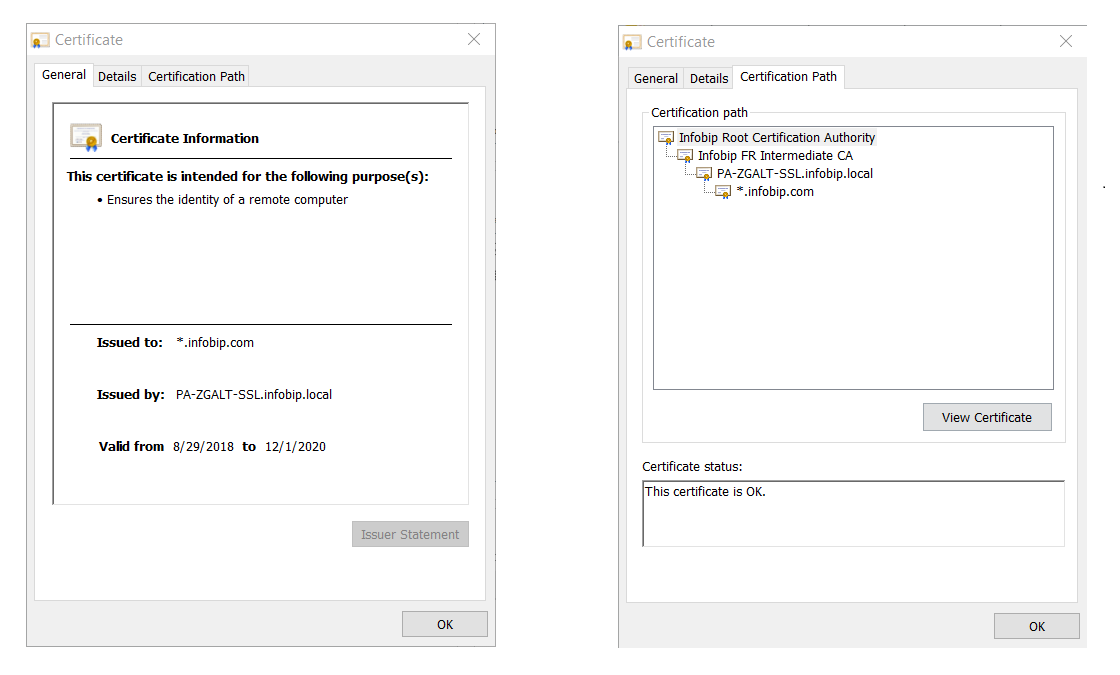
- When you select the Certificate Information, you will get all the information the CA verified before it issued the certificate.
The Infobip certificate looks like this:
Sharing confidential information
This section is a quick guide on how to safely use and store confidential information.
How to use S-Pass [#how-to-use-s-pass-sharing-confidential-information]
S-PASS is an Infobip app for sharing confidential information with the Infobip employees, clients, and other 3rd parties. Note that shared information is readable only once, and then it is permanently erased from S-PASS.
It is possible to create and send a secret note to a recipient or access and read a secret note if you have received a token from the sender. In both cases, it is necessary to access S-PASS(opens in new tab) using a web browser of your choice (it might look different in different web browsers).
Store a secret [#store-a-secret-sharing-confidential-information]
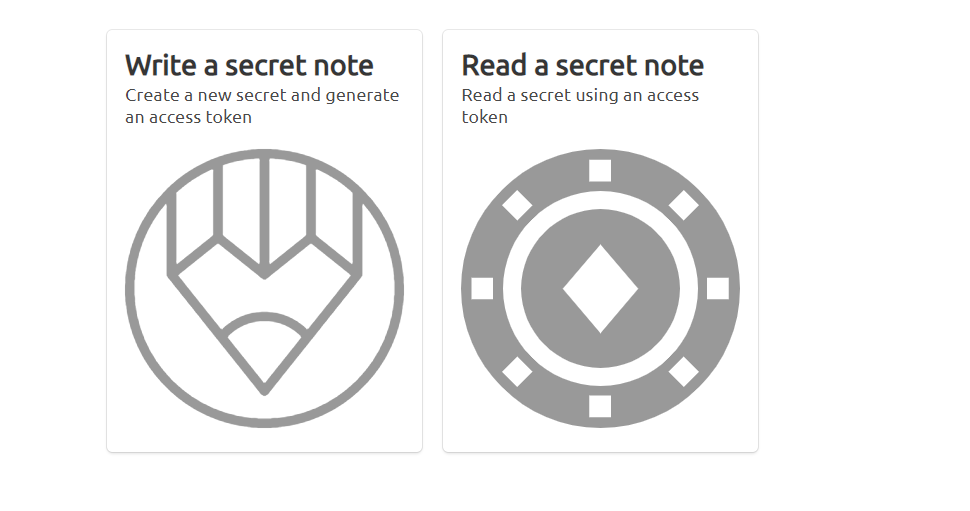
- Access S-PASS(opens in new tab). Click Write a secret note to share a secret with someone or Read a secret note if you have received a token for reading secret notes.
- Write/paste the secret note you want to send. Select how long you want your secret note to remain stored. It will be kept until it has been read or until it has surpassed the selected storing time. When finished, click Store secret.
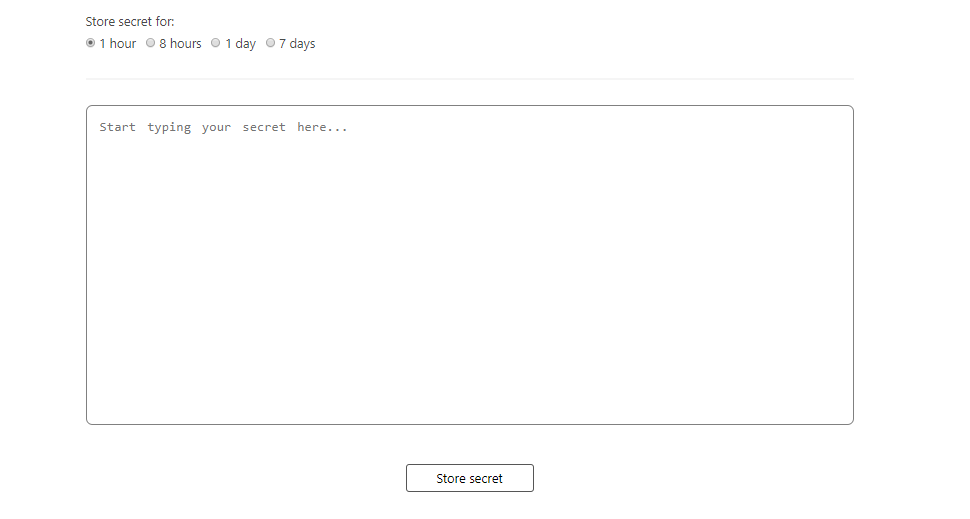
Anyone with the token will be able to access your secret note during the time frame you specified.
Your secret note is now stored. Copy the token or copy the direct link to share your secret from the Secret stored! pop-up.
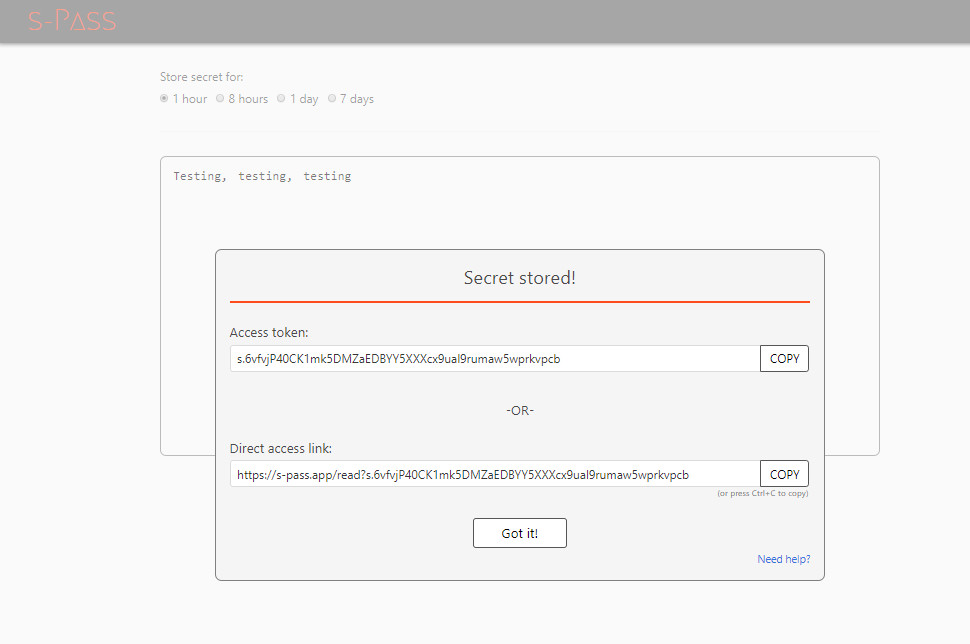
Your confidential information will be accessible only by the person who has the token or the link. Until viewed, the information is encrypted, unreadable to everyone and stored in the Infobip system.
Read a secret [#read-a-secret-sharing-confidential-information]
If you have a direct access link, paste it in a web browser and you will see the shared secret under the Secret section. If you have an access token, go to S-PASS(opens in new tab), click Read a secret note, paste your token, and click Submit token.
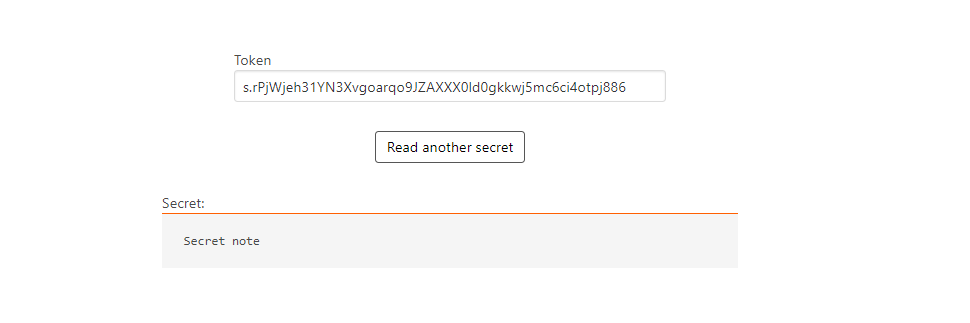
Once you read the secret note, it will be deleted from the system.
Secure file transfer
Using the Infobip web interface, you can define how you wish to export your Reports from Infobip. Methods enabled for this purpose are FTP and SFTP.
FTP is a file transfer protocol providing basic, unencrypted file transfer capability. Although it enables both anonymous access and authenticated sessions, the user credentials and data payload are transferred over public networks in cleartext, posing a high risk of unauthorized access to confidential data and spreading of concealed malware.
Being completely replaced with more secure alternatives (SFTP, FTPS, SCP...), the FTP protocol should only be used with extremely trusted and isolated systems or for public access with an anonymous FTP - which is not applicable to any Infobip use case.
We recommend using SFTP (Secure FTP). All you need to do is to implement an SFTP server on the client-side and provide access parameters, either via the Infobip web interface Export feature or towards Customer Care.
Secure implementation process usually adhere to these pointers:
- Specify a non-standard port (other than 22).
- Safelist incoming (sender) IP address ranges; for Infobip, these would be
193.105.74.0/24and62.140.31.0/24. - Use dedicated credentials for each client user (i.e., credentials dedicated solely for Infobip).
- Choose long, complex passwords (12 characters minimum).
- Change passwords regularly (e.g., every three months).
Apart from security reasons, usage of the encrypted data transfers is, in many industries worldwide, a regulatory compliance requirement included in the security policy of businesses.
When you choose the insecure version of the FTP, you accept related security risks, and, at the same time, Infobip renounces any liability possibly resulting from such use.
Authorization to perform security testing activities against Infobip resources
Infobip conducts regular external penetration tests by engaging renowned 3rd party companies and using best practice methodologies that encompass:
- OSSTMM (Open Source Security Testing Methodology Manual)
- OWASP (Open Web Application Security Project)
- NIST penetration testing and audit methodologies, including automated and manual techniques designed to evaluate the security of our target systems
Infobip provides detailed reports of these testing exercises to its clients and partners, upon a signed NDA and limited to the scope of the contracted services. Our security teams are available for any question or discussion regarding the reports' contents or other aspects of our vulnerability management program.
Using existing reports and documentation for verification of your supply chain security is beneficial, as it provides adequate assurance levels while reducing operative burdens and costs on both sides.
If these arguments are not sufficient, penetration testing or vulnerability scanning of our environment might be arranged according to the provisions stipulated in the Service terms and conditions(opens in new tab) and the respective service agreement.
The client/partner will be required to agree to share the testing findings with the Infobip Corporate Security team. In case of especially severe and/or critical issues discovered within the Infobip products or services, the client agrees to report their findings to Infobip without any delay.
Third parties are not authorized to perform any kind of security testing of endpoints pertaining to Infobip and its affiliated companies without prior approval from Infobip. Third parties are not allowed to disclose any findings resulting from their testing activities, or information discovered during the course of the provision of the services, with any other 3rd parties, without a prior contractual agreement or approval from Infobip.
Every external security testing activity must be announced and a request has to be sent towards an Infobip representative (account/sales manager or Support).
Every such request will be evaluated against the current client's/partner's permission for conducting the testing. If the request has been approved, the requesting party will have to comply with a defined set of requirements regarding their engagement, documented in the External Penetration Testing Document which will be provided by the Infobip Corporate Security department.
In accordance with the NDA provisions, the client assumes the responsibility to protect the confidentiality of the found vulnerabilities. Any such information, in whatever form,shall not be disclosed to or shared with 3rd parties without prior approval from the Infobip Corporate Security department.
If the client breaches this confidentiality clause, Infobip will hold them liable based on the contract provisions, and the potential reimbursement claims will take into consideration the maximum amount of damages resulting from these unauthorized activities.
If the conducted penetration testing discovers vulnerabilities in the Infobip system, these findings will be triaged by the Infobip Corporate Security department. If marked as needed for remediation, the proof of the remediation of identified vulnerabilities will be provided to the requesting 3rd party in the form of an internally provisioned report compiled by the dedicated application security experts and other relevant security specialists.
Client's internal processes
Reinforce internal credentials storage and management to mitigate a potential risk of internal data leakage in the future which might result in unauthorized access to the Infobip platform and traffic costs.
For safekeeping of your passwords, consider using one of the commercial-grade password management tools.
Store credentials (How-to and How-not-to)
If you are using Infobip APIs, you need to handle sensitive data such as passwords, tokens, or secrets. This can be quite a challenge, especially if sensitive data must be sent from one service to another to execute service operations.
The need to store sensitive data can be a legitimate use case and can happen a lot of times during the design phase. In cases where you cannot resort to secure methods of sharing resources and initiating operations, you need to set up additional security mechanisms which are set up in layers and increase your defense in depth.
Here is an example scenario code where authorization is hardcoded:
This is a scenario which we want to prevent.
Let's look into some of those security mechanisms and ways to secure sensitive data.
Use hardware security module (HSM)
Hardware security modules are special physical devices usually formally certified as tamper-proof FIPS 140-2 level 3 devices and designed to store and protect secret material and securely perform cryptographic operations. The idea behind HSMs is to store data or execute operations in a more secure environment rather than in a computer where the application is deployed. There are a lot of different providers of HSMs and the way they are used and operated is in the scope of the provider's documentation. This is the best approach that you can use to handle sensitive data.
Never store any sensitive data
Instead of storing sensitive data, include it in the application when its deployed. Make the application request secrets when starting. This is the best thing you can do, if you cannot use HSMs as your password is only contained in the memory.
There are other risks associated with this. For example, pulling password/keys directly from memory or availability risks, such as server reboot, in cases where the application is deployed as a service. This method is far safer than any of the other methods. All other methods have the same risk associated with pulling sensitive data from memory.
Here is an example of how you might incorporate this in a simple Spring Boot application:
Set additional layers when storing sensitive data
In an event that you really need to store sensitive data, set additional layers of defense.
There are several options here:
- Store secrets in a verified encrypted store (e.g. keystore) and load those secrets on application boot.
- Encrypt secrets and store the encryption key safely and in a way that it is restricted only to a specific user on the service.
- Store secrets in an environment variable and fetch the value in code.
- Use a separate process or service that serves secrets to the application after it has been authenticated.
Here is an example code of how secrets can be fetched from an environment variable:
Security guidelines for SMS fraud prevention
With the large increase of cyber-attacks on the internet, web applications are attacked in different ways. To effectively defend against these attacks, we are providing you with web application security guidelines which can be implemented from a perspective of most common web application issues leveraged in fraud cases.
Web application issues leveraged in fraud cases [#web-application-issues-leveraged-in-fraud-cases-security-guidelines-for-sms-fraud-prevention]
-
Web application issues leveraged in fraud cases
Limit frequency and quantity of SMS messages to a specific number, so none of the users can misuse the service or platform. Using this approach, you will avoid potential spam to the end users and the resources will not be potentially exhausted by the end user. Rate limit should be implemented at a user account level.
-
Lack of security mechanisms in HTTP headers and cookies
HTTP headers should contain a set of security mechanisms which can provide additional security layer to the web application. Application cookies should have at least "Secure" and "HttpOnly" directive in place. Additional option is to include the SameSite, which will mitigate the risk of cross-origin information leakage. Besides securing cookies, application should use X-Frame-Options to avoid clickjacking attacks, X-XSS-Protection to mitigate XSS attacks, Strict-Transport-Security to tell browser to use only HTTPS, etc.
-
Missing authentication or rate-limit on some of the API endpoints
It is important to have proper asset management of all API endpoints, since some of them can be in debug or test mode and authentication or rate limit could be disabled for those which are used for testing purposes. This is common in situation where you want to maintain backward compatibility on multiple deployments production, staging, internal, and development.
-
Insecure Direct Object Reference
Application should check if the user who tried to access a certain object from the database has the right access to it. IDOR usually happens when the user modifies an input, e.g., by changing the ID of the object in a URL from 10 to 20. The user can access the object which is tied to another user. Application should prevent the exposure of a real identifier, such as an ID, and use a hash instead because the sequential ID could be easily guessed.
-
Missing or insecure CAPTCHA mechanism
Use reCAPTCHA or hCAPTCHA to tackle bots. Be aware of existence of automated CAPTCHA solvers which are solved using both bots and human interaction. Consider using some of the non-conventional CAPTCHA methods, like graphic puzzle solving or context-specific questions.
-
Missing anti-CSRF token
It is advised to use anti-CSRF tokens within all sensitive HTTP requests. CSRF tokens should be generated for each HTTP request, as the time range for exploiting is shorter as opposed to a CSRF token generated per session.
-
Using GET parameters for sending sensitive data to API
Avoid using GET parameters for sending sensitive data or API keys, as the URL can be cached in HTTP proxies, browser history, or in web server logs. Use the HTTP POST method for sending any sensitive data to the API.
-
Web application doesn't filter and sanitize dangerous input like injection payloads
Define what type of data could be used in a form of web application. Validate and escape the input; for example, there is no need to accept special characters in a username field, since it only accepts an alphanumeric string, a phone number field should only use numbers, etc. Instead of using user input directly from HTML form, use stored procedures or prepared statements with parametrized queries when interacting with underlying database to minimize the risk of SQL injections. XSS should be tackled using validation and input sanitization on each form which doesn't have input selection such as date or yes/no selection, always encode special characters, such as less than (<) or more than (>).
-
Insecure connection over HTTP
Instead of using HTTP, switch to HTTPS, as it offers encryption of the HTTP traffic and protects against traffic interception. Using plain HTTP protocol, an API key or user credentials could be sniffed, if a user is connected to public Wi-Fi hotspot or insecure network. Avoid using SSL 2.0/3.0, disable TLS 1.0, and use TLS 1.2 and TLS 1.3. Disable null and anonymous ciphers.
-
Insufficient logging and monitoring
Web application should be able to produce sufficient number of logs with proper level of integrity at rest and transit. Also, application logs should be sanitized from sensitive info like credentials in plaintext, message content, etc. This especially goes for authentication and any sensitive actions, like registration or change of password/API key, denied access or input validation errors. Logging and monitoring are requirement for any future forensics and examination of user's action.
Was this page helpful?