Model Context Protocol (MCP) servers play a pivotal role in facilitating communication between large language models (LLM) and their respective toolchains or workflows. This unique context-driven architecture introduces a set of challenges not typically encountered in standard web service environments.
For starters, MCP servers don’t have the same traffic patterns as HTTP RESTful services. While REST APIs typically handle stateless, independent requests distributed across many clients, MCP servers maintain persistent connections with AI agents that generate traffic in bursts during reasoning chains.
Given their central importance and the volatility of the workloads they process, load testing MCP servers becomes essential. Effective load testing helps us understand how these systems perform under varying levels of demand, identify potential bottlenecks or failures, and ensure reliability and responsiveness even during sudden spikes in usage.
By simulating real-world scenarios, we can better prepare MCP infrastructure to support seamless, robust, and scalable conversational AI experiences.
To ensure stable MCP services, we needed to answer these questions:
- How does your MCP server behave under heavy load?
- What scale of resources do you need to survive larger MCP traffic?
- What is your baseline? How many MCP calls do you support as-is?
Understanding MCP traffic patterns
Before designing any load test, we need to analyse which traffic patterns we expect so we can emulate real-world usage as accurately as possible. LLMs generate different traffic than regular web users and HTTP RESTful service clients.
Because our interactions with chat agents differ significantly from those with traditional web services, we can identify distinct patterns for each approach (see the images below).
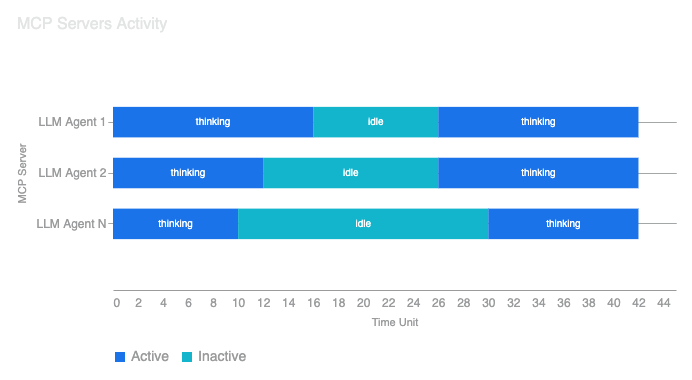
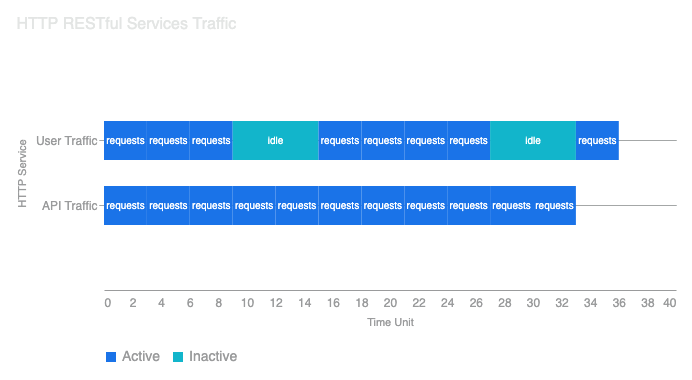
HTTP RESTful traffic tends to be distributed and predictable with steady streams of independent requests spread across time.
MCP traffic, on the other hand, is bursty and inference driven. Expect larger idle gaps followed by sudden spikes in activity.
This distinction matters to testers because real MCP workloads often shift suddenly from inactivity to bursts of activity. Accurately simulating these patterns in tests is vital to reveal performance issues that might only appear during such spikes. Additionally, since MCP tool workflows chain calls in quick succession, replicating these conditions ensures servers remain robust under real conversational loads.
Defining functional requirements
Building on what we’ve learned about MCP traffic, we can define functional requirements for our load test:
- Ability to introduce random variable idle gaps
- Ability to create spike traffic
- Emulate multiple LLM agents
- Control which tools we call and in which order
- Identify key performance metrics
Choosing the right metrics
With a clear understanding of the functional requirements, it’s crucial to prioritise the metrics that truly reflect real-world performance and reliability.
We want to support as many concurrent agents as we can without performance degradation or errors. The most common measures in load testing are latency (duration of processing), success-to-error ratio (the proportion of successful responses to failures), and throughput (how many requests are handled for a given period). While all are useful, not all carry the same weight.
Latency is important but secondary. If a tool call takes 400ms or less, it’s generally within an acceptable range. If a user is waiting for an MCP response within a conversational cycle of 10 seconds, a 1-second response time for a single step is negligible.
Reliability is critical because of token usage and subsequent cost. If an MCP tool call fails, it leads to:
- Wasted tokens: The cost of the prompt and the initial agent reasoning leading to the failed call is lost.
- Increased latency and cost from retries: If the LLM agent is configured to retry the MCP call, it adds multiple seconds to the user’s wait time and consumes even more tokens for the retry logic.
By focusing on the metrics that directly impact user experience and operational costs, we ensure our testing efforts drive meaningful improvements to MCP service quality.
Choosing the right tool
Many tools can load test different protocols and enable some degree of control, but in the case of our Infobip MCP servers, the requirements were:
- Total control of traffic patterns
- Easy to use and compatible with our existing observability tooling
- Extendable
- Open source
The tool that met most of these requirements was Grafana’s k6. In addition to our initial requirements, it has also enabled us to use Go and JavaScript programming languages to add MCP protocol support with existing SDKs.
Furthermore, k6 has in-built multiple scenarios for virtual users (VU), each scenario has its own executor, one of them is “ramping-vus”. The ramping VUs executor in k6 is designed to simulate a gradually increasing or decreasing load. Instead of hitting our MCP server with a fixed, immediate load, it allows you to define different stages where the number of Virtual Users (VUs) changes over time.
Everything that’s mentioned here is defined in JavaScript, which made it the perfect tool for us to implement our particular scenario and have fine control over its execution.
To Sum Up
Load testing MCP servers isn’t just a scaled-up version of traditional API testing but rather requires a fundamentally different mindset. The key points to remember are the following:
- Traffic patterns differ: MCP traffic is bursty and inference-driven, with idle gaps followed by sudden spikes. Traditional steady-state load testing won’t reveal the issues that matter. To reflect actual usage, load tests must simulate real agent behaviour.
- Reliability trumps latency: Failed MCP calls waste tokens and trigger expensive retries. Optimise for success rates first, response times second.
- Choose extensible tooling: MCP is a young protocol. You’ll likely need to extend your testing tools to support it properly in the long run.
With this methodology in place, you’re ready to move from theory to practice. To help you get started, we’ve open-sourced our k6 MCP extension at xk6-infobip-mcp.
In the next post, we’ll walk through the practical implementation: setting up virtual users, simulating random idle times, and analysing the results that helped us identify real stability improvements.