Message status codes
API status codes appear in message send responses, delivery reports, and message logs. They provide more detail about the lifecycle of a message beyond the HTTP status code.
Each status is returned as a structured object:
Message delivery lifecycle
A message moves through a lifecycle: it starts pending and ends in one final state. The status you see depends on when you look.
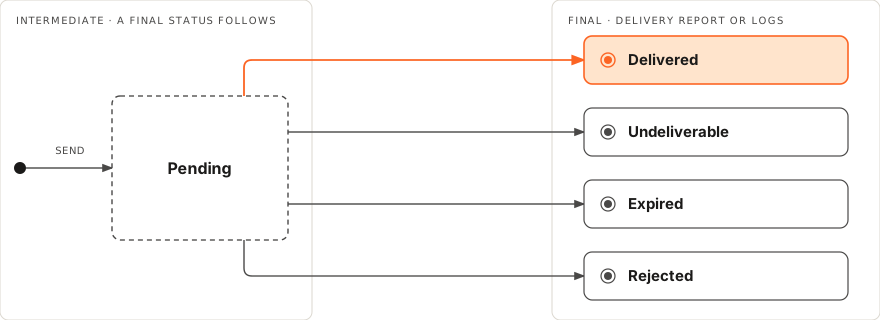
The send response is an acceptance, not an outcome. When you send a message, the API responds with an early status (typically in the PENDING group), confirming the platform accepted the request. The final outcome arrives later, in a delivery report (DLR) or the message logs. To receive the outcome automatically, use Webhooks. Otherwise, poll the logs using the messageId.
Intermediate and final statuses. Some statuses are transient and are later superseded. Others are terminal. This distinction is easy to miss because a status can carry a positive-sounding groupName while still being intermediate. The following table shows which statuses are intermediate and which are final:
| Status | Group | Meaning |
|---|---|---|
PENDING_* | Pending | Intermediate. Message is in flight. A final status follows. |
DELIVERED_TO_OPERATOR (id 2) | Delivered | Intermediate. Reached the operator, not yet the handset. A further DLR may follow. |
DELIVERED_TO_HANDSET (id 5) | Delivered | Final. The operator reported delivery to the handset. |
UNDELIVERABLE_*, EXPIRED_*, REJECTED_* | Undeliverable/Expired/Rejected | Final. The message is not delivered. |
A final DELIVERED_TO_HANDSET is the report from the operator that the message reached the device. It is the strongest delivery signal available, but it is not a read receipt and, on some routes, operator reporting can be imperfect.
General status codes
Each status belongs to a group. All statuses in a group share the group ID.
Pending (general) [#pending-general-general-status-codes]
Group ID: 1
The message was processed and sent to the next instance, for example a mobile operator. This status does not mean that the message was delivered to the handset. For the delivery outcome, use delivery reports.
| ID | Status | Description |
|---|---|---|
| 3 | PENDING_WAITING_DELIVERY | Message has been successfully sent from the platform to the operator's end, but the platform is awaiting a delivery report from their end. In case the delivery itself is impacted, the causes can be the availability of the destination, network issues, congestion, or additional setup requirements. |
| 7 | PENDING_ENROUTE | Message has been successfully accepted and processed by the platform and forwarded to the next instance, which specifically involves the mobile operator. |
| 26 | PENDING_ACCEPTED | Message is pending after being accepted by the system and waiting for further processing or delivery confirmation from the operator. |
Undeliverable (general) [#undeliverable-general-general-status-codes]
Group ID: 2
The message was not delivered.
| ID | Status | Description |
|---|---|---|
| 4 | UNDELIVERABLE_REJECTED_OPERATOR | Message was rejected by the operator and deemed undeliverable, possibly due to a network glitch or restrictions imposed by the operator. Resolution steps include contacting Support for further clarification or resolution. |
| 9 | UNDELIVERABLE_NOT_DELIVERED | Message was not delivered to the intended recipient and considered undeliverable, typically due to factors such as an invalid or unreachable destination number. Resolution steps involve verifying the accuracy of the recipient's number. If the issue persists, contact Support for assistance. |
| 31 | UNDELIVERABLE_NOT_SENT | The message has not been sent. |
| 96 | NO_ANSWER | The call was successfully delivered to the end user device; however, it was not answered by the end user. |
| 97 | BUSY | The call has been successfully delivered to the end user's device, but the end user's device indicates that they are currently busy and unable to answer the incoming call. |
| 98 | CANCELLED | The call was canceled at the origination end before it could be successfully routed to the end user. |
Delivered [#delivered-general-status-codes]
Group ID: 3
The message was delivered. Check the status name, not only the group: see Message delivery lifecycle.
| ID | Status | Description |
|---|---|---|
| 2 | DELIVERED_TO_OPERATOR | Message has been successfully delivered to the operator's system and awaits further processing or delivery to the recipient's handset. |
| 5 | DELIVERED_TO_HANDSET | Message has been successfully delivered to the recipient's handset. |
Expired [#expired-general-status-codes]
Group ID: 4
The message was sent but did not reach a final status within its validity period. The default validity period is 48 hours. The status also applies when the operator returns EXPIRED as the final status.
| ID | Status | Description |
|---|---|---|
| 15 | EXPIRED_EXPIRED | Message was received and sent to the operator. However, it has been pending until the validity period has expired or the operator returns the EXPIRED status.Resolution steps include contacting Support for further clarification or resolution. |
| 29 | EXPIRED_DLR_UNKNOWN | Message has expired, and the delivery status is unknown, indicating that the delivery report or confirmation was not received or could not be determined. Resolution steps involve contacting Support to resolve the unknown delivery status. |
| 87 | SIGNALS_BLOCKED | Message has been rejected due to an anti-fraud mechanism. The message is charged to the customer. |
Rejected (general) [#rejected-general-general-status-codes]
Group ID: 5
The message was received, but Infobip rejected it, or the operator returned REJECTED as the final status.
| ID | Status | Description |
|---|---|---|
| 6 | REJECTED_NETWORK | Message has been received, but the network is either out of Infobip coverage or is not set up on your account. Your account manager can inform you about the coverage status or set up the network in question. Otherwise, reach out to Support. |
| 8 | REJECTED_PREFIX_MISSING | Message has been received but rejected as the number is not recognized due to an incorrect number prefix or length. This information is different for each network and is regularly updated. |
| 10 | REJECTED_DND | Message has been received and rejected because the user is subscribed to DND (Do Not Disturb) services, disabling any service traffic to their number. |
| 11 | REJECTED_SOURCE | Your account is set to accept only registered sender IDs, and the sender ID defined in the request has not been registered on your account. |
| 12 | REJECTED_NOT_ENOUGH_CREDITS | Your account is out of credits for further submission. Top up your account. For assistance in topping up or applying for an online account top-up service, contact your account manager or Support. |
| 13 | REJECTED_SENDER | The sender ID has been blocklisted on your account through the web interface. Remove the blocklist on your account or contact Support for further assistance. |
| 14 | REJECTED_DESTINATION_BLOCKLISTED | The destination address has been blocklisted either at the operator's request or on your account through the web interface. Remove the blocklist on your account through the web interface or contact Support for more information. |
| 17 | REJECTED_PREPAID_PACKAGE_EXPIRED | Account credits are past their validity period. Top up your subaccount with credits to extend the validity period. |
| 18 | REJECTED_DESTINATION_NOT_REGISTERED | Your account has been set up for submission only to a single number for testing purposes. Contact your account manager or reach out to Support to remove the limitation. |
| 19 | REJECTED_ROUTE_NOT_AVAILABLE | Message has been received on the system. However, your account has not been set up to send messages, that is, no routes on your account are available for further submission. Your account manager can set up your account based on your preference. Otherwise, reach out to Support for more information. |
| 20 | REJECTED_FLOODING_FILTER | Message has been rejected due to an anti-flooding mechanism. By default, a single number can only receive 20 varied and 6 identical messages per hour. If a requirement exists, the limitation can be extended per account on request to your account manager or Support. |
| 21 | REJECTED_SYSTEM_ERROR | The request has been rejected due to an expected system error. Retry the submission or contact Support for more details. |
| 23 | REJECTED_DUPLICATE_MESSAGE_ID | The request has been rejected due to a duplicate message ID specified in the submit request; the message IDs must be unique values. For more information, see the SMS section on the Infobip API Developer Hub. |
| 24 | REJECTED_INVALID_UDH | Message has been received and the platform detected the message was formatted incorrectly because of either an invalid ESM class parameter or an inaccurate amount of characters when using esmclass:64 (UDH). For more information, see User Data Header(opens in new tab) and Concatenated SMS(opens in new tab) or contact Support for clarification. |
| 25 | REJECTED_MESSAGE_TOO_LONG | Message has been received, but the total message length is more than 25 parts, or the message text exceeds 4000 bytes, which is the platform limit. |
| 51 | MISSING_TO | The request has been received, but the to parameter has not been set, or it is empty, that is, there must be a valid recipient to send the message to. |
| 52 | REJECTED_DESTINATION | The request has been received, but the destination is invalid: the number prefix is incorrect as it does not match a valid number prefix by any mobile operator. Number length is also taken into consideration when verifying number validity. |
| 87 | SIGNALS_BLOCKED | Message has been rejected due to an anti-fraud mechanism. If the message is deemed fraudulent, it will not be charged. |
| 99 | REJECTED | The call was rejected/declined by the end user at the receiving end. |
| 100 | UNDELIVERABLE_REJECTED_PLATFORM | The request was rejected due to being invalid, malformed, or because the service is temporarily unavailable. Review the request parameters and structure, and try again when the service is accessible. |
Voice status codes
Rejected (Voice) [#rejected-voice-voice-status-codes]
Group ID: 5
The voice message was received, but Infobip rejected it, or the operator returned REJECTED as the final status. For example, Infobip rejects a request with an invalid parameter.
| ID | Status | Description |
|---|---|---|
| 53 | REJECTED_INVALID_AUDIO_FILE_URL | The URL of the audio file is invalid and could not be read properly. |
| 54 | REJECTED_UNSUPPORTED_LANGUAGE | The language submitted within the request is not supported and the request could not be processed correctly. |
| 55 | REJECTED_MESSAGE_IS_EMPTY | Native to Voice services, this status is returned when no text is sent in your Voice message request. |
| 56 | REJECTED_INVALID_NOTIFY_URL | Native to Voice services, this status is returned when the notifyUrl parameter is not formatted properly.For more information, see Voice messages over API. |
| 57 | REJECTED_INVALID_NOTIFY_CONTENT_TYPE | Native to Voice services, this status is returned when the notifyContentType parameter is not formatted properly.For more information, see Voice messages over API. |
| 58 | REJECTED_INVALID_DTMF_SIGN | Defined value for repeating the message is invalid and must be a positive number. |
| 59 | REJECTED_INVALID_DTMF_TIMEOUT | Defined value for the waiting period is invalid and must be a positive number. |
| 60 | REJECTED_INVALID_RING_TIMEOUT | Defined value for the duration of the call is invalid and must be a positive number. |
| 61 | REJECTED_INVALID_CALL_TIMEOUT | Defined value for the total period of the call is invalid and must be a positive number. |
| 62 | REJECTED_INVALID_MACHINE_DETECTION | The action which attempts to detect answering machines at the beginning of the call is invalid. |
| 63 | REJECTED_INVALID_ACTIONS | Actions submitted in HTTP API request are invalid. |
| 64 | REJECTED_INVALID_ACTION_GROUPS | Action groups submitted in HTTP API request are invalid. |
| 83 | REJECTED_MACHINE_DETECTION_DISABLED | Machine detection is not enabled. Contact your dedicated account manager or reach out to Support. |
| 87 | REJECTED_INVALID_DELIVERY_TIME_WINDOW | Invalid deliveryTimeWindow. The time gap between from and to cannot be less than 1 hour. |
| 91 | REJECTED_INVALID_SSML | Submitted message text contains invalid SSML. |
MMS status codes
Rejected (MMS) [#rejected-mms-mms-status-codes]
Group ID: 5
The MMS message was received, but Infobip rejected it, or the operator returned REJECTED as the final status.
| ID | Status | Description |
|---|---|---|
| 56 | REJECTED_INVALID_NOTIFY_URL | Status is returned when the notifyUrl parameter is not formatted properly. |
| 77 | REJECTED_MESSAGE_TEXT_TOO_LONG | Message has been received, but the textual part of the message length exceeds 1600 characters, which is the system limitation. |
Email status codes
Rejected (Email) [#rejected-email-email-status-codes]
Group ID: 5
The email was received, but Infobip rejected it before sending, for example because validation failed or the free trial limit was reached.
| ID | Status | Description |
|---|---|---|
| 75 | REJECTED_FREE_TRIAL_EXCEEDED | This status code is returned by the API when a user's free trial has been exceeded. It means the user has exceeded the allowed number of messages or usage limits and must upgrade to continue using the service. |
| 88 | REJECTED_DATA_TRANSFORMATION_FAILED | This status code is returned by the API when there is an error in the data transformation process while creating the data needed to proceed with sending a mail. Errors can include placeholder size exceeding limits or data failing to parse (for example, custom headers). |
| 89 | REJECTED_INTERNAL_ERROR | This status code is returned by the API when there is an internal error with the system processing a message. This occurs when a message exceeds retry limits or when internal data fails to parse. |
| 90 | REJECTED_VALIDATION_FAILED | This status code is returned by the API when a validation check fails during message processing. Errors can be caused by issues such as an invalid sender, an invalid landing page, invalid preserved recipients, a missing template, and so on. |
SMTP enhanced status codes [#smtp-enhanced-status-codes-email-status-codes]
SMTP responses include enhanced status codes that indicate whether a request was successful, temporarily rejected, or permanently rejected. For a complete list of codes and their meanings, see the SMTP enhanced status codes page.
Push notifications status codes
Undeliverable (Push notifications) [#undeliverable-push-notifications-push-notifications-status-codes]
Group ID: 2
The push notification was not delivered, for example because no device matches the destination.
| ID | Status | Description |
|---|---|---|
| 66 | UNDELIVERABLE_NO_DESTINATION | The status occurs when a TO object in a Push API call defines a filter that does not resolve any pushRegistrationIds as destinations for Push delivery. The to field is used to query the message recipient segment.For example, you can target a tag that does not exist in any instance of the requested ApplicationCode. In this case, no destinations are found.Alternatively, you can target all application instances (devices) that use Android OS. Here CloudType: GCM resolves all destinations and sends the message to all linked devices.To verify your valid registrations, use the filtering options in the Infobip web interface. For more information about user data, see the following links: iOS(opens in new tab) and Android(opens in new tab). |
Rejected (Push notifications) [#rejected-push-notifications-push-notifications-status-codes]
Group ID: 5
The push notification was received, but Infobip rejected it, for example because the request is invalid.
| ID | Status | Description |
|---|---|---|
| 65 | REJECTED_NO_APPLICATION | The status occurs when an invalid or non-existent ApplicationCode is used in the from field of a Push API call.Each application profile has a unique ApplicationCode, which is used in the SDK as a key identifier for the application installed on an end user's device and enables communication with the platform.For each paired device and installed application, a pushRegistrationId is issued and uniquely linked to the ApplicationCode. You can get all available applications or check the configuration. |
| 68 | REJECTED_PAYLOAD_TOO_BIG | The total serialized message payload in a Push API request exceeds the maximum allowed size of 4000 characters. The payload size is calculated across all message fields combined, including the message text, custom payload data, notification options, and any other content included in the request. To resolve this, reduce the overall content of the message to ensure the combined serialized size does not exceed 4000 characters. |
| 69 | REJECTED_NO_CONTENT | The Push API request contains neither a text field nor a localization textKey. Every push notification must have some form of message content: either a plain text string in the text field, or a localization key in textKey that maps to a localized string defined in the application.To resolve this, include either a text value with the message content or a textKey if your application uses localized strings. |
| 70 | REJECTED_INVALID_VALIDITY_PERIOD | The validityPeriod specified in a Push API request is shorter than the minimum allowed duration of 30 seconds. The validity period defines how long the platform will attempt to deliver the message before it expires and delivery is abandoned.To resolve this, set the validityPeriod to a value of 30 seconds or longer. |
| 71 | REJECTED_INVALID_QUERY | The destination query in the to field of a Push API request cannot be parsed or is structurally invalid. The to field defines the recipient segment for message delivery and must follow the supported query format. Common causes include unsupported field names, invalid operators, or a malformed query object.To resolve this, review the to field in your request and ensure the query is correctly structured. For more information about targeting recipients, see the Push API documentation. |
| 73 | REJECTED_INVALID_INBOX_TOPIC | The inboxTopic specified in a Push API request does not exist for the account. Inbox topics are used to route push notifications into a persistent in-app inbox on the user's device, and must be created and configured for your account before they can be referenced in a send request.To resolve this, verify that the inbox topic exists for your account in the Infobip web interface, or omit the inboxTopic field if inbox message storage is not required for this notification. |
| 74 | REJECTED_INVALID_PRIMARY_BUTTON_ACTION | The primaryButtonAction object in a Push API request is configured inconsistently. The primaryButtonAction defines the action triggered when the user taps the primary button on an interactive push notification. It requires both a type (the kind of action to perform) and a resource (the target of that action, such as a URL or deeplink). Providing one without the other is not valid.To resolve this, ensure that the primaryButtonAction object includes both a type and a resource, or remove the object entirely if an interactive button is not needed. |
Moments status codes
Pending (Moments) [#pending-moments-moments-status-codes]
The following table lists the status codes for batch flow processing.
| ID | Status | Description |
|---|---|---|
| 200 | PENDING_ACCEPTED | A person has been accepted and is going to be processed by Flow. |
Handling errors
How Infobip APIs report request errors and delivery error codes, and how to retry failed requests.
Error code reference
Look up network, delivery, and product-specific error codes across SMS, Voice, MMS, Email, Chat, and more.
Webhooks
Receive delivery reports and other event notifications in real time instead of polling for updates.
Was this page helpful?