Idempotent message sending
A send request can time out, lose its connection, or fail with an error that leaves the outcome unclear. In that case, you cannot tell whether Infobip accepted the message, and a retry might send the message to the end user twice.
Idempotency lets you retry a send request when its outcome is unclear. When enabled for your channels, Infobip uses the messageId you assign to identify retries of a message it has already accepted. Retries with the same messageId within the configured grace period are rejected during processing, so they do not send another copy of the message.
How idempotency works
The messageId is your own identifier for a message. Infobip uses it to identify the message in API responses, delivery reports, and logs. When idempotency is enabled, it also uses this value to detect duplicates of previously accepted messages within the configured grace period.
Assign a message ID [#assign-a-message-id-how-idempotency-works]
Set a messageId for each independent message that you submit for delivery, and make sure that the value is unique for that message. If your system can make more than one delivery attempt for the same message, see New delivery attempts.
For requests with multiple destinations, assign a different messageId to each destination. Reuse that destination's ID for every retry of the same message.
A messageId can have up to 200 characters. Some APIs allow fewer characters. For the limit in your API, see the API reference.
These principles apply to all Infobip send APIs. The following request uses the Messages API as an example:
First send attempt [#first-send-attempt-how-idempotency-works]
For the first request with a given messageId, the API responds as usual:
Infobip then processes the message as usual. Use the delivery report to determine the delivery outcome.
Retry with the same message ID [#retry-with-the-same-message-id-how-idempotency-works]
If you do not receive the response and the message outcome is still unknown, retry the same request with the same messageId within the configured grace period. The API responds to the retry like any other request:
The PENDING_ACCEPTED status confirms that the API accepted the retry for processing. Duplicate detection happens afterward, and the duplicate status is returned in a delivery report.
When Infobip processes the retry, it recognizes that a message with this messageId was already accepted, and it does not forward the retry for delivery. Instead, you receive a delivery report for the retry with the status REJECTED_DUPLICATE_MESSAGE_ID. The following shortened example shows only the relevant fields:
A retry rejected as a duplicate is not charged, and it does not appear in message logs. The delivery report is the only record of it.
Retry flow example [#retry-flow-example-how-idempotency-works]
The following SMS example shows a retry after the response to the first request is lost.
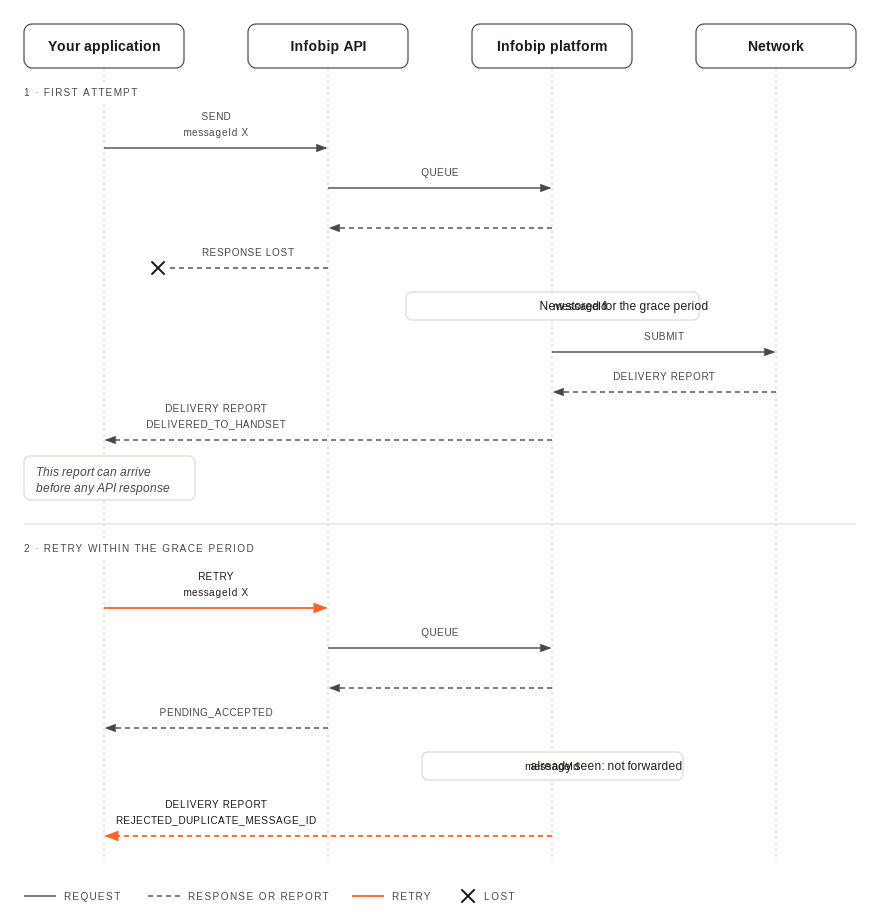
- Your application sends the message with
messageIdX. The API accepts the request, but its response is lost on the way back to your application. - Infobip processes the message. It stores the
messageIdfor the grace period and submits the message to the network, for example a mobile operator. - The network delivers the message, and you receive a delivery report with
DELIVERED_TO_HANDSET. This can happen before your application receives any API response. - Within the grace period, your application retries the request with the same
messageId. The API accepts the retry and responds withPENDING_ACCEPTED. - During processing, Infobip recognizes the
messageIdand does not forward the retry for delivery. You receive a delivery report for the retry withREJECTED_DUPLICATE_MESSAGE_ID.
In this example, the end user received the message once, and you were charged once.
Deduplication rules
When idempotency is enabled, duplicate detection takes place during message processing, after the API accepts the send request. A retry can therefore receive PENDING_ACCEPTED before being identified as a duplicate. If Infobip has already accepted a message with the same messageId within the configured grace period, it does not forward the retry for delivery and returns REJECTED_DUPLICATE_MESSAGE_ID in a delivery report. This status applies to the retry and does not indicate whether the original message was delivered.
Grace period [#grace-period-deduplication-rules]
Infobip stores each accepted messageId for a configurable grace period, from 1 minute to 24 hours. Specify the grace period you need when you request activation. The grace period applies to your account, and you can request a different grace period for a specific channel. To change it later, contact your account manager or Support.
Choose a grace period that is at least as long as your longest retry window, and make sure that all retries happen within it. Infobip recommends 8 to 24 hours, but the right value depends on your retry policy.
After the grace period ends, Infobip treats a request with an earlier messageId as a new message and sends it.
Accepted messages [#accepted-messages-deduplication-rules]
Only previously accepted messages count toward duplicate detection. If your first request failed for a temporary reason and was not accepted, that failed attempt does not make the retry a duplicate.
Infobip records the messageId when it accepts the message. If delivery fails later, the messageId stays recorded for the grace period, so a retry with the same messageId is still rejected as a duplicate. To try delivery again, see New delivery attempts.
New delivery attempts [#new-delivery-attempts-deduplication-rules]
Idempotency detects repeated submissions of the same message. Because it relies only on the messageId, it also blocks a new delivery attempt that reuses the messageId of an accepted message.
Retrying a submission and making a new delivery attempt are different:
- Retry of a submission: You do not know whether Infobip accepted the message. Reuse the same
messageId, so that Infobip can detect the duplicate. - New delivery attempt: Infobip accepted the message, but delivery failed, and you want Infobip to try again. Use a new
messageId.
For example, Infobip accepts message msg1234, but delivery fails with EC_ABSENT_SUBSCRIBER. This error is temporary, so you might want another delivery attempt. If you send the message again with msg1234 within the grace period, Infobip rejects it as a duplicate and does not attempt delivery.
If your system can make new delivery attempts for the same message, give each attempt its own messageId. For example, add the attempt number to the ID from your system: msg1234-1 for the first delivery attempt and msg1234-2 for the second. Infobip then deduplicates each delivery attempt independently and charges for each one. For when a new delivery attempt can succeed, see Act on a delivery error.
Uniqueness [#uniqueness-deduplication-rules]
Infobip relies on each messageId to represent what you consider one unique message. The following rules apply:
- Account-wide check: Infobip checks each
messageIdagainst all accepted messages from your account, regardless of destination and content. Each sub-account is checked separately. If you reuse amessageIdfor a different recipient within the grace period, Infobip rejects the second message. - Multipart messages: If you submit the parts of a message as separate requests, Infobip deduplicates each part independently. Each part needs its own
messageId. - Failover: In Messages API failover, Infobip checks only the first message in the failover chain. If that message is rejected as a duplicate, Infobip does not fail over to the next channel.
Prepare your integration
Before you ask Infobip to enable idempotency, make sure that your integration does the following:
- Use the same ID for the same message: Every retry must have exactly the same
messageIdas the first request. Use different IDs for different messages and for different destinations. Do not reuse amessageIdfor a new message within the grace period, or Infobip rejects the new message as a duplicate. Use a newmessageIdfor each new delivery attempt. See New delivery attempts. - Handle delivery reports that arrive before the API response: When a response is lost or slow, the delivery report can reach you first. Match each delivery report to its message by
messageId, even if your system has no API response for that message yet. See Webhooks. - Retry unclear outcomes within the grace period: Retry on timeouts, connection errors, and
5xxresponses, with a backoff between attempts. See Handling errors. - Preserve the original message status: A delivery report with
REJECTED_DUPLICATE_MESSAGE_IDdescribes the retry, not the original message. Do not let it overwrite the status of the original message, for exampleDELIVERED_TO_HANDSET. The two delivery reports can arrive in either order. A duplicate rejection means that Infobip accepted the message earlier, not that the message was delivered.
Enable idempotency
When your integration is ready, contact your account manager or Support and ask them to enable idempotency. Include the following:
- The channels that you use
- The grace period that you need, from 1 minute to 24 hours
Was this page helpful?