Alim Talk
To send a message using Alim Talk, you must use templates that are approved by Kakao Corporation. See the Deliverability and compliance page for more information.
An Alim Talk message can consist of one of the following combinations:
| Option | Text | Title | Image | Linked-type buttons |
|---|---|---|---|---|
| Text only | Supported | N/A | N/A | N/A |
| Text + title | Supported | Supported | N/A | N/A |
| Text + image | Supported | N/A | Supported | N/A |
| Text + linked-type buttons | Supported | N/A | N/A | Supported |
| Text + title + linked-type buttons | Supported | Supported | N/A | Supported |
| Text + image + linked-type buttons | Supported | N/A | Supported | Supported |
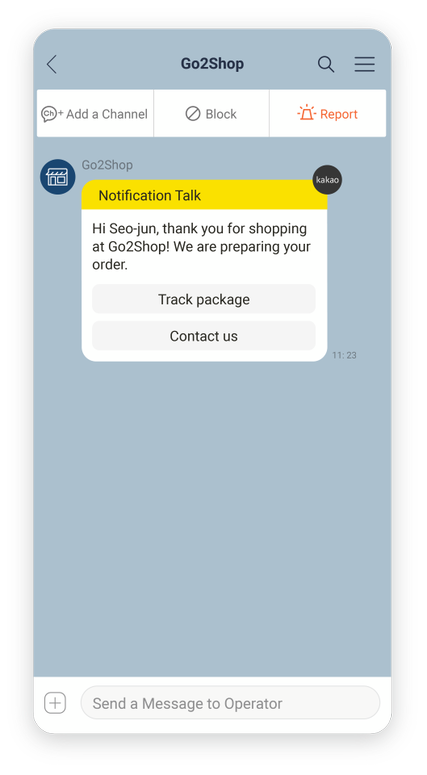
Text
| Category | Details |
|---|---|
| Content | Text only, single block. Maximum 1,000 characters including spaces, regardless of language. |
| Supported languages | Korean and English |
Image
You can include images in an Alim Talk template.
To send an image using Alim Talk, follow these guidelines:
- Do not include promotional content in the image.
- Upload the image to the Kakao server during template registration.
- After the template is approved, you cannot modify the image or use a different image for that template.
Images must follow the specifications in the following table:
| Specification | Details |
|---|---|
| Recommended size | 800px x 400px |
| Size limit | Minimum width: 500px. Aspect ratio must be 2:1. Upload is not allowed otherwise. |
| File format | .jpg, .png |
| Max file size | 500 KB |
Linked-type buttons
You can include a maximum of five buttons in each message. Each button can be of a different type.
| Button name | Purpose | Description |
|---|---|---|
| WL | Web link | Launches a web page either in the KakaoTalk in-app browser or in an external browser if you add the relevant attribute. |
| AL | App link | Runs the KakaoTalk app custom scheme. |
| DS | Delivery tracking | Parses the courier company name and invoice number from the message content. Launches the delivery inquiry page provided by the courier company. |
| MD | Message delivery | Sends a text message from the end user containing the button text and the message body. |
| BK | Bot keyword | Sends a text message from the end user containing the button text. |
| BT | Chatbot switch | Switches from the current chatbot to a different one. |
Was this page helpful?