AI transparency and disclosure
When an AI system talks directly to a person, that person must know they are interacting with AI. Article 50 of the EU AI Act(opens in new tab) sets this transparency requirement. It applies to chatbots and AI agents that hold a conversation with end users without a human between them.
Find out when your chatbot needs an AI disclosure and how to turn on AI disclosure in your products.
When to disclose [#when-to-disclose]
Disclose AI when all of the following are true:
- The system is an AI system.
- The system is designed for a two-way conversation with people.
- The AI communicates with the person directly, not through a human.
- The person is a natural person, such as a consumer, a professional, or an employee.
Show the disclosure at or before the first AI interaction. Make it clear, easy to notice, and accessible.
You can skip the disclosure only when it is obvious to the intended audience that they are talking to AI. Apply this exception narrowly. General awareness that chatbots exist is not enough. Consider the audience, the context, their familiarity with AI, the language, and whether vulnerable groups are involved.
Turn on AI disclosure [#turn-on-ai-disclosure]
Use the AI disclosure message setting to show a disclosure message to end users automatically. The setting is available in AI agents, chatbots, and journey elements.
The setting includes a default message you can edit. Make sure that your message clearly tells end users that AI generates the responses. For examples, see Write a good disclosure message.
AI agents [#turn-on-ai-disclosure-ai-agents]
To turn on AI disclosure for an AI agent:
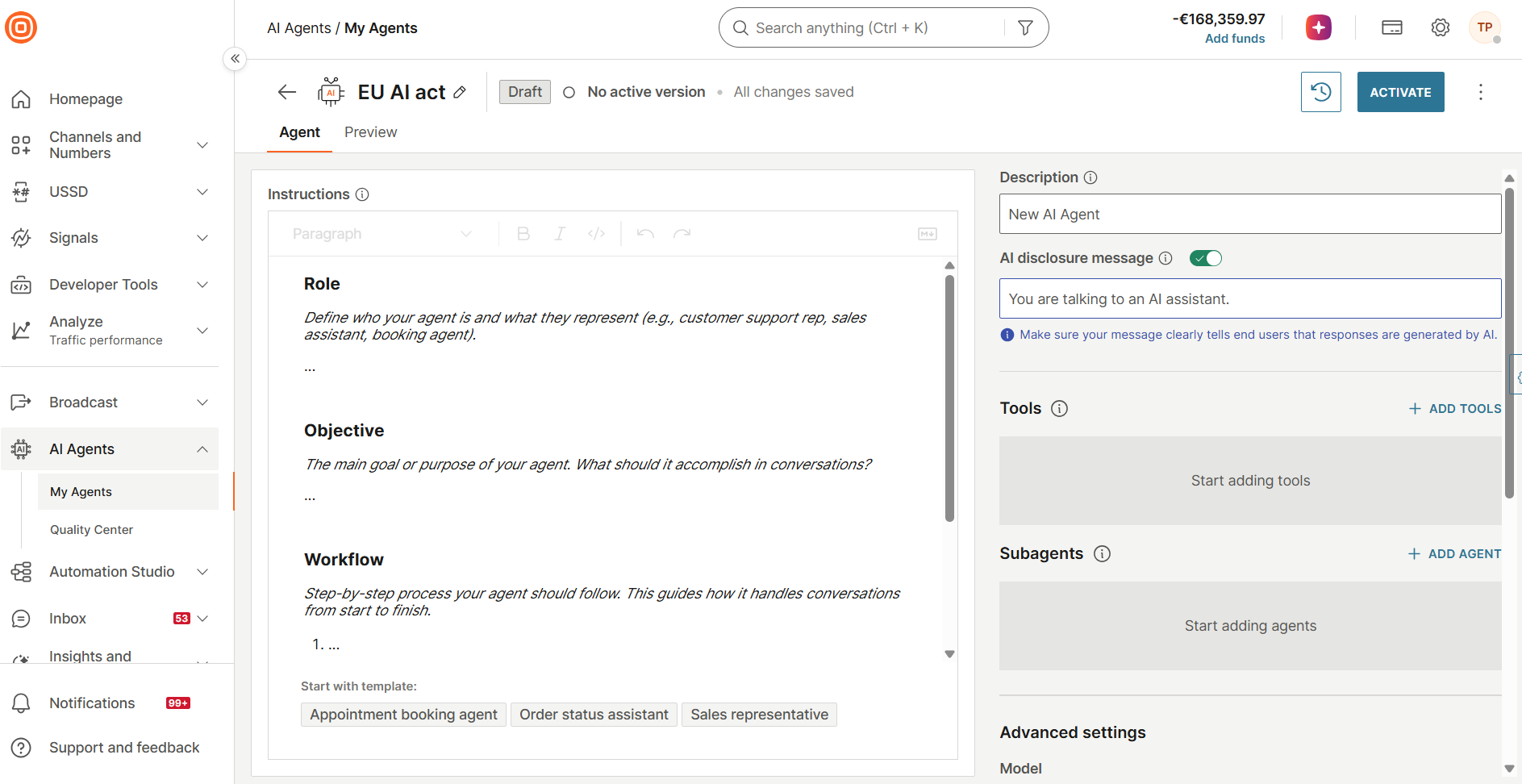
- Go to AI Agents > My agents and open the agent.
- On the Agent tab, turn on AI disclosure message.
- Enter the disclosure message, or keep the default message.
The message appears at the start of the first message from the agent.
For details, see Create and configure an AI agent.
Chatbots [#turn-on-ai-disclosure-chatbots]
Turn on AI disclosure on the Settings tab of the chatbot. For details, see Chatbot settings.
If your chatbot uses an AI agent, you can turn on AI disclosure in the chatbot, in the AI agent, or in both. The disclosure works with either setting. If both are on, the chatbot setting takes priority.
Journeys [#turn-on-ai-disclosure-journeys]
AI disclosure in Journeys is tied to a journey element.
The following elements have the AI disclosure message setting. The setting is on by default.
- Send SMS message
- Send Viber message
- Send Messenger message
- Send Email
- Send Mobile Push
- Send Web Push notification
- Send RCS message
- Send WhatsApp message
- Send LINE message
- Send MMS message
- Send Apple Message for Business
- Send In-app message
- Send Zalo message
- Transfer call to AI agent, only when you select Speech to speech
To set up AI disclosure for a journey element:
- In the journey editor, select one of the elements in the list.
- In the side panel of the element, make sure that AI disclosure message is on.
- Enter the disclosure message, or keep the default message.
- Select Save.
When the setting is not enough [#when-the-setting-is-not-enough]
The setting shows the disclosure at the start of the conversation. Some situations need a disclosure again later in the conversation, such as a handoff from a human agent back to AI. For these situations, add a disclosure message to your chatbot or journey.
Write a good disclosure message [#write-a-good-disclosure-message]
The disclosure must clearly state that the end user is interacting with an AI system. Use plain language.
Examples that work [#examples-that-work]
The following disclosures clearly tell end users that they are interacting with AI:
- You are chatting with an AI assistant.
- You are interacting with an AI assistant.
- At handoff from a human agent to AI: You are now chatting with our AI assistant.
- A persistent AI assistant label or AI icon, visible throughout the conversation.
Examples that do not meet the requirement [#examples-that-do-not-meet-the-requirement]
The following disclosures do not meet the requirement:
- A mention only in your terms and conditions or privacy policy
- Technical wording, such as The system uses an LLM
- A vague label, such as Assistant, without the word AI
- A general statement, such as Our services use AI
Place the disclosure where the end user sees it during the conversation. Example: in the first message from the AI, or in a banner that stays visible in the chat.
Do not turn off, remove, or hide the disclosure where AI talks to end users directly. Without it, your chatbot might not meet the transparency requirements.
For more tips on the first message, see Initial message for first-time end users.
Where the requirements apply [#where-the-requirements-apply]
The EU AI Act transparency requirements apply when one of the following is true:
- The provider or the deployer is based in the EU.
- The AI output is intended to be used or distributed in the EU.
The location of your company alone does not decide whether the requirements apply. Example: a company outside the EU that offers its chatbot to end users in the EU must meet the requirements. A company outside the EU that serves only local end users and does not target the EU is likely outside the scope.
A clear disclosure, such as You are interacting with an AI assistant, meets the requirements where they apply. You can use the same approach in all regions, together with any other local requirements.
AI-generated text on matters of public interest [#public-interest-text]
A separate labeling requirement applies to AI-generated or AI-manipulated text that is published to inform the public on matters of public interest. Examples: public safety warnings, summaries of public administration decisions, or investor information in a listed company report.
Next steps [#next-steps]
For more information, see the following pages:
- Chatbot settings: AI disclosure: Turn on and edit the disclosure for a chatbot.
- Create and configure an AI agent: Set the disclosure message for an AI agent.
- Transfer call to AI agent: AI disclosure: Disclose AI to callers in voice journeys.
- Journey channel elements: Find the send elements that have the setting.
- Activate or deactivate chatbot: AI disclosure is off: Find out what the activation warning means.
- Chatbot design guidelines: Initial message: Write a first message that includes the disclosure.
Was this page helpful?