Get started with Signals
Create an account [#create-an-account-getting-started]
To use Signals or any other Infobip product, you need to sign up for a free account.
See Create an account for more details.
How it works [#how-it-works]
Signals is a tool for detecting artificially created traffic employed in various fraudulent scenarios that ultimately result in inflated costs. The following steps describe how Signals processes each message:
Users request an OTP
Users initiate One-Time PIN (OTP) ↗, and some of them are fraudulent.
Client sends the request
The client sends a request to Infobip to send an OTP to a defined destination (MSISDN) through SMS or Voice.
Signals analyzes the traffic
Signals Analysis engine checks for anomaly patterns and registers an event if it finds one.
Infobip delivers or blocks the message
The Infobip CPaaS platform processes the message. Infobip delivers the OTP to the defined destination and logs the transaction and delivery status codes. If the risk score of the message is above the blocking threshold, Infobip blocks the message instead.
Blocked messages are logged
Infobip logs all blocked messages, and you can view them in the web interface. To track blocked traffic and estimated savings, see Signals reports.
The following diagram shows the Signals high-level solution:
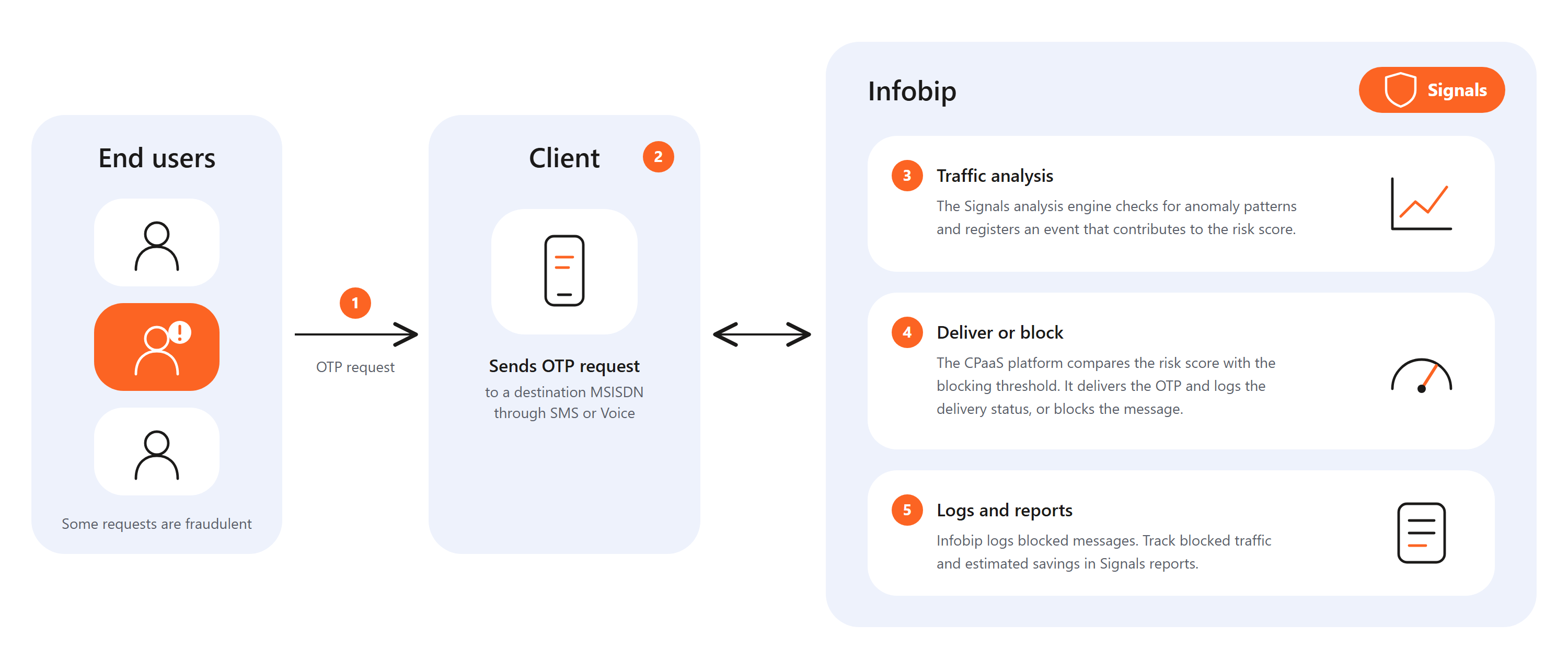
Signals overview
Learn how Signals detects artificially inflated SMS traffic and calculates risk scores.
Fraud detection parameters
See which parameters Signals uses to recognize fraudulent patterns.
Signals for CPaaS X
Protect each CPaaS X application and entity separately.