Configure guardrails
Guardrails detect harmful content in end user messages and control how the agent responds. They are part of the agent configuration.
For broader behavioral planning, see Plan behavioral guidelines.
Filter settings
Each guardrail has three settings:
- Category
- Severity
- Mode
Category [#category-filter-settings]
Select the type of content to filter:
- Violence - Violent language or threats.
- Hate - Hate speech or discriminatory content.
- Sexual - Explicit or inappropriate sexual content.
- Self harm - Content promoting self-harm.
- Jailbreak shield - Attempts to manipulate the agent or bypass safety guidelines.
Severity [#severity-filter-settings]
How sensitive the filter is:
| Severity | Description |
|---|---|
| Low | Detects mildly inappropriate language. |
| Medium | Detects moderately harmful language. |
| High | Detects only explicitly harmful language. |
NOTENot applicable for Jailbreak shield.
Mode [#mode-filter-settings]
What the agent does when the filter triggers:
| Mode | Description |
|---|---|
| Annotate | Allows the message through; logs the filter match in analytics. |
| Block | Blocks the message; logs the filter match in analytics. |
| Off | Disables the filter for this category. |
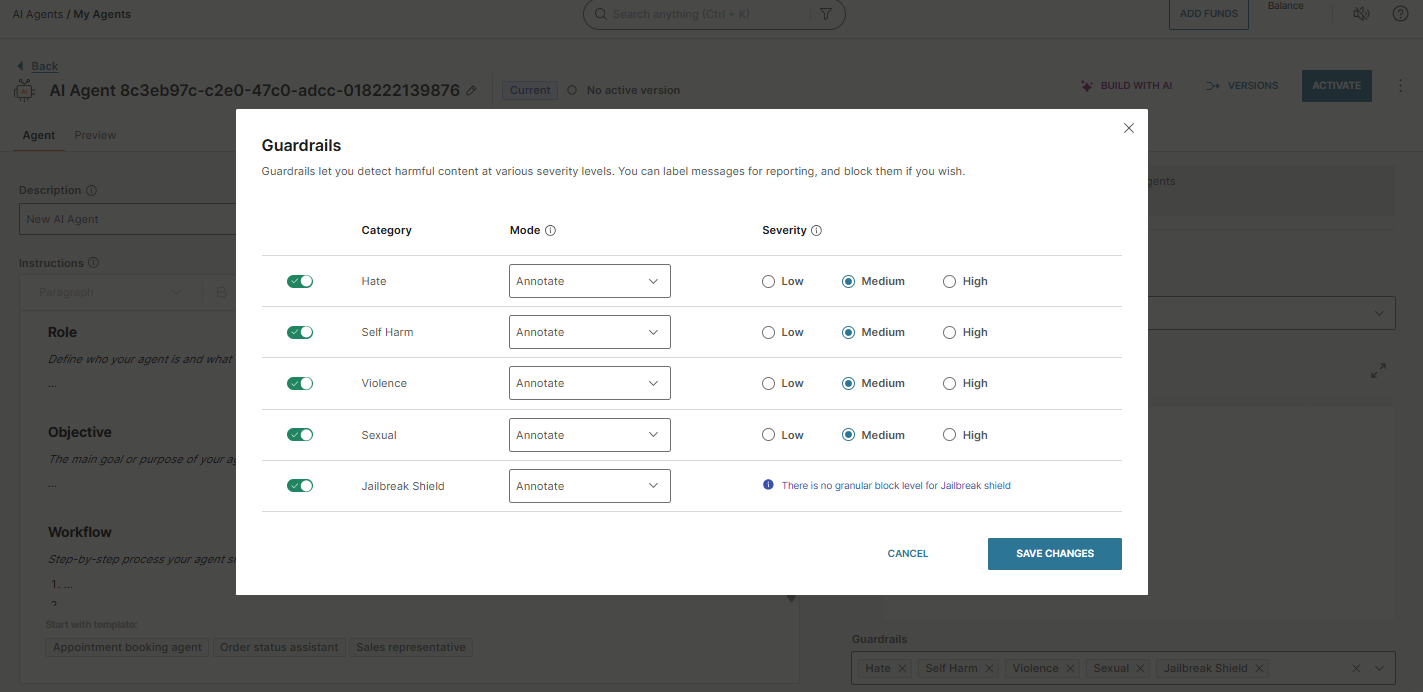
NOTE
The Jailbreak shield category does not use severity levels. It detects attempts by end users to manipulate the AI agent, such as exploiting flaws, bypassing safety guidelines, or overriding predefined instructions.
To configure guardrails, open the Guardrails section in your agent configuration and set the Category, Mode, and Severity (where applicable) for each filter.