Coral
Last update March 11, 2026
| What's new | Learn more |
|---|---|
| Analyze | Email content storage and download Flash Calls and Microsoft Operator Connect in detailed reports and logs Kakao Brand Message support in Analyze and Metrics API |
| Apps and Integrations | Meta Ads Reporting for Infobip Business Messaging WhatsApp and SMS Messaging for Adobe Marketo Engage |
| Blocklist | WhatsApp support in Blocklist API |
| Conversations | Conversation priority visibility in message list Group calls SLA management for inbound calls |
| Single sender removal Disaster recovery and traffic balancing update Safelisting for high-volume email traffic to Interia and Onet SMTP enhanced status codes | |
| Essentials | Platform search |
| Live Chat | Live Chat messages and Live Chat WebRTC calls as one unified conversation |
| Platform | Hungarian language now available in the Infobip web interface |
| RCS | Enhanced traffic classification Conversational billing transparency Enhanced RCS sender management webhook events with filtering options through Subscription Management |
| Reset identity information |
Analyze
Email content storage and download [#analyze-email-content-storage]
EARLY ACCESSYou can now store and download the complete content of sent email messages directly from Logs section in Analyze. The downloaded file is in .eml format and includes headers, body content, inline images, and attachments, preserving the exact look of the email as received by the end recipient.
Previously, there was no way to store or retrieve the full content of sent emails within the platform. HTML email content was retained for only two days, and clients in regulated industries had to rely on external archiving tools to stay compliant.
What's new
- Download email content from Logs: Select any sent email in the Logs section in Analyze and download the complete
.emlfile for review. - Active storage: Self-service access to stored emails through the web interface, with retention from 3 months to 3 years. Intended for operational use cases such as customer support, troubleshooting, and internal reviews.
- Passive storage: Long-term retention from 1 to 10 years for compliance, legal disputes, and regulatory audits. Retrieval is handled through Support.
Key benefits
- Maintain verifiable audit trails for sensitive communications without relying on external archiving tools.
- Simplify compliance with regulatory and data retention requirements directly within the platform.
- Speed up troubleshooting and dispute resolution by giving your team direct access to the exact content of any sent message.
Email content storage is a paid add-on and is not enabled by default. To activate this feature for your account, contact your dedicated account manager.
For more details, see Email storage and retrieval and Download email content.
Flash Calls and Microsoft Operator Connect in detailed reports and logs [#analyze-flash-calls-operator-connect]
EARLY ACCESSYou can now view Flash Calls and Microsoft Operator Connect call events in detailed reports and logs.
Flash Calls appear as a new standalone channel in the channel picker, while Microsoft Operator Connect is available within the Voice and Video channel, alongside existing technologies such as SIP Trunk and WebRTC.
Previously, customers using these channels had no way to see their call events, filter by these dimensions, or troubleshoot from Analyze.
Key benefits
- Full visibility into Flash Calls traffic for verification and 2FA use cases.
- Microsoft Operator Connect call events are now tracked in reports and logs, improving troubleshooting and operational monitoring.
For more details on types of reports and managing logs, see Reports and Logs.
Kakao Brand Message support in Analyze and Metrics API [#analyze-kakao-brand-message]
Following the migration from Kakao ChinguTalk to Kakao Brand Message, all analytics surfaces have been updated to reflect the new channel naming.
Dashboards, reports, logs, and Metrics API responses now display Kakao Brand Message instead of the deprecated ChinguTalk label. The Metrics API channel capability code has changed from KAKAO_C to KAKAO_B.
This is a naming update only — there are no changes to the underlying data or reporting logic.
Key benefits
- Analytics now accurately reflect the channel you are operating on, eliminating confusion caused by outdated ChinguTalk references.
- Consistent naming across all Analyze touchpoints: dashboard, reports, logs, and Metrics API responses.
To learn more about our reporting capabilities, see Analyze and Metrics API.
Apps and Integrations
Meta Ads Reporting for Infobip Business Messaging [#meta-ads-reporting]
Meta Ads Reporting for Infobip Business Messaging is an integration that connects Infobip with Meta. It lets you track the performance of your Click-to-WhatsApp (CTWA) campaigns when users start conversations from ads running on Facebook or Instagram.
Key features:
- Connect your WhatsApp Business Account (WABA) through the WhatsApp Embedded Signup flow.
- Submit conversion events programmatically using the Submit WABA conversions API with the
whatsapp:conversionsscope. - Supports conversion event types including
PURCHASE,LEAD_SUBMITTED,INITIATE_CHECKOUT,ADD_TO_CART,VIEW_CONTENT, and order lifecycle events.
For more information, see Meta Ads Reporting for Infobip Business Messaging.
WhatsApp and SMS Messaging for Adobe Marketo Engage [#adobe-marketo-engage]
Adobe Marketo Engage is a marketing automation platform that enables marketers to manage and automate lead nurturing, personalization, and cross-channel campaign orchestration at scale.
The new Infobip integration, built and managed by Clevertouch Consulting, enables marketers to send SMS and WhatsApp template messages to Marketo leads directly from Adobe Marketo Smart Campaigns using custom Self-Service Flow Steps (SSFS).
Key features:
- Send WhatsApp approved templates and SMS from any Marketo Smart or Batch Campaign.
- Personalize messages using Marketo tokens and lead data.
- Track delivery and read statuses through Custom Activities using delivery reports for sent, delivered, and seen messages.
- Automate follow-up campaigns based on message outcomes and engagement data.
- Automatically convert local phone numbers to international format using ISO country code field mapping.
For more information, see WhatsApp and SMS Messaging for Adobe Marketo Engage.
Blocklist
WhatsApp support in Blocklist API [#whatsapp-blocklist-api]
The Blocklist API has been extended to support WhatsApp. With this update, you can block contacts for WhatsApp only, without affecting their opt-in status for SMS, Viber, Email, or other channels. This makes it easier to honor channel-specific opt-out requests.
Key features:
- Add, remove, and query WhatsApp contacts in the blocklist using the Blocklist API (
POST,DELETE, andGET/platform/1/blocklists). - Channel-specific blocking: a WhatsApp block does not affect the contact's opt-in status for other channels.
For more information, see the Blocklist API documentation.
Conversations
Conversation priority visibility in message list [#conversation-priority-visibility]
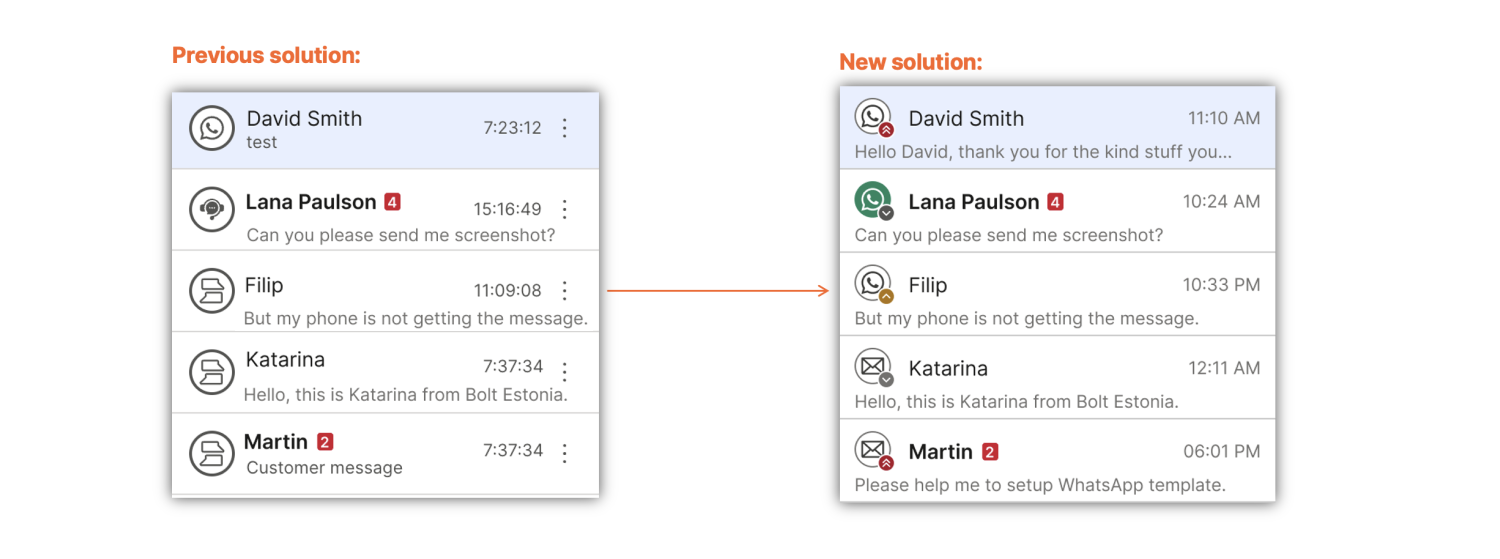
We've improved visibility of conversation priority within My Work.
Previously, all messages appeared the same, making it difficult for agents to identify which conversation to handle next. As a result, urgent customer issues could go unnoticed alongside routine requests.
With priority now clearly visible in the message list, you can quickly identify and respond to critical conversations, helping reduce response times and improve customer satisfaction.
Group calls [#group-calls]
Group calls are now supported in Conversations, enabling multiple participants to join the same call.
Agents can add additional agents or participants to a call with a customer, allowing all parties to be part of a single conversation.
Read more about group calls and how to merge calls during a consult call.
SLA management for inbound calls [#sla-management-inbound-calls]
SLA management is now available for inbound calls in Conversations through the following metrics:
- Call SLA achievement rate - Percentage of inbound calls answered within the configured response time target.
- Calls SLA compliance - Comparison between calls resolved within SLA and calls that exceeded SLA limits.
Previously limited to messaging channels, SLA tracking can now be configured and monitored for voice interactions.
Refer to the Inbound calls section to learn more.
Essentials
Platform search [#platform-search]
EARLY ACCESSThis release introduces an improved Platform search experience.
The previous Conversations search is now integrated into platform search, providing a single, unified way to search across the entire platform. Advanced Conversations filters and the results page remain unchanged.
The experience keeps familiar behaviors and continues to respect existing permission models, so users only see what they are allowed to access.
With the new unified search, you can now search across:
- Channels
- Campaigns (Broadcasts and Flows)
- Conversations
- Chatbots
- Users
- Seats
- Agents
- Contacts (People and Companies)
- Product documentation and API documentation (English only)
Read more about Platform search.
Single sender removal [#single-sender-removal]
We have removed the single sender validation requirement during initial Email onboarding.
You can now send test messages immediately after account setup using an Infobip-provided testing domain. Domain or single sender validation is no longer required to send the first message.
Disaster recovery and traffic balancing update [#disaster-recovery-traffic-balancing]
With the Sweden (SE1) data center fully set up, disaster recovery (DR) support is implemented to improve traffic reliability and failover. Domains sending over FR4 will now benefit from DR, and traffic to api.infobip.com is optimized for better balancing.
For more information, reach out to Support or your dedicated account manager.
Safelisting for high-volume email traffic to Interia and Onet [#safelisting-interia-onet]
Clients sending high volumes of email traffic to Interia and Onet domains now have the option to safelist their traffic with these Polish mailbox providers.
Both Interia and Onet enforce strict rate limits and filtering mechanisms. Safelisting can help ensure timely and uninterrupted delivery for large email volumes, but involves additional fees imposed by the providers.
For more information, reach out to Support or your dedicated account manager.
SMTP enhanced status codes [#smtp-enhanced-status-codes]
A new documentation page listing all enhanced SMTP status codes returned by the SMTP API is now available.
The page highlights how to handle common response categories, including 4xx temporary failures (retry recommended) and 5xx permanent failures (request must be corrected before retrying).
Status codes in the 2xx and 3xx ranges represent normal SMTP protocol states and are typically handled automatically by SMTP client libraries.
Refer to the SMTP enhanced status codes documentation to learn more.
Live Chat
Live Chat messages and Live Chat WebRTC calls as one unified conversation [#live-chat-unified-conversation]
Live Chat messages and Live Chat WebRTC calls are now treated as a single unified conversation. When a chat escalates to a call, the interaction remains within Live Chat, so Live Chat capacity rules continue to apply.
Key benefits
Previously, when a Live Chat conversation escalated to a WebRTC call, it was converted into an omnichannel conversation, and call capacity rules were applied. This could allow agents to exceed their configured Live Chat capacity and make workload planning less predictable.
With this update, messages and WebRTC calls stay within the same Live Chat conversation. This preserves Live Chat capacity limits, helps prevent agent overload, and ensures more consistent behavior across digital channels.
Platform
Hungarian language now available in the Infobip web interface [#hungarian-language]
You can now use the Infobip web interface in Hungarian.
Hungarian has been added to our list of supported languages, alongside Albanian, Arabic, Bosnian, Chinese (Simplified and Traditional), French, German, Greek, Italian, Japanese, Korean, Portuguese, Russian, Spanish, Slovenian, Swedish, Turkish, and Ukrainian.
To switch languages, log in to your Infobip account → go to Settings → User profile → User information → Language.
RCS
Enhanced traffic classification [#enhanced-traffic-classification-rcs]
In messaging platforms like RCS, traffic types classify messaging interactions based on their purpose and nature. Structured classification provides valuable insights into communication patterns and helps analyze messaging behavior.
In earlier versions, all messages within a conversation received individual traffic type tags, including follow-ups and responses.
Key features:
- Only the message that initiates a conversation receives a traffic type designation (such as
A2P_CONVERSATIONorP2A_CONVERSATION). - Subsequent messages within that 24-hour session are tagged as part of the conversation thread rather than receiving separate classifications.
- Inbound messages in non-US markets and events no longer receive traffic type tags.
- Cleaner breakdown visible in the Analyze dashboard and through Metrics API.
- Uncluttered aggregated data that reflects actual communication milestones.
In a future release: A new interaction type dimension will complement traffic type by providing deeper insight into message content and structure, distinguishing between Basic, Single, Rich, and Rich Media messages across all interactions.
Conversational billing transparency [#conversational-billing-transparency-rcs]
RCS conversational billing is more transparent with clearer documentation and new event subscriptions to help you track conversation pricing accurately.
To track conversation pricing effectively, set up subscriptions for the relevant event types.
Key features:
- New RCS subscription event types: Conversation Started. This event informs the client of the switch from a non-conversational to a conversational billing model.
- Updated RCS delivery report formatter to contain additional billing and conversational information.
- New formatters for RCS inbound message and RCS user action event (under inbound events) containing additional billing and conversational information.
- Track RCS conversation lifecycle and billing in real time.
Subscriptions must be configured to receive conversational billing events. Review your current subscription settings to check what types of events are available to you.
To track conversation lifecycle and billing, configure subscriptions for Conversation Started events, Updated Delivery Reports, and MO Messages with conversational enrichment. Apply appropriate filters based on sender name or resource level depending on your tracking needs.
For more information, see RCS billing types documentation.
Enhanced RCS sender management webhook events with filtering options through Subscription Management [#enhanced-rcs-sender-management-webhook-events-with-filtering-options-through-subscription-management-rcs]
All RCS sender management webhooks include explicit event type parameters, making it clearer which event is being delivered. Platform parameters configured at the sender level are also included in webhook payloads.
In earlier versions, webhook event types were not explicitly defined. With this release, each webhook clearly indicates its event type.
Key features:
- RCS Sender Status Update, RCS Sender Launch Status Update, and RCS Sender Number Status Update events contain a unique event type definition for easier identification of the inbound event.
- RCS Sender Status Update, RCS Sender Launch Status Update, and RCS Sender Number Status Update events support filtering through Subscription Management.
- RCS Sender Status Update, RCS Sender Launch Status Update, and RCS Sender Number Status Update events contain CPaaSx parameters set on the Sender level (Application and Entity).
Reset identity information [#whatsapp-reset-identity-information]
You can now resolve WhatsApp identity changes without waiting for an inbound message from the end user.
Previously, when an end user's identity changed (for example, after reinstalling the app or switching devices), outbound messaging was blocked until the end user sent an inbound message. That could take hours, days, or never happen. You then had to call the Confirm WhatsApp identity API to lift the block.
With the new reset identity information flow, you can initiate the reset yourself by calling the Delete WhatsApp identity API. This removes the stored identity, and the next outbound message automatically fetches and stores the new one. No inbound message or confirm call is required.
Reset identity information is not enabled by default. Contact Support or your account manager to enable it for your account.
For more details, see Detect identity changes.