Send and receive TikTok messages with Infobip
Send and receive TikTok messages using Infobip after completing the TikTok Business Messaging setup.
TikTok messaging with Infobip is based on user-initiated conversations. A TikTok user must first send a message to your business before you can reply.
You can send and receive TikTok messages through the Infobip API or through Conversations, the Infobip contact center solution. When a user sends you a TikTok message, their contact information is automatically stored in People.
How TikTok messaging works [#how-tiktok-messaging-works]
A typical TikTok messaging flow consists of the following steps:
- A user sends a message to your TikTok Business Account.
- Infobip delivers the inbound message to your webhook.
- Your system processes the message and stores required identifiers.
- You send a reply using the Infobip API or Conversations.
- Infobip delivers message status events through webhooks.
For information about tracking options, see TikTok delivery and seen reports.
Receive TikTok messages [#receive-tiktok-messages]
Inbound TikTok messages are delivered to your system through webhooks ↗.
When a user sends a message to your TikTok Business Account:
- Infobip sends an inbound message event to your configured webhook endpoint
- The event includes message content and identifiers required for replying
You must acknowledge each inbound message by returning an HTTP 200 response.

Supported inbound message types [#supported-inbound-message-types-receive-tiktok-messages]
You can receive the following inbound message types:
- Text messages
- Image messages
- Share post messages
If a conversation starts from a TikTok Direct Messaging Ad or a TikTok.me link, the inbound message can also include referral information about the conversation origin.
Required identifiers [#required-identifiers-receive-tiktok-messages]
To reply to a user, store the following values from the inbound message event:
- The TikTok user identifier: The user ID of the person sending you the message.
- Your TikTok Business Account identifier: Visible on the Senders tab in the TikTok channel section on the web interface.
- Conversation ID (
conversationId), if provided: Included when the conversation starts from a Direct Messaging Ad or a TikTok.me link.
These identifiers are required when sending outbound messages.
Send TikTok messages [#send-tiktok-messages]
You can send TikTok messages only after a user has initiated the conversation.
You can send outbound messages using the Infobip API or through Conversations.
Before sending a message, make sure that:
- The user has initiated the conversation
- You use your TikTok Business Account as the sender
- You use the user identifier from the inbound message as the destination
- You use one of the supported message types
- You are aware that outbound TikTok messages have a limited validity period and may not be delivered if the validity window expires
For details on how to send supported message types to customers, see Send TikTok messages.
If a TikTok message fails or is not delivered, review the Response status and error codes documentation to understand possible causes and recommended actions.
Use TikTok in Conversations [#use-tiktok-in-conversations]
You can manage TikTok messaging through Conversations, the Infobip contact center solution. This allows agents to handle TikTok conversations directly from the web interface without building custom API integrations.
TikTok conversations in Conversations follow the same user-initiated rule. A TikTok user must send the first message before an agent can reply.
Start a conversation [#start-a-conversation-use-tiktok-in-conversations]
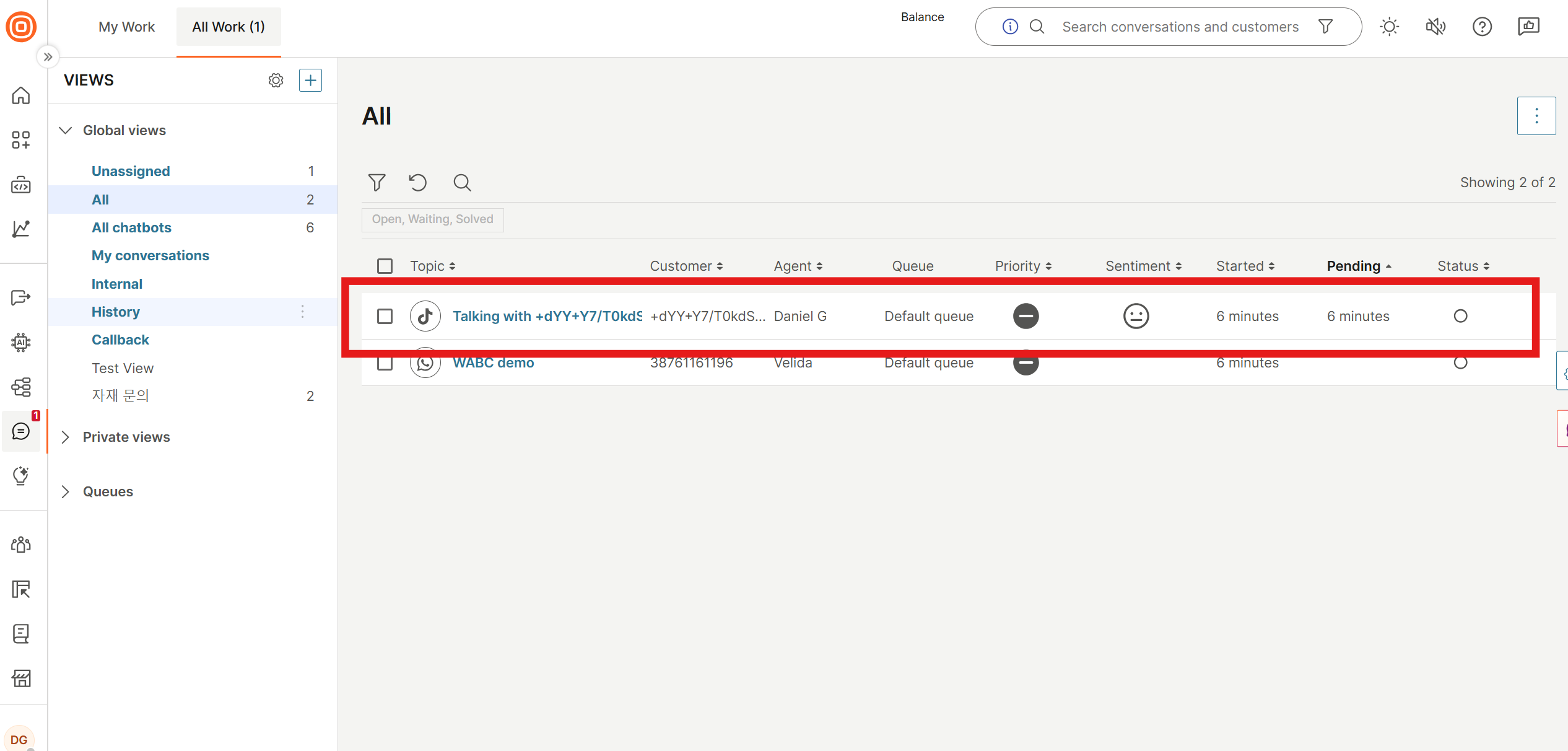
When a TikTok user sends a direct message to your TikTok Business Account, the conversation automatically appears in your Conversations inbox.
To find the conversation:
- In the Infobip web interface, go to Conversations.
- Select the inbox connected to your TikTok sender.
- Look for a new conversation thread with the channel shown as TikTok.
Reply to TikTok messages [#reply-to-tiktok-messages-use-tiktok-in-conversations]
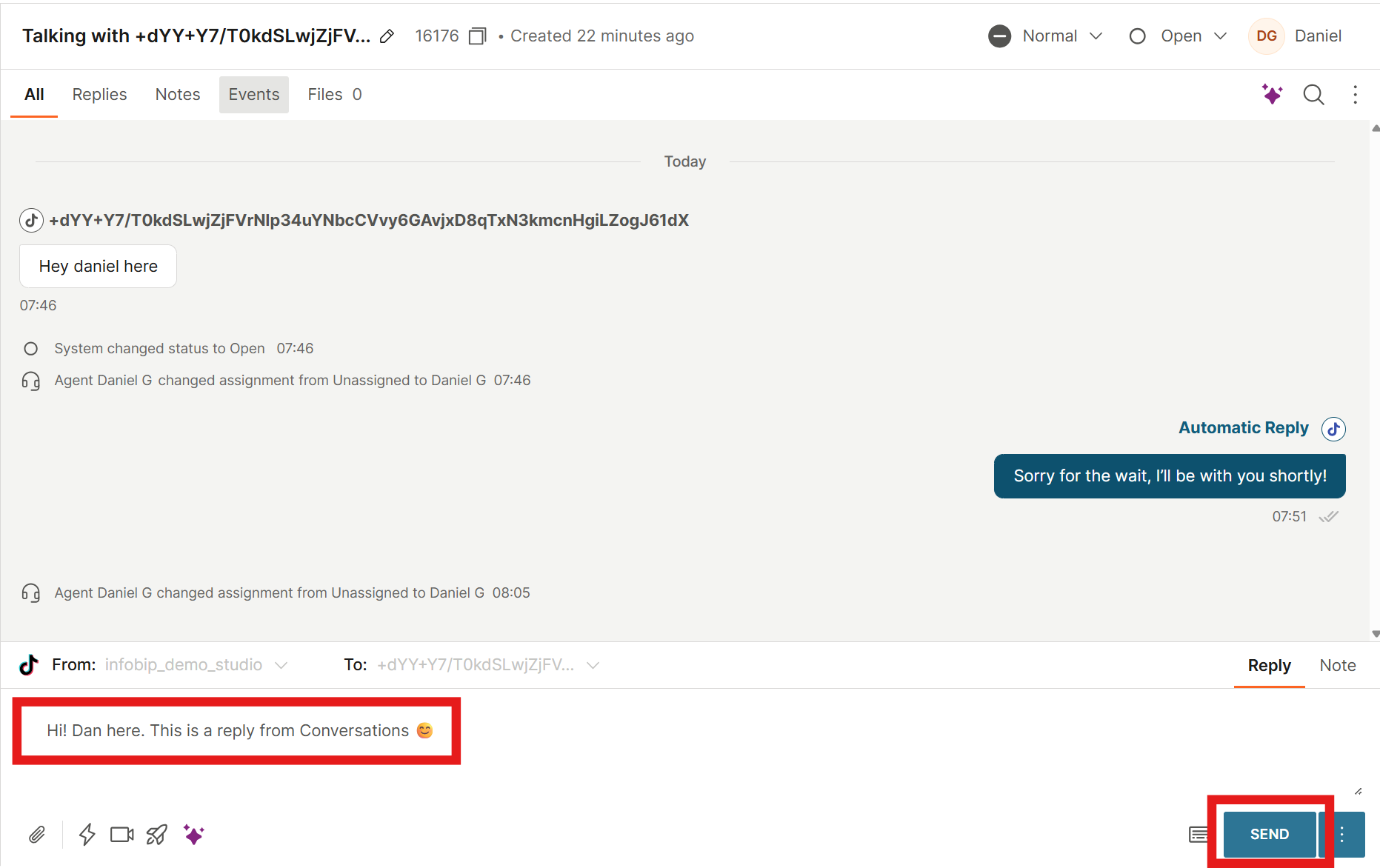
- Open the TikTok conversation thread.
- Select Assign to me to assign the conversation to yourself.
- Type a reply in the message field.
- Select Send.
After sending, check the message status indicator next to the timestamp:
- Single grey tick: The message is being sent
- Double grey tick: The message has been delivered to the user
- Double green tick: The message was seen by the user
- Red triangle: A delivery error occurred or processing failed
Two-way messaging [#two-way-messaging-use-tiktok-in-conversations]
After the initial reply, both the agent and the TikTok user can continue exchanging messages in the same conversation thread. New messages from the user appear in real time within the active Conversations thread.
Direct Messaging Ads conversations [#direct-messaging-ads-conversations]
TikTok Direct Messaging Ads ↗ allow users to start a conversation with your business by clicking an ad.
When a conversation starts from a TikTok Direct Messaging Ad, the first inbound message includes referral information that indicates the conversation origin.
If a conversion occurs during the conversation, you can report it back to TikTok using the appropriate API.
For conversations that start from Direct Messaging Ads:
- Source identifier (
sourceId): Represents the TikTok Business Account (business account ID) connected in Infobip. - Destination identifier (
tiktok_unique_identifier): Represents the TikTok user who initiated the conversation.
Use the destination identifier captured from the initial inbound message when sending replies or reporting conversions.
TikTok.me link conversations [#tiktok-me-link-conversations]
TikTok.me links are shareable links that open a direct message conversation with your TikTok Business Account. You can use them across channels and campaigns to drive users into conversations.
When a user starts a conversation through a TikTok.me link, the first inbound message includes referral data with the type REFERRAL_SHORT_LINK. This data contains the following fields:
- Conversation ID (
conversationId): The conversation ID needed for sending reply messages. - Ref parameter (
ref): A URL-encoded tracking string used to differentiate links across channels or campaigns. Supports alphanumeric characters and- _ =with a maximum length of 2,083 characters. - Prefilled message (
prefilledMessage): The message text that was configured in the TikTok.me link. - Prefilled message audit status (
prefilledMessageAuditStatus): Whether the prefilled message passed TikTok's content audit. Possible values:PASS,REJECT, orUNKNOWN.
TikTok message types
Review supported text, image, and share post formats.
Delivery and seen reports
Track message delivery and user interaction.
Get started with TikTok
Review webhook setup and security configuration.