Follow RCS best practices
This page provides guidelines for designing effective RCS messages that work across all devices and platforms.
Message types
Choose the appropriate message type based on your use case:
- Basic text messages: Use for simple communications like OTPs, confirmations, and notifications. Text messages have the highest compatibility across all devices.
- Rich messages: Use rich cards and carousels for promotional content, product showcases, and interactive experiences. Rich messages provide better engagement but require careful design.
What to consider when sending RCS messages
Consider these factors when designing RCS messages:
- Device compatibility: Not all devices support all RCS features. Always provide fallback options.
- Platform differences: iOS and Android handle RCS features differently. Test messages on both platforms.
- User preferences: Respect user opt-outs and message frequency preferences.
Message content considerations
Images:
- Use high-quality images with appropriate aspect ratios
- Test image display on both Android and iOS
- For carousels, ensure images work well when cropped

Videos:
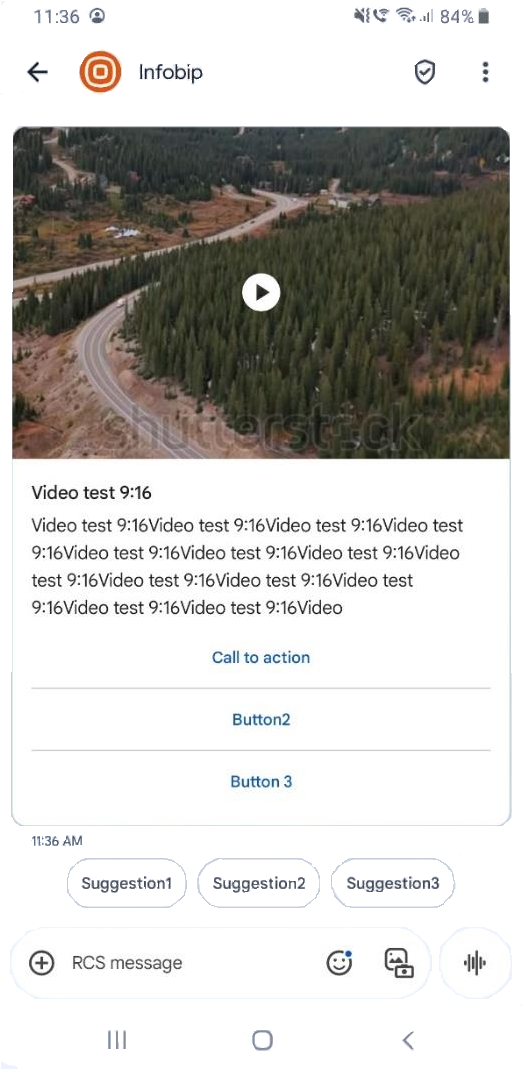
- Keep videos short and engaging
- Test video playback on both platforms
NOTE
Horizontal card orientation can cause videos to display vertically on iOS.
GIFs:
Android: GIFs work in rich cards and carousels.
iOS:
- GIFs work when sent as files
- GIFs in rich cards and carousels display as static images (see GIFs in rich cards and carousels for details)
- Use video format for animated content in rich messages
Carousels
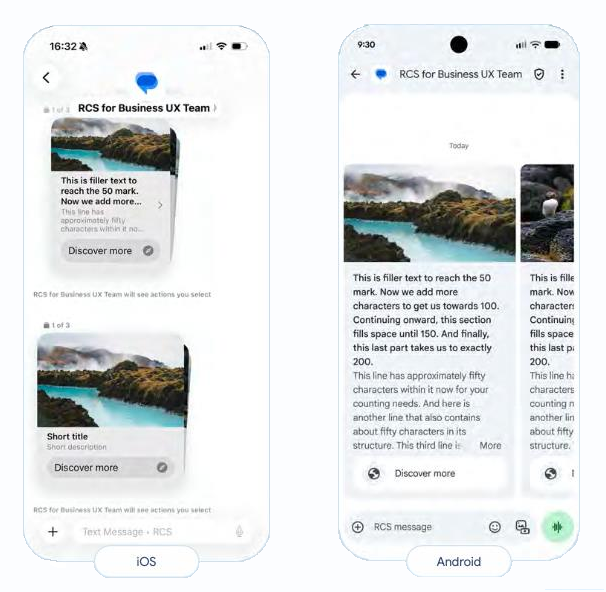
- Use a maximum of 10 cards per carousel
- Keep titles and descriptions to a maximum of 3 lines each
- Use a single call-to-action (CTA) per card
- Use up to 3 suggested replies
- Recommendation: Use medium media width with medium media height to prevent image cropping on iOS
Content suggestions
- Keep text concise and scannable
- Use clear, action-oriented CTAs
- Avoid lengthy descriptions that may get truncated
- Test character limits across platforms
OTPs and sensitive information
- Send OTPs in basic text messages, not in rich card titles or descriptions
- On iOS, OTPs in rich card text cannot be copied (see OTPs for details)
- Use text-only messages for information users need to copy