AI agents overview
What are AI agents
Introduction
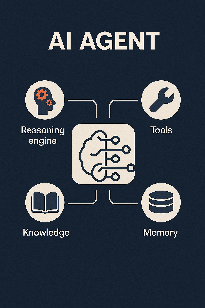
An AI agent (opens in a new tab) is an AI-driven system that can perform tasks autonomously to achieve goals. It uses large language models, tools, external systems, and instructions to process requests and return responses.
Unlike traditional chatbots that follow scripted responses, AI agents can do the following:
- Set sub-goals and plan multi-step workflows
- Use tools such as APIs, databases, browsers, and external services
- Take actions like sending API requests, updating databases, and retrieving information
- Identify the intents of the requests
- Adapt behavior based on context or previous interactions
Key capabilities
- Goal setting and breaking down tasks: Break down complex objectives into manageable sub-goals.
- Multi-step planning: Create a plan, execute it, review the results, and refine the action plan.
- Tool and API integration: Select and use the correct tools or services.
- Context memory: Maintain short-term working memory and long-term storage such as vector databases.
- Multi-agent coordination: Collaborate with sub-agents for complex tasks.
How AI agents work
AI agents operate in a continuous cycle:
- Receive input: Accept requests from the solution in which they are used
- Analyze and plan: Understand the goal, break it into steps, and identify which tools to use
- Take action: Carry out the plan by calling APIs, querying databases, or using other tools
- Evaluate results: Check if the goal was achieved or if additional steps are needed
- Return results: Provide the final response or output
This cycle may repeat multiple times for complex, multi-step tasks.
Common use cases
Use AI agents for a variety of use cases from answering simple questions to managing multi-step operations.
The following are examples of use cases:
- Recommend products: Help end users find products or services based on their preferences. Example: Find a phone that costs less than $500 with a high-definition camera.
- Manage billing and payments: Process billing queries, payment updates, and refund requests, and guide users through payment issues.
- Track orders: Fetch real-time status updates by using tracking numbers or end user credentials.
- Answer FAQ: Answer complex questions by accessing multiple knowledge sources. Example: Internal databases, help centers, or third-party knowledge sources.
- Provide customer support: Resolve issues end-to-end.
- Book appointments: Schedule, reschedule, and cancel. Integrate with calendars.
Examples of AI agents
- Weather agent: Gets end user's location and provides current weather.
- Research agent: Searches the web, reads pages, extracts facts, compiles a report.
AI agents compared to other systems
Difference between AI agents and other AI systems
The following table explains how AI agents differ from other AI systems:
| Feature | Other AI systems | AI agents |
|---|---|---|
| Primary function | Perform narrow tasks: classification, prediction, or answering queries | Execute multi‑step workflows, organize them into a plan, and complete goals |
| Technology base | Rule‑based systems, statistical models, or machine learning trained for specific tasks | LLMs, planning, memory, and tool use |
| Adaptability | Fixed behavior, minimal adjustment to feedback | Dynamic, adapts based on feedback and environment |
| Examples | Spam filter, image classifier, recommendation engine | Research agent, workflow automation bot |
Difference between AI agents and chatbots
| System | Characteristics |
|---|---|
| Traditional chatbot | Scripted responses, single‑turn interactions, no context or tool use. Often FAQ or menu‑driven. |
| Rule‑based chatbot | Decision trees, keyword matching, limited flexibility, struggles with ambiguous queries. |
| AI agent | Multi-step tasks, tool usage, context memory, real actions. Example: Update a calendar. |
Difference between AI agents and AI assistants
| Feature | AI Assistants | AI Agents |
|---|---|---|
| Primary role | Support end user requests: answer questions, follow commands, manage simple tasks | Autonomous problem‑solving: pursue goals, plan steps, and act independently |
| Initiation | Reactive: act only when prompted | Proactive: can set sub‑goals, monitor progress, and continue working |
| Scope of tasks | Short tasks: reminders, FAQs, scheduling, controlling devices | Complex workflows: research, data extraction, updating systems, coordinating with other agents |
| Examples | Infobip AI assistant, Siri, Alexa, Google Assistant | Research agent, autonomous workflow bot |
How Infobip AI agents work
AI agents must be used with a user-facing entry point such as an Answers chatbot.
Technology used
AI agents use large language models (LLMs) as controllers, together with planning, memory, and tool execution capabilities.
AI agents use the same core technology as other AI features such as AI assistant, Intent detection, or Prompt elements. The difference is in how this technology is applied - AI agents can perform multi-step autonomous workflows.
System architecture
The process is as follows:
- The Infobip solution gets the request from the end user and forwards it to the Orchestrator agent.
- The Orchestrator coordinates multiple tools and AI agents, each of which does a specific task. The Orchestrator agent identifies one or more AI agents and tools that can help with the request.
- The tools and AI agents return the response to the Orchestrator agent.
- The Orchestrator agent returns the response to the Infobip solution.
- The solution either uses the response for further processing or shares it with the end user.
Example
An end user wants to purchase a ticket.
- The Answers chatbot gets the request from the end user.
- The solution calls the Orchestrator agent.
- The Orchestrator agent contacts the Appointments agent to get availability.
- The Appointment agent calls the Calendar component to get available dates and times.
- The Appointment agent returns the response to the Orchestrator agent.
- The Orchestrator agent contacts the Authentication agent to verify the identity of the end user.
- The Orchestrator agent contacts the Payments agent to process the payment and generate the order details.
- The Orchestrator agent shares the order details with the chatbot.
- The chatbot shares the order details with the end user.
Terminology
This section defines key terminology used for AI agents.
AI agent
An autonomous AI system that performs tasks to achieve goals. For more information, refer to What are AI agents.
Orchestrator
An AI agent that coordinates multiple sub-agents to complete complex requests.
What an orchestrator does
The orchestrator does the following:
- Routes tasks to the most appropriate sub-agent.
- Sequences tasks in the correct order.
- Manages memory, permissions, retries, and logging.
- Combines results from multiple AI agents.
When to use an orchestrator
Use an orchestrator when multiple AI agents need to work together to achieve a goal.
For more information about orchestration, architecture, and example workflows, refer to Orchestration.
Sub-agent
A self-contained agent focused on a single goal. It plans, calls tools, and maintains its own local memory but does not coordinate other agents.
Tools
External capabilities that AI agents use to perform tasks or interact with systems.
Tools are of the following types:
- Answers components: Reusable Answers blocks that can perform specific tasks.
- MCP servers: External systems that use model context protocol (MCP)
- Exchange integrations: Integrations from Infobip Exchange marketplace. Example: Get end user data from Shopify.
For detailed information, refer to Configure your agent and Use Answers components in AI agents.
Component
A reusable Answers block that performs a task such as retrieving information or executing an action. Components can be used as tools by AI agents.
For more information, refer to Component design.
MCP server
An external system that enables AI agents to connect to external services such as calendars, CRMs, databases, or APIs.
For more information about MCP servers and use cases, refer to MCP servers.
Next steps
Ready to create your first AI agent? Follow these steps:
- Set up your account: Create an Infobip account and start your free trial
- Create your first AI agent: Quick start guide to create an agent from a template
- Plan your implementation: Before building production systems