Filter persons
In the Persons page filter, you can filter profiles using the following options:
- Person type: Customer, lead, or agent. Learn more about person types
- Channels: Communication channels associated with the profile
- Tags: Assigned tags
- Gender: Female or male
- Country: Geographic location
- City: City location
- Address: Street address
- Source: Origin of the profile
Filtered results appear in the persons list where you can view profile summaries and access individual profile details.
Advanced filters
Advanced filters help create precise audience segments for targeted communication. After applying filters, you can export the filtered profiles, add them to campaigns, or select Create segment to save the filter criteria as a reusable segment.
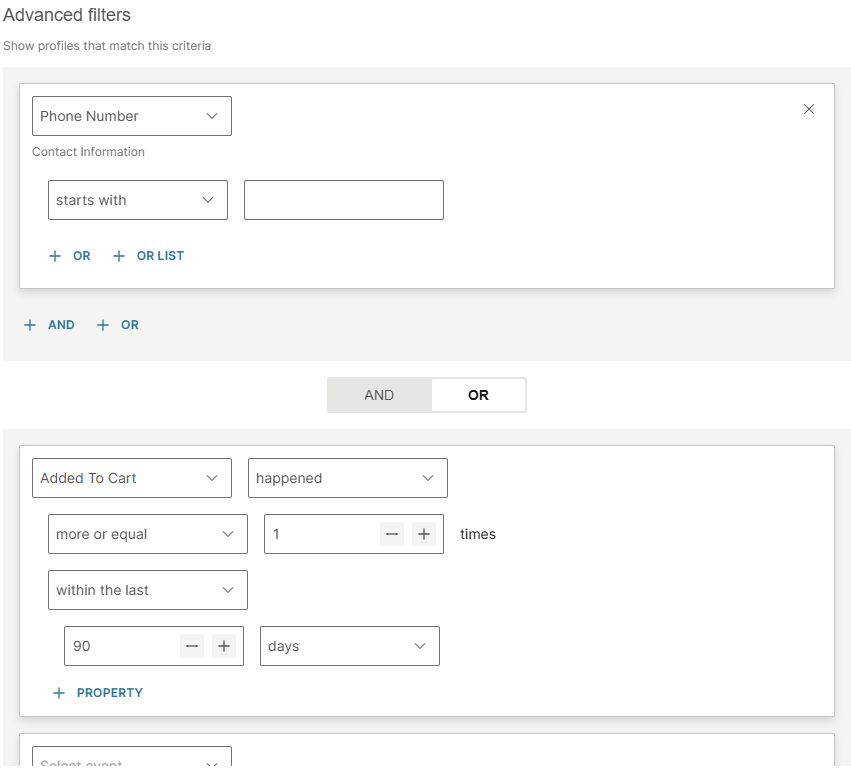
Select Advanced filters to define conditions based on attributes, events, or both.
- Attribute conditions: Select an attribute, operator, and value. To add alternative values for the same attribute, select + OR or + OR LIST. To add one more attribute condition, select + AND.
- Event conditions: Select an event, operator, and parameters such as frequency and time range. To add one more event condition, select + AND.
- Combining attributes and events: Use the AND/OR toggle between the attribute and event sections. This controls whether profiles must match both conditions (AND) or either condition (OR).
- OR between clause blocks: Select + OR below a clause block to create an alternative group. A profile matches if it meets the conditions in at least one group.
The following example shows advanced filters with AND/OR logic.
IMPORTANT
Advanced filters that use OR groups are not supported in the following scenarios:
- Continuous trigger: You cannot use segments based on these filters as an audience in flows with a Continuous entry point. Flows that listen to segment updates do not work with extended AND/OR logic.
- Prompting: These filters are not available for prompting use cases.
Was this page helpful?