SIP trunking
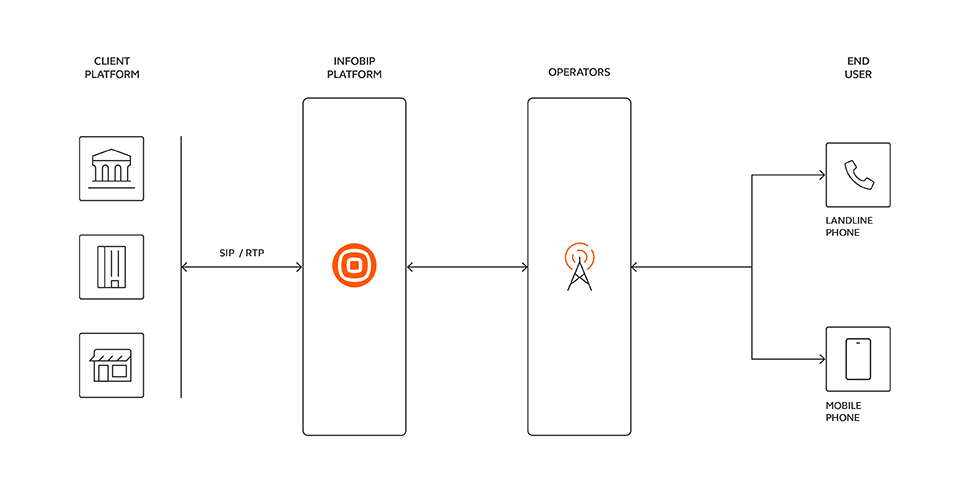
Session Initiation Protocol (SIP) trunking is a digital communications technology that enables voice calls to be transmitted over IP networks instead of traditional circuit-switched telephone lines. Rather than relying on physical wiring, SIP trunking uses packet-based transmission to carry voice data over the internet.
This approach reduces costs associated with long-distance and international calls and provides scalability by allowing call capacity to be adjusted as needed. It also offers flexibility in managing telephony systems by enabling the addition or removal of channels without requiring physical infrastructure changes.
Businesses typically use SIP trunking for:
- Cost savings: SIP trunking reduces expenses on long-distance and international calls.
- Scalability: SIP trunking enables you to add or remove lines as needed.
- Business continuity: SIP trunking provides redundancy and failover options so that calls continue even during an outage.
To use SIP trunking, you need:
- An IP-based Private Branch Exchange (PBX) system, which manages internal and external calls, or an SBC (Session Border Controller) that acts as a firewall between your internal network and the internet.
- A reliable internet connection: since SIP trunking relies on the internet to make and receive calls, a stable and fast internet connection is crucial.
Use cases with Infobip SIP trunking
The following table describes common use cases:
| Use case category | Use case | Description |
|---|---|---|
| Global reach and connectivity | Outbound (termination) | Use your SIP infrastructure to send call requests to the Infobip platform for termination on PSTN destinations across the world. Infobip offers the widest reach of connectivity on the planet, with more than 200 countries in its global reach and 9 geographically dispersed data center locations accepting your SIP trunk connections in self-service. |
| Inbound (origination) | Rent local DID numbers from Infobip, and calls received on these numbers are forwarded to your SIP infrastructure. | |
| Programmable SIP | SIP trunk management | Although SIP trunks can be fully managed from the Infobip web interface, you can integrate and automate the management of your trunks using the API (creation, update, and deletion). |
| Your voice application | When using the Calls API platform to develop a voice application that implements your exact scenario, your application can process inbound calls coming from your SIP trunks and create outbound calls to SIP endpoints. |
Supported SIP trunk types and characteristics
Infobip supports SIP trunking to multiple environments.
| SIP trunk provider | Use case | Type | Configuration | Authentication |
|---|---|---|---|---|
| INFOBIP | Connect to your own on-premise or cloud hosted PBX or SBC. | Static | Requires manual configuration of the trunk settings such as IP addresses, port number, codecs, and DTMF/Fax transcoding. | Uses IP-based authentication where Infobip trusts traffic from your declared IP addresses. |
| INFOBIP | Connect to your own on-premise or cloud hosted PBX or SBC. | Registered | Configured dynamically through the registration process between your PBX/SBC and the Infobip servers. Requires manual configuration of the trunk settings codecs and DTMF/Fax transcoding. | Uses username and password authentication to validate the PBX/SBC identity. |
| Freshworks | Connect to Freshcaller from Freshworks. Freshcaller uses Twilio as its communication engine. See How to configure BYOC for more details. | N/A | Requires your Twilio Account SID and Twilio SIP domain. Other parameters such as codecs, dtmf and fax transcoding settings are preset. | Twilio Account SID and traffic source. |
| Genesys PureCloud | Connect to your Genesys PureCloud environment. | N/A | Based on the selected Genesys region, the trunks will be automatically mapped to the adequate Infobip data center. | Genesys region, Inbound SIP termination identifier and Outbound SIP termination FQN. |
| Cisco Webex | Connect to your Cisco Webex environment. | N/A | Available in the USA only. | Requires your Cisco Customer Organizational ID (UUID). |
| OpenAI Realtime | Connect to OpenAI Realtime API over SIP for your voice AI agent projects. | N/A | Requires your OpenAI Project ID. | Requires your OpenAI Project ID. |
| Microsoft Operator Connect | Use Infobip as your voice provider for Microsoft Teams-based telephony services. | N/A | Requires your Microsoft Tenant ID. See Microsoft Operator Connect for configuration and usage details. | Requires your Microsoft Tenant ID. |
When configuring an Infobip static SIP trunk to connect to your SBC or PBX, make sure that you provide public and dedicated IP addresses. This means the IPs must be:
- Publicly routable on the internet: not behind NAT or within private subnets.
- Exclusively assigned to your infrastructure: not shared with other customers.
Infobip does not support configurations where SBC or PBX systems are hosted in shared environments where IP addresses may be dynamically allocated or used by multiple tenants. For security, stability, and routing integrity, your endpoint must have a static, dedicated IP.
SIP trunk channels and related billing plans
When creating a SIP trunk, you need to define the number of channels to be allocated. A channel represents a single concurrent call, so a 10-channel trunk means 10 concurrent calls can take place at any moment in time, whether inbound and/or outbound. Calls submitted to the trunk when the trunk has reached its channel capacity will be rejected.
You can choose between two different channel plans: Metered or Unlimited.
Metered channel plan
With the metered plan, the per-channel price is the same regardless of the call destination or the SIP trunk location (Infobip data center).
The voice traffic (between Infobip and the telco operators) is billed by usage, regardless of the destination or origination.
Unlimited channel plan for US domestic traffic
With the unlimited channel plan, the outbound US domestic voice traffic is not charged by usage (subject to fair use policy). Any traffic to or from other countries will be billed by usage.
Technical requirements
SIP methods
The following SIP methods are supported:
- INVITE and reINVITE
- ACK
- BYE
- CANCEL
- OPTIONS
Transport
The following transport mechanisms are supported:
-
UDP (User Datagram Protocol): a connectionless transport mechanism used to transmit voice data between endpoints. It is a lightweight, fast protocol that does not require handshaking or acknowledgment of received packets, making it suitable for real-time applications such as voice calls. However, it does not provide encryption or authentication.
-
TLS/SRTP: secure transport mechanisms that use encryption and authentication to protect against eavesdropping, tampering, and other security threats. TLS (Transport Layer Security) encrypts SIP signaling traffic between the PBX and the Infobip infrastructure, while SRTP (Secure Real-time Transport Protocol) encrypts the voice traffic itself. Both require a handshake and verification process, which introduces some latency and overhead but provides higher security and privacy.
Codecs and transcoding
| Type | Support |
|---|---|
| Media | G.711a (PCMA): high-quality audio with low latency (8khz sample rate and 64kbps bit rate) |
| Media | G.711µ (PCMU): high-quality audio with low latency (8khz sample rate and 64kbps bit rate) |
| Media | G.729: for networks with limited bandwidth, requires additional processing power (8khz sample rate and 8kbps bit rate. Uses a compression algorithm to reduce the bit rate while maintaining acceptable audio quality) |
| DTMF | RFC2833: sends DTMF separately from the audio stream using dedicated RTP (Real-Time Transport Protocol) event message. Allows for more precise transmission of the DTMF signals, and better compatibility with various network configurations and PBX systems. Increases the overall bandwidth usage and may require additional setup and configuration. |
| DTMF | Inband DTMF: DTMF signals are transmitted as part of the audio stream, using the same frequency range as the voice data. Simple and widely supported, but can lead to distortion or clipping of the audio signal, particularly in low-bandwidth or noisy environments. |
| Fax | T38: separates the fax signal from the audio signal and transmits it as a separate stream using UDP or TCP. Most reliable and error-free. |
| Fax | Inband: transmits fax data as part of the audio stream using the same frequencies as voice data. Can lead to error and distortion in low-bandwidth or noisy environments. |
SIP trunking redundancy
Infobip provides multiple levels of redundancy for SIP trunks and routing of DID to SIP. At a high level, these capabilities fall into three categories.
| Redundancy Type | Description |
|---|---|
| Infobip SBC redundancy | For each SIP Trunk you order, Infobip provisions the trunk on two geographically-redundant SBCs within its core network. Upon failure of the primary SBC, calls automatically route to/from the secondary SBC. This capability is limited to Infobip USA data centers. |
| Your SBC/PBX redundancy | Static SIP trunks can be defined with multiple destination IPs (fixed public IPs that are exposed by you) and distribute calls according to your chosen policy (such as round-robin or failover). If you have redundant infrastructure in your network, you can also order multiple SIP trunks and source calls from either SIP Trunk. |
| Infobip Call Routing | If you have redundant infrastructure in your network, you may order multiple SIP trunks. Infobip call routing allows you to define routes that consist of SIP trunks and phone number entries. You can have up to 10 entries in a route. Incoming calls to an Infobip DID can be forwarded to a designated route and thereby trigger a hunting sequence. When building your route in Infobip call routing, the last entry in your route can be a phone number. Upon loss of connectivity to your SIP trunks defined in that route, calls destined to the DID are automatically forwarded to the number you designate. There is no additional charge for using Infobip call routing, but regular per-usage rates apply for the traffic resulting from routing. For more information, see Call routing. |
Service address
A service address, also referred to as the Place of Primary Use (PPU), is the physical location where a SIP trunking service is primarily used or consumed. It corresponds to the location of the SIP-terminating equipment (SBC or PBX) connected to Infobip data centers.
The service address (PPU) is independent of the location of the service provider infrastructure (for example, data centers). SIP-terminating equipment connects to the provider network, but taxation and regulatory obligations are determined based on the service address.
It is an important concept for regulatory and taxation purposes in the telecommunications industry, particularly in jurisdictions such as the United States, for the following reasons:
- Taxation: Telecommunications services in the United States are subject to taxes and fees imposed at the federal, state, and local levels. Applicable tax rates vary based on the location where the service is used. Defining the service address or PPU enables accurate tax determination and supports compliance with tax regulations.
- Regulatory compliance: The telecommunications industry in the United States is regulated by federal and state authorities. Compliance with these regulations is essential to ensure fair competition, consumer protection, and adherence to industry standards. Service address information is used by service providers to determine the applicable regulatory jurisdiction and ensure compliance with regulatory requirements.
- Jurisdictional boundaries: Telecommunications services may be subject to different regulatory requirements when crossing state or local boundaries. Defining the service address ensures that services are governed according to the appropriate jurisdiction.
For SIP trunking services with a PPU in the United States, a service address must be associated with the trunk. For services with a PPU outside the United States, associating a service address is not mandatory but is recommended for documentation and administrative purposes.
Managing service addresses
You can manage service addresses using the Infobip web interface. Log in to your account and go to Channels and Numbers > Channels > Voice and WebRTC > SIP Trunking > Service Addresses.
- The same service address can be associated with multiple SIP trunks.
- A service address cannot be deleted as long as it is associated with at least one SIP trunk.
- When a SIP trunk has been created, you cannot change the associated service address.
- The association of a service address to a SIP trunk is performed during the definition of the trunk.
Setting up a SIP trunk
For step-by-step instructions on creating and configuring a SIP trunk using the Infobip web interface or API, see Set up a SIP trunk.
For Microsoft Operator Connect configuration, see Set up Microsoft Operator Connect.
Understanding SIP trunk status
| Status class | Status value | Description | Applies to |
|---|---|---|---|
| Administrative | ENABLED | The SIP trunk is enabled for use by the user. | Static & Registered trunks |
| Administrative | DISABLED | The SIP trunk is disabled for use by the user. Calls sent to this trunk will not be processed. For registered trunks, setting the administrative status to disabled will force the deregistration of any registered clients. | Static & Registered trunks |
| Administrative | SYSTEM_DISABLED | The SIP trunk has been disabled by the system and cannot be re-enabled by the user unless the root cause has been fixed. When the root cause is fixed, the trunk will be transitioned back to the disabled state. From that moment, the user can re-enable the trunk as required. | Static & Registered trunks |
| Registration | REGISTERED | At least one client is registered on the trunk. | Registered trunks |
| Registration | UNREGISTERED | No client is registered on the trunk. | Registered trunks |
| Action | PENDING | The submitted action (create, edit) has been submitted and its status is pending. No further action can be submitted until this action completes. | Static & Registered trunks |
| Action | SUCCESS | The submitted action (create, edit) has been successfully completed or applied. | Static & Registered trunks |
| Action | RESET | The submitted action (edit) did not complete and the trunk was restored to its original state. | Static & Registered trunks |
| Action | FAILED | The submitted action (edit) did not complete successfully, and the trunk is now in an unusable state. No traffic is permitted on this trunk, and the only available action is to delete the trunk definition. | Static & Registered trunks |
Infobip SBC locations
When you create a SIP trunk, Infobip returns the SBC address(es) you need to configure on your environment. The format depends on whether your account already has existing SIP trunks:
- If you had no existing SIP trunks in your account on April 13, 2026 (first trunk ever created): you receive a unique FQDN for each trunk you create, along with a list of IP subnets to allowlist on your firewall.
- If you already had one or more SIP trunks in your account on April 13, 2026: you continue to receive static SBC IP addresses, including for any new trunks you create.
You can check whether you have existing SIP trunks in the SIP trunking section of your Infobip account.
SBC addresses for accounts with existing SIP trunks
The following table lists the SBC IP addresses by data center.
| Location name | Geography | Infobip static trunk SBC address | Infobip registered trunk SBC address |
|---|---|---|---|
| FRANKFURT | Frankfurt, Germany | 62.140.31.124 | 62.140.31.213 |
| BOGOTA | Colombia | 81.23.252.124 | 81.23.252.80 |
| NEW_YORK | New York, US | 185.255.9.23 | 185.255.9.216 |
| PORTLAND | Portland, US | 185.255.11.170 | 185.255.11.110 |
| SAO_POLO | São Paulo, Brazil | 81.23.253.104 | 81.23.253.60 |
| SINGAPORE | Singapore | 81.23.254.103 | 81.23.254.222 |
| JOHANNESBURG | Johannesburg, South Africa | 202.22.162.104 | 202.22.162.50 |
| MOSCOW | Moscow, Russia | 202.22.163.127 | 202.22.163.222 |
| ISTANBUL | Istanbul, Turkey | 202.22.169.124 | 202.22.169.222 |
| KUALA_LUMPUR | Kuala Lumpur, Malaysia | 202.22.165.100 | 202.22.165.222 |
A migration path from IP-based to FQDN-based trunks will be made available later in 2026.
SBC addresses for new accounts (FQDN-based)
When you create your first SIP trunk, the system generates a unique FQDN for that trunk. The FQDN follows this format:
{unique-id}.{region}.sip.voice.infobip.comFor example: a1b2c3d4-e5f6-7890-abcd-ef1234567890.eu.sip.voice.infobip.com
The FQDN is returned at trunk creation and is specific to that trunk. Each trunk gets its own FQDN.
In addition, you must allowlist the returned IP subnets on your infrastructure to allow traffic from the Infobip SBCs.
SIP trunk creation limitations
By default, a single Infobip account can have:
- Up to 10 trunks per account.
- Up to 10 trunks per Infobip data center.
- Up to 3 IP addresses per trunk for inbound traffic.
- Up to 3 IP addresses per trunk for outbound traffic.
- SIP trunks in up to 2 different Infobip data centers.
Setting up call routing
In this context, you rent one or several numbers from Infobip and want calls received on these numbers to be forwarded to your telephony equipment over your newly created SIP trunk(s). Infobip call routing is the Infobip product with which you can implement such scenario.
Specific notes for provider trunks
The following information is relevant to the specific provider trunks only.
Freshworks trunks
Freshworks provider trunks allow you to use Freshworks services (call center Freshcaller (opens in a new tab)) while leveraging Infobip as the underlying voice connectivity provider for both inbound and outbound calls.
Freshcaller uses Twilio as its communication engine. To use Infobip for voice connectivity with Freshcaller, you must:
- Configure a Bring Your Own Carrier (BYOC) connection with Twilio
- Have a properly configured Freshworks account
Follow the official Freshworks documentation (opens in a new tab) for setup instructions.
To set up an Infobip provider trunk for Freshworks, you must provide these two specific parameters:
| Parameter | Description |
|---|---|
| Twilio Account SID | Your Twilio Account SID. |
| Destination Host | Your Twilio SIP domains (FQDN), as received from Freshworks. |
When defining multiple Freshworks trunks in the same Infobip data center, consider the following specific behaviors:
- Channels
- On inbound traffic (origination): The channel count defined per SIP trunk is applied as a channel upper limit on each individual trunk.
- On outbound traffic (termination): The total channel count for all defined Freshworks trunks is applied as an upper group limit across all Freshworks trunks.
- Reports and Logs
- On inbound traffic (origination): Reports and logs show the SIP trunk ID and SIP trunk name used for sending traffic to Freshworks.
- On outbound traffic (termination): Reports and logs show the ID and name of the oldest provisioned Freshworks trunk. This is because traffic from Freshworks does not include a trunk identifier.
Genesys PureCloud trunks
See the Genesys PureCloud Provider SIP Trunk Configuration Guide (opens in a new tab) to help you set up a Genesys PureCloud trunk and configure it in Genesys PureCloud.
You can determine the appropriate region where the SIP trunk needs to be created based on your Genesys PureCloud web interface login URL:
Cisco Webex trunks
See the Cisco Webex Provider SIP Trunk Configuration Guide (opens in a new tab) to help you set up a Cisco Webex trunk and perform the Cisco Webex BYOC Enterprise configuration.
Cisco Webex trunks are available in the US only.
OpenAI Realtime SIP trunks
To connect Infobip voice to the OpenAI Realtime API over SIP, provide your OpenAI Project ID.
- Infobip OpenAI Realtime SIP trunks integrate directly with OpenAI. These trunks do not support OpenAI Realtime deployments on Azure.
- You can create OpenAI SIP trunks in any listed Infobip data center. Infobip does not control which OpenAI data center or region will be triggered.
Connect inbound caller to your AI agent
Use Infobip Call Routing to connect inbound callers to your OpenAI Realtime project.
To set this up, follow these steps:
- Create a new route in Call Routing and set your OpenAI trunk as the destination.
- Configure the route based on how users will call your agent:
- PHONE: Ensure you have at least one Infobip DID. For detailed steps, see Call Routing documentation.
- WHATSAPP: Make sure you have at least one WhatsApp sender enabled for WhatsApp Voice. The setup is similar to phone, but inbound configuration is done from the WhatsApp Voice tab of your sender in the Numbers application on the web interface.
- WEBRTC: See the filter-based route execution documentation. In summary:
- Your WebRTC client (using Infobip's WebRTC JS or mobile SDK) must place an applicationCall to
CALL_ROUTING. - Your route in Call Routing must have a filter criteria defined of type
WEBRTC.
- Your WebRTC client (using Infobip's WebRTC JS or mobile SDK) must place an applicationCall to
Enable your AI agent to call recipients
Outbound calls from OpenAI to Infobip over the SIP trunk are not supported directly. To enable your AI agent to call recipients, build a voice application using the Calls API platform.
This application:
- Creates the outbound call to the recipient(s), either as an individual call (opens in a new tab) or bulk calls (opens in a new tab).
- When the call is answered, connect it to an outbound SIP call to your AI agent by:
- Using the create Dialog (opens in a new tab) method.
- Setting the
childCallRequestto use theSIPendpoint type and referencing your OpenAI trunk'ssipTrunkId.