SAP Emarsys Automation messaging
 SMS
SMS
 WhatsApp
 RCS
RCS
The SAP Emarsys Automation messaging integration lets you connect SAP Emarsys with Infobip using SMS, WhatsApp and RCS as communication channels.
What you will need
To use this integration, you need:
- SAP Emarsys instance and account
- Infobip account and API keys with senders for WhatsApp or RCS
See Create an Account for more information on Infobip accounts.
API key scopes [#api-key-scopes-sap-emarsys]
When creating your API key, ensure you have the following API key scopes enabled:
message:sendwhatsapp:manage(if WhatsApp channel is used)
Using SMS in SAP Emarsys
Emarsys provides a native user interface, and a choice of providers it is integrated with.
You need a contract with Infobip to start using SMS in Emarsys.
Follow the Self-Service SMS Onboarding guide to connect your Infobip account to Emarsys.
For the full guide for building use cases with SMS sending, refer to the SAP Emarsys SMS use case guide.
Using WhatsApp and RCS in Automation Programs
For this integration, there is no installation required and no marketplace.
The available integration points inside SAP Emarsys are limited and so this integration uses Automation Programs by setting up and using a Webhook Node Preset and Block.
Automation Programs can be either:
- Audience-focused (executed on a contact segment)
- Behavior-focused (triggered by events)
The simplest program includes a target segment and a webhook node. Both elements are selectors for a predefined segment and preset.
The following section describes how to configure the Webhook Node Preset.
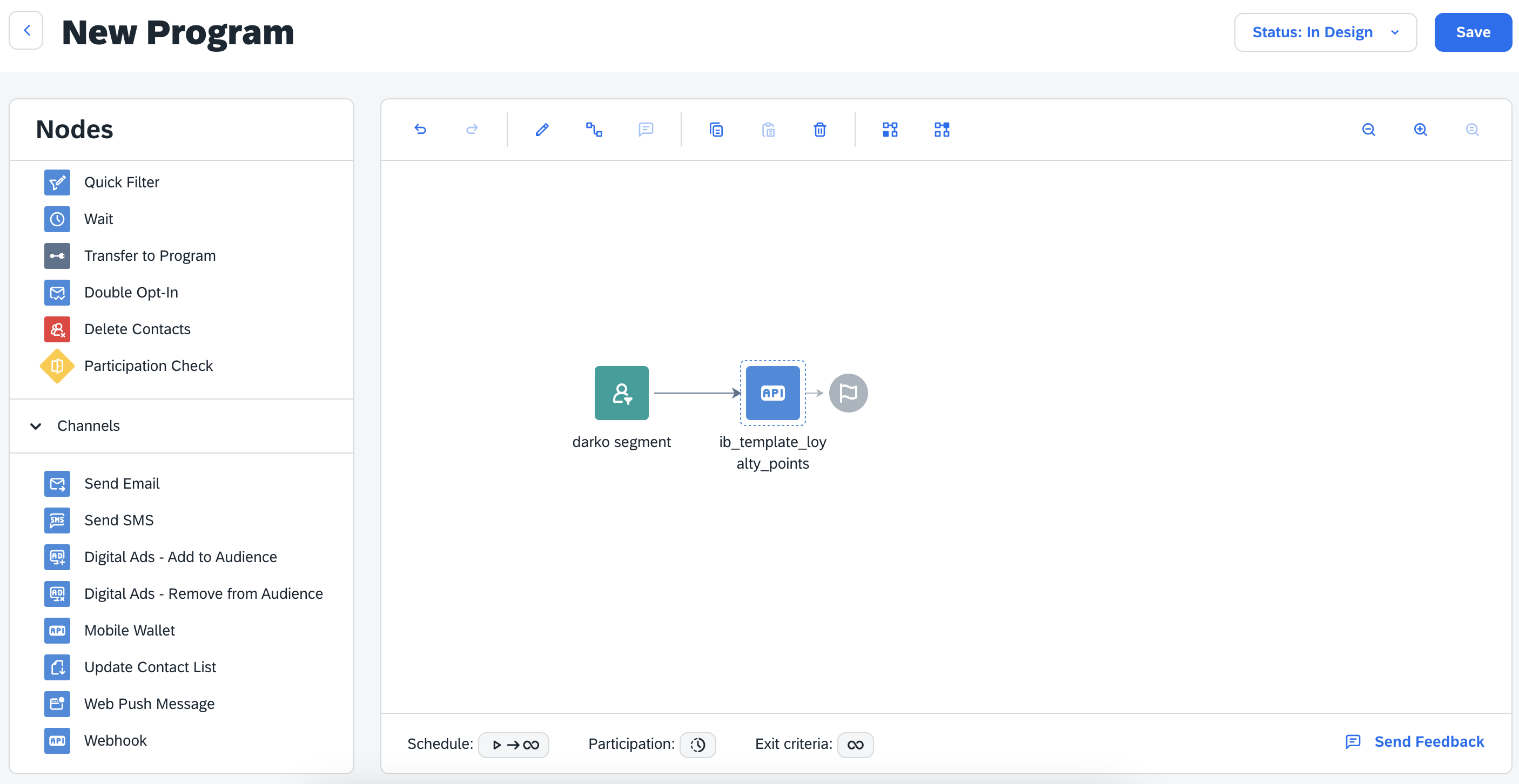
Configure Webhook Node Presets
To configure the presets:
- Go to Automations > Webhook Node Presets.
You need to define the authentication, endpoint, and preset data attributes.
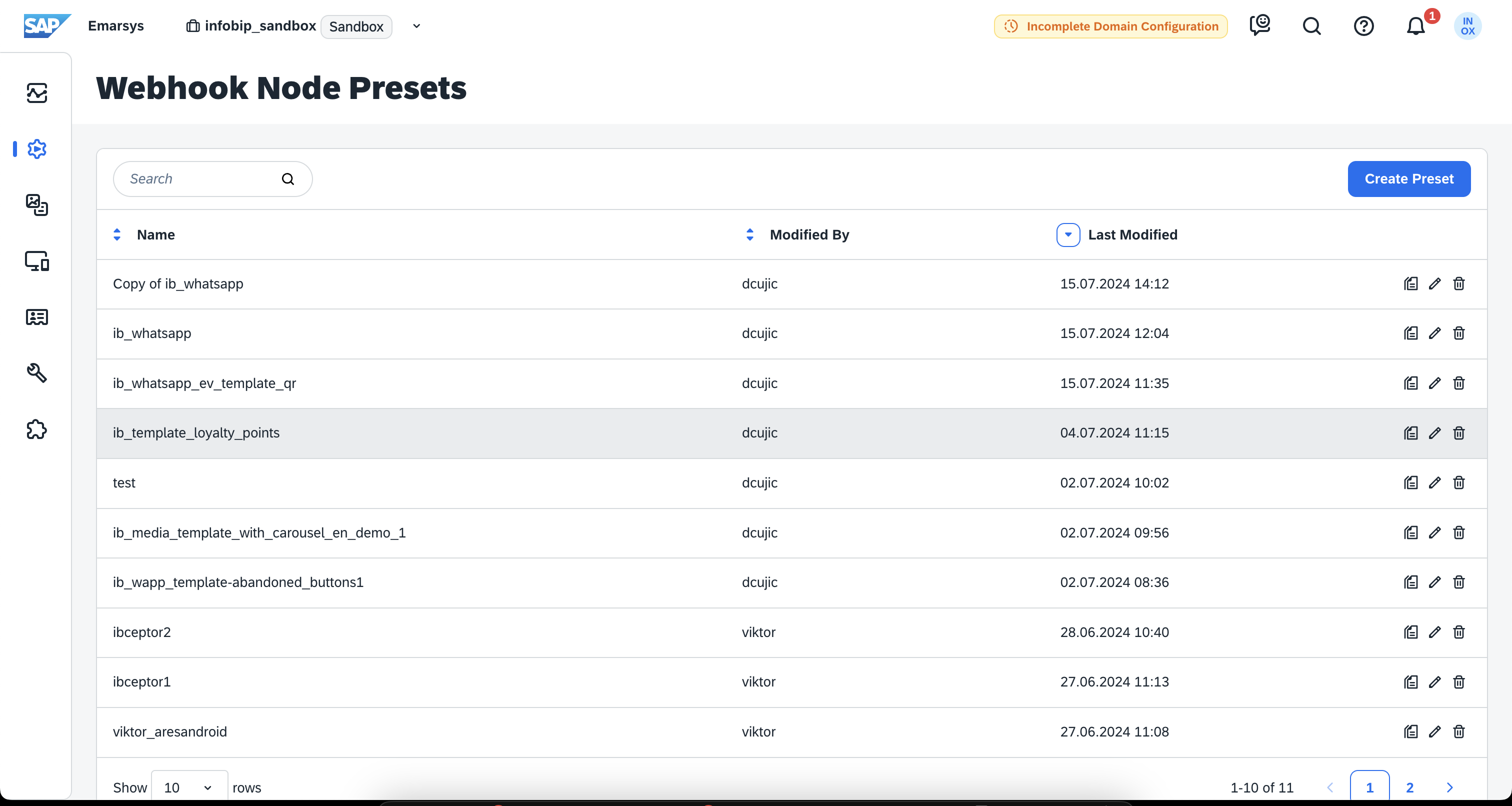
- Click Create Preset to define the attributes.
The following sections show the required configuration sections.
Configure preset appearance
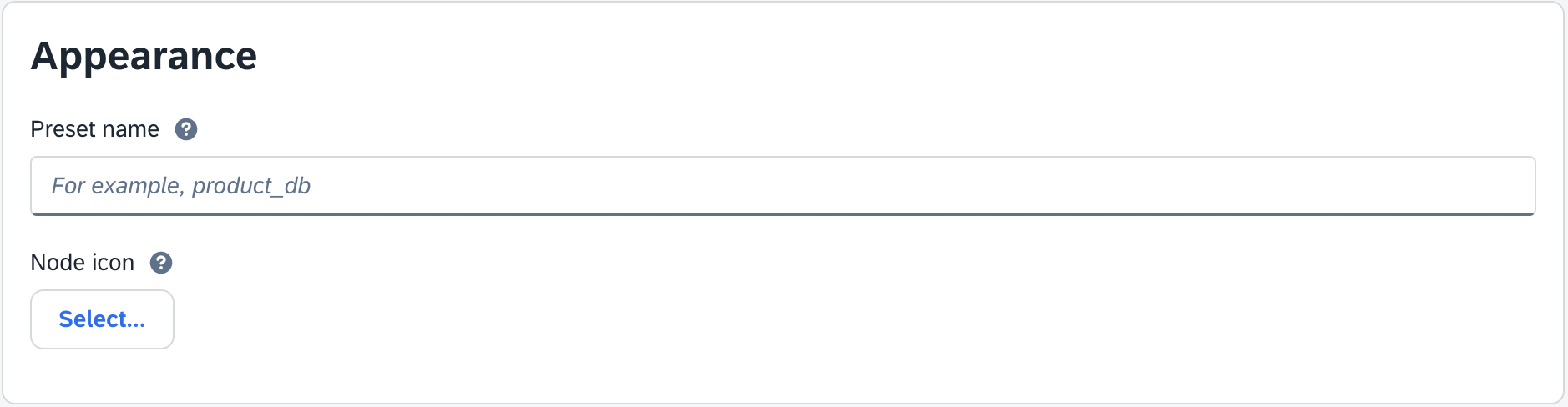
It is recommended that you give your preset a name and you can choose an icon so that it is more recognizable.
- Add a name in the preset name. For example, use a unique and recognizable name, such as
ib_whatsapp_my_test_template. - Select a preferred icon from Node icon so it is easily spotted in the Automation program.
Configure preset authentication
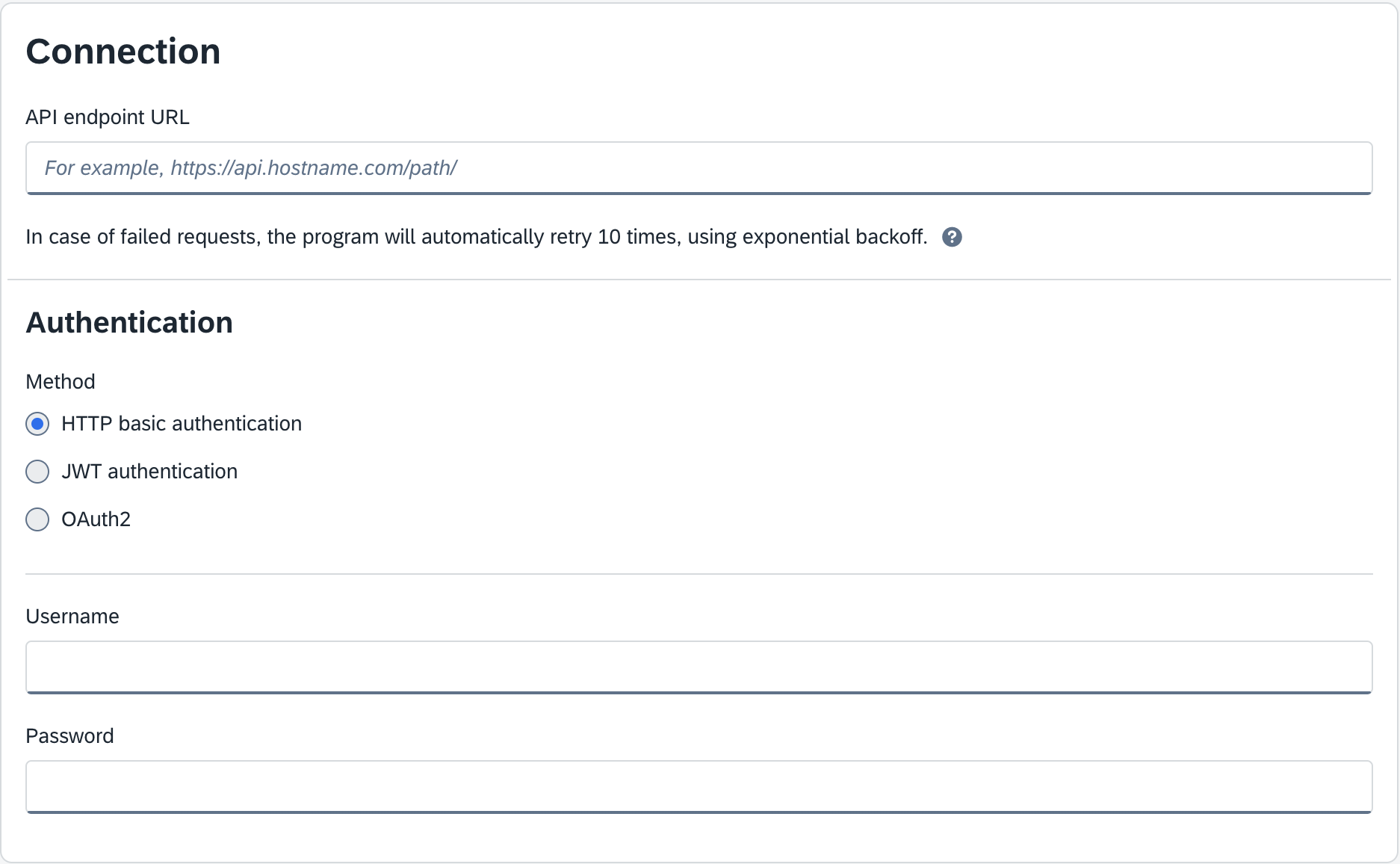
Specify the authentication method and credentials used to authenticate with Infobip.
- Add the relevant URL in API endpoint URL. The endpoint is channel-specific and defined as:
https://ib-emarsys-prod.azurewebsites.net/api/message/<channelType>.- WhatsApp:
https://ib-emarsys-prod.azurewebsites.net/api/message/whatsapp. - RCS:
https://ib-emarsys-prod.azurewebsites.net/api/message/rcs.
- WhatsApp:
- Select your chosen authentication method. For example, use HTTP basic authentication.
- For the Username, use
iband for the Password, copy your Infobip API key. The required scopes for API key are channel-specific. See API key scopes.
Preset data definition
It is possible to define two types of data:
- Contact data is dynamic data taken from a contact
- Additional data are key-value pairs that can contain static value in the form of predefined value(s) or, if left empty, the value has to be entered during automation program setup
Some generic key-value pairs must be defined. Depending on the data source, it must be defined in its respective section.
When building the preset, always consider whether the required data is static or taken from a contact. It is extremely important to follow the naming schema for fields. All fields not recognized by the application will be dropped, which might lead to your messages being rejected due to missing parameters.
The naming schema consists of a prefix (ib_) followed by either an attribute name or, for template parameters, the section identifier (header, body, btn) and the word param with a number indicating the index of that param (starts at 1) or required attribute. An example for a text header placeholder would be ib_header_param1 or for a media header, it would be ib_header_mediaUrl.
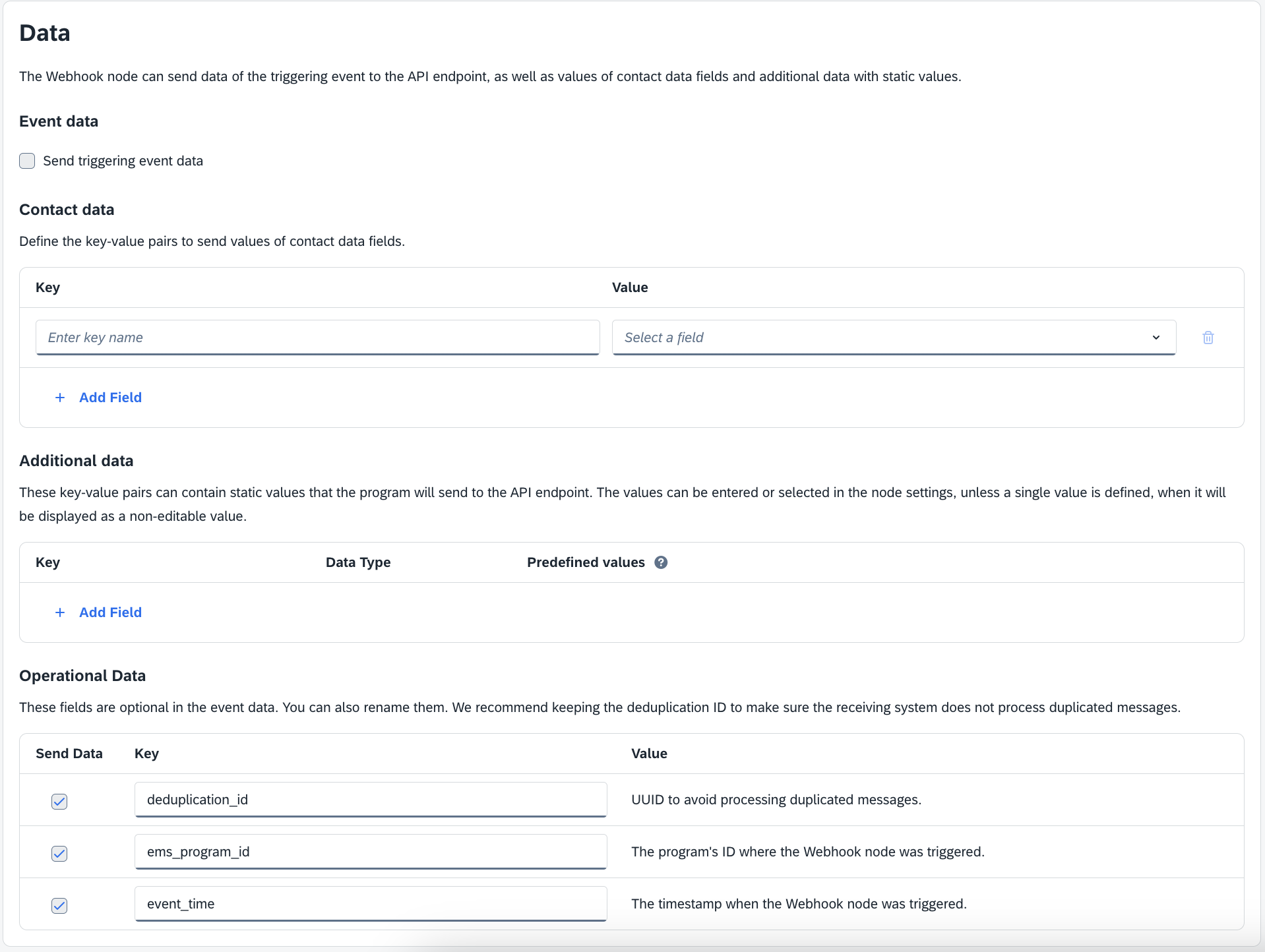
Preset data reference
This reference describes the preset data names.
Generic data
| Name | Value | Recommendation |
|---|---|---|
ib_to | Can be one of: mobile phone, phone (office), any contact field where the contact number is stored | Contact data as it is always dynamic |
ib_from | Predefined value (or you can leave empty to define during program building) | Additional data as this value is most likely static. |
WhatsApp-specific data
| Name | Value | Recommended section |
|---|---|---|
Ib_templateName | Predefined value with template name. | Additional Data |
Ib_templateLanguage | Predefined value with template language. If not defined, it falls back to English (en). | Additional Data |
The following data depends on the template being used in the preset.
| Name | Value | Recommended section |
|---|---|---|
ib_header_param1 | Text placeholder (if exists) in text header templates. If there are no placeholders in the text, you can omit this pair. | Depends on whether it is static or contact data. |
ib_header_mediaUrl | Image header media URL, also used in video and document headers | Most likely static data, so should go to Additional data |
ib_header_fileName | Document header file name. | Most likely static data, so should go to Additional data |
ib_header_longitude ib_header_latitude | Latitude and longitude for WhatsApp location templates. | Most likely static data, so should go to Additional data |
ib_body_paramN (for example, ib_body_param1) | Template body placeholders. The ending of key name defines the placeholder it replaces. Add as many as there are placeholders in template body. | Depends on whether it is static or contact data. |
ib_btn_paramN (for example, ib_btn_param1) | Template button placeholders. Buttons that should have params defined include: Quick Reply buttons URL buttons with a placeholder if the URL button doesn’t include a placeholder, it has to be omitted | Depends on whether it is static or contact data. |
ib_btn_copy_code | Template button parameter for copy code button type. | Depends on whether it is static or contact data. |
ib_card_N_header_mediaUrl | Carousel template placeholder. To be used for card headers in case of a media header. N designates card index (starting from 1). | Depends on whether it is static or contact data. |
ib_card_N_header_placeholder | Carousel template placeholder. To be used for card headers in case of a text header and placeholders. N designates card index (starting from 1). | Depends on whether it is static or contact data. |
ib_card_N_header_latitude ib_card_N_header_longitude | Carousel template placeholder. To be used for card headers in case of location header. N designates card index (starting from 1). | Depends on whether it is static or contact data. |
ib_card_N_body_paramM | Carousel template placeholder. To be used for card body placeholders. N designates card index and M is the index of body placeholder (starting from 1). | Depends on whether it is static or contact data. |
ib_card_N_btn_paramM | Carousel template placeholder. To be used for card button placeholders. URL and quick reply buttons require parameters. | Depends on whether it is static or contact data. |
RCS specific data
| Name | Value | Recommended section |
|---|---|---|
ib_type | Can be one of: text, file, card, carousel | Additional data |
Text messages
| Name | Value | Recommended section |
|---|---|---|
ib_text | Text you want to send to customers. Example with placeholders: Hello {{1}}, welcome to our promotion for {{2}}. Today we are giving away {{3}}% of discount on selected items. | Additional data |
ib_placeholder_N | Where N is index of placeholder defined in ib_text | Depends whether it is static or contact data. |
File messages
| Name | Value | Recommended section |
|---|---|---|
ib_fileUrl | URL of the given resource. The following content types are supported: application/pdf, image/jpeg, image/jpg, image/gif, image/png, video/h263, video/m4v, video/mp4, video/mpeg, video/mpeg4, video/webm. | Depends whether it is static or contact data, but most likely will be static data so into Additional data. |
ib_thumbnailUrl | URL of the file thumbnail. | Depends whether it is static or contact data, but most likely will be static data so into Additional data. |
Suggestions
| Name | Value | Recommended section |
|---|---|---|
ib_suggestion_N_type | Where N is the index number of suggestion, starting at 1. Can be one of: reply, open_url, dial_phone, show_location, request_location, create_calendar_event | Additional data |
Reply
| Name | Value | Recommended section |
|---|---|---|
ib_suggestion_N_postbackData | Value which is going to be sent as a reply to a suggestion | Additional data |
ib_suggestion_N_text | Suggestion text | Additional data |
Open URL
| Name | Value | Recommended section |
|---|---|---|
ib_suggestion_N_postbackData | Value which is going to be sent as a reply to a suggestion | Additional data |
ib_suggestion_N_url | URL that will be opened on mobile phone when the suggestion is selected | Additional data |
ib_suggestion_N_text | Suggestion text | Additional data |
Dial phone
| Name | Value | Recommended section |
|---|---|---|
ib_suggestion_N_postbackData | Value which is going to be sent as a reply to a suggestion | Additional data |
ib_suggestion_N_phoneNumber | Valid phone number | Additional data |
ib_suggestion_N_text | Suggestion text | Additional data |
Show location
| Name | Value | Recommended section |
|---|---|---|
ib_suggestion_N_postbackData | Value which is going to be sent as a reply to a suggestion | Additional data |
ib_suggestion_N_latitude | Latitude of the location. | Additional data |
ib_suggestion_N_longitude | Longitude of the location. | Additional data |
ib_suggestion_N_text | Suggestion text | Additional data |
ib_suggestion_N_label | Label of the location | Optional. Additional data |
Request location
| Name | Value | Recommended section |
|---|---|---|
ib_suggestion_N_postbackData | Value that will be sent as a reply to a suggestion | Additional data |
ib_suggestion_N_text | Suggestion text | Additional data |
Create calendar event
| Name | Value | Recommended section |
|---|---|---|
ib_suggestion_N_postbackData | Value that will be sent as a reply to a suggestion | Additional data |
ib_suggestion_N_text | Suggestion text | Additional data |
ib_suggestion_N_startTime | Event start time | Additional data |
ib_suggestion_N_endTime | Event end time | Additional data |
ib_suggestion_N_title | Event title | Additional data |
ib_suggestion_N_description | Event description | Optional. Additional data |
RCS card message
| Name | Value | Recommended section |
|---|---|---|
ib_card_title | Title of the card, displayed as bolded text. | Additional data |
ib_card_description | Description of the card, displayed as regular text. | Additional data |
ib_card_orientation | Orientation type defines orientation in Card message. Values can be HORIZONTAL or VERTICAL. | Additional data |
ib_card_alignment | Image preview alignment for Card message with horizontal layout. | Additional data |
ib_card_mediaUrl | Specifies the URL of the media resource. | Additional data |
ib_card_mediaHeight | Height of the card media. Can be SHORT, MEDIUM, TALL | Additional data |
ib_card_button_N_type | Card button type where N is button index (starting from 1). Can be one of: REPLY, OPEN_URL, DIAL_PHONE, SHOW_LOCATION, REQUEST_LOCATION, CREATE_CALENDAR_EVENT | Additional data |
ib_card_button_N_text | Card button text. | Additional data |
ib_card_button_N_postbackData | Card button postback value. | Additional data |
ib_card_button_N_url | Card button URL in case of URL buttons. | Additional data |
ib_card_button_N_phoneNumber | Card button phone number in case of DIAL_PHONE | Additional data |
ib_card_button_N_latitude | Card button latitude in case of SHOW_LOCATION | Additional data |
ib_card_button_N_longitude | Card button longitude in case of SHOW_LOCATION | Additional data |
ib_card_button_N_label | Card button location label in case of SHOW_LOCATION | Additional data |
ib_card_button_N_startTime | Card button start time in case of CREATE_CALENDAR_EVENT | Additional data |
ib_card_button_N_endTime | Card button end time in case of CREATE_CALENDAR_EVENT | Additional data |
ib_card_button_N_title | Card button title in case of CREATE_CALENDAR_EVENT | Additional data |
ib_card_button_N_description | Optional card button description in case of CREATE_CALENDAR_EVENT | Additional data |
RCS carousel parameters
| Name | Value | Recommended section |
|---|---|---|
ib_card_width | Width of cards contained within the carousel. Can be SMALL or MEDIUM | Additional data |
ib_card_N_title | Title of the card, displayed as bolded text. | Optional. Additional data |
ib_card_N_description | Description of the card, displayed as regular text. | Optional. Additional data |
ib_card_N_mediaUrl | Specifies the URL of the media resource. | Additional data |
ib_card_N_mediaHeight | Height of the card media. Can be SHORT, MEDIUM, TALL | Additional data |
ib_card_N_button_M_type | Card button type where N is card (starting from 1) and M is button index (also starting from 1). Can be one of: REPLY, OPEN_URL, DIAL_PHONE, SHOW_LOCATION, REQUEST_LOCATION, CREATE_CALENDAR_EVENT | Additional data |
ib_card_N_button_M_text | Button text | Additional data |
ib_card_N_button_M_postbackData | Button postback value | Additional data |
ib_card_N_button_M_url | Button URL in case of OPEN_URL | Additional data |
ib_card_N_button_M_phoneNumber | Button phone number in case of DIAL_PHONE | Additional data |
ib_card_N_button_M_latitude | Button latitude in case of SHOW_LOCATION | Additional data |
ib_card_N_button_M_longitude | Button longitude in case of SHOW_LOCATION | Additional data |
Campaign tracking
Currently, there is no way to track campaigns other than through the Infobip web interface. For RCS, additional parameters are available for improved filtering options. To use them, include any of the following in the data section inside the Webhook Node Presets:
ib_campaign_reference_id(also works withib_campaignReferenceIdorcampaign_id)ib_campaign_name- Emarsys default data:
deduplication_idems_program_id