Live analytics
Use the Live analytics dashboard to monitor live conversation activity in your contact center. The dashboard shows real-time metrics related to contact center operations.
- Data marked with a clock icon covers the period from 12:00 AM to 11:59 PM. This includes Closed conversations in the Conversation widget and in Queues.
- All other data refreshes every 15 seconds.
To see the live analytics:
- Log in (opens in a new tab) to your Infobip account.
- Go to Conversations → Analytics → Live analytics.
- Use the following filters to refine the metrics:
- Agents
- Queues
- Channels
- Direction
Filtering by Channels may show or hide certain elements in the dashboard. For example, if you select Channel = SMS, call-related metrics are hidden because they do not apply to the SMS channel.
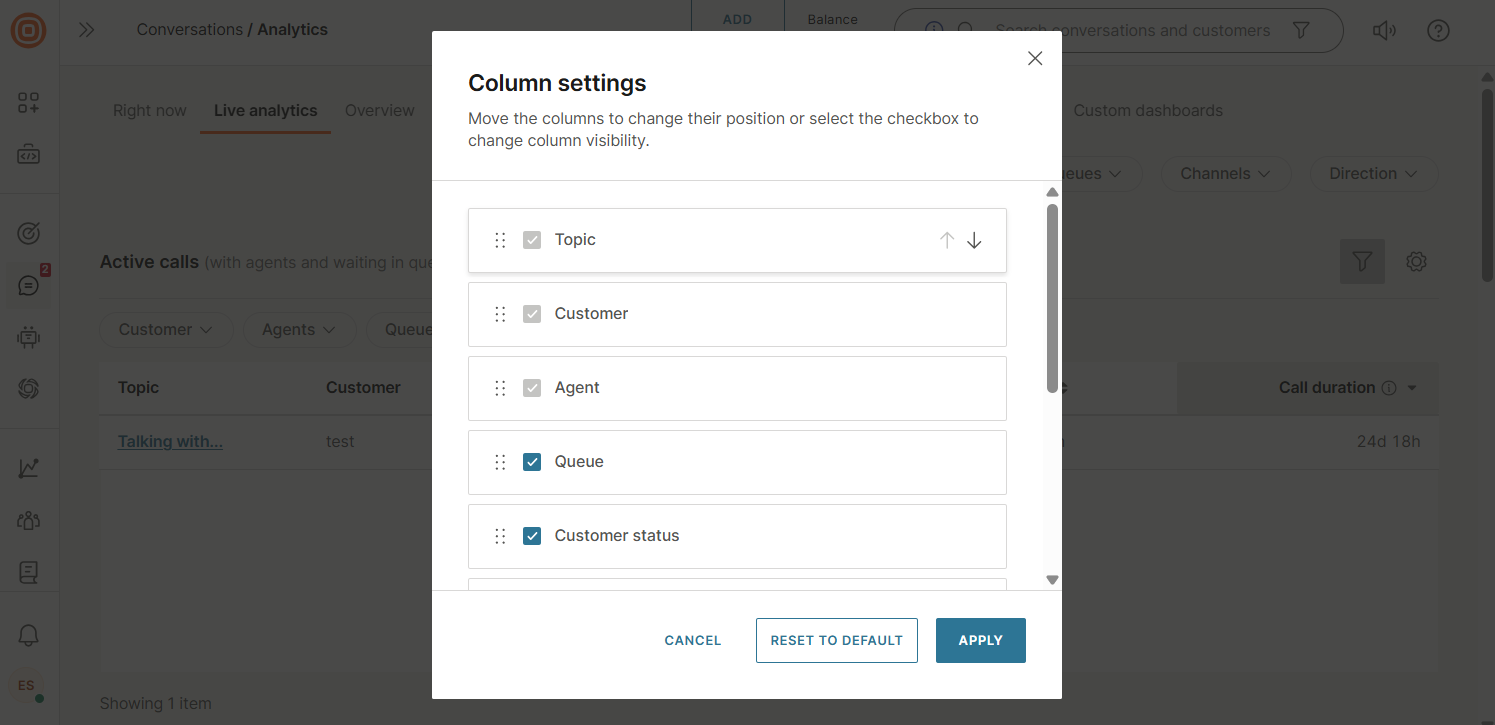
- In each section, select the Arrange columns on the right to open the column settings. From there, you can reorder columns or use the checkboxes to control column visibility. You can cancel your changes, reset the columns to their default settings, or apply the new configuration at any time by selecting the corresponding option.
Active calls overview
The Active calls overview includes the following sections:
- Live calls: Displays the total number of active calls along with a breakdown of their distribution by status across two tabs:
- Per status: Voice automation, Waiting in queue, With human agent
- Per direction: Inbound, Outbound
- Voice automation (IVR and AI agents): Calls currently managed by automated systems, including IVR and AI agents, with some cases escalated to a human agent when needed. Metrics include:
- Total
- IVR: Interactive voice response system. Handles both inbound and outbound calls.
- AI agents: AI-powered agents that handle inbound and outbound calls autonomously. Some calls may be escalated to a human agent.
- Waiting in queue: Inbound calls currently waiting to be connected to an available human agent. Also includes outbound calls waiting after being transferred, as well as outbound calls initiated by IVR that are later transferred to a human agent. Metrics include:
- Total
- Current longest wait time: The longest time a user has been waiting for a human agent, measured from when the call starts until it is accepted
- With human agent: Calls currently being handled by a human agent when needed. Metrics include:
- Total
- Inbound
- Outbound
Active calls
The Active calls metrics section provides real-time data about agents and all customers waiting in queues for an available agent to answer their call.
The metrics table displays the following details:
- Topic
- Customer
- Agent
- Queue
- Customer status
- Call count: Number of repeated calls made by the customer in the last 24 hours.
- Call duration (including wait time, talk time, and hold time)
- SLA: FRT: Remaining time to meet the first response time service-level agreement (SLA). After an agent answers a call, it shows whether the SLA FRT was breached at the time of the answer.
You can further refine the displayed data using filters for:
- Customer
- Agents
- Queues
- Customer status (talking, on hold, waiting for an agent)
- Direction (inbound, outbound)
Conversations
The Conversations metrics section includes:
- Open and assigned: All open conversations with assigned agents.
- Open and unassigned: All open conversations without assigned agents.
- Closed: All closed conversations. This is measured from 12 AM to 11:59 PM.
Queues
The Queue metrics section includes:
- Queue name: Name of the queue.
- Open and assigned: Number of open conversations with assigned agents.
- Open and unassigned: Number of open conversations without assigned agents.
- Set to waiting: Conversations waiting for an agent’s response.
- Agent statuses: Distribution of agents in the Available, Busy, and Away status groups.
- Closed conversations: Total number of closed conversations in the queue.
You can customize the column layout by selecting Arrange columns. Drag and drop items to reorder, include, or exclude columns as needed.
Human agents
The Human agents metrics section includes:
- Agent name: Name of the agent.
- Status: Current availability status of the agent.
- Time in status: Duration the agent has been in the current status.
- Current workload: Number of active conversations the agent is handling compared to their maximum workload limit.
You can customize the column layout by selecting Arrange columns. Drag and drop items to reorder, include, or exclude columns as needed.