




What is PII masking? Techniques, use cases, and best practices
Learn what PII masking is, how redaction, tokenization, static and dynamic masking differ, and how to choose the right method.

PII masking helps organizations protect personal information while giving teams the data they need for approved tasks. It hides or transforms identifiers such as names, phone numbers and email addresses, so users see a protected value instead of the original. Some techniques alter a copy of the data. Others change how a value appears to a user while preserving the original for authorized access. Understanding these differences helps teams choose an approach that fits their data and use case.
This article covers common methods, their limits, and how masking differs from related controls such as encryption, pseudonymization, and anonymization.
What is PII?
PII stands for personally identifiable information. NIST defines PII as information that can distinguish or trace a person’s identity, or information linked or linkable to them. The EU’s GDPR uses the term personal data for any information relating to an identified or identifiable person, directly or indirectly.
PII falls into two groups:
- Direct identifiers point to a person on their own. Examples include a name, phone number, email address, or account ID.
- Indirect identifiers identify someone only in combination. A postcode, birth date, and job title together may point to one person.
Definitions vary across laws and contexts. Ask your legal team which information counts as personal data for your business.
What is PII masking?
PII masking hides or transforms an original value into a protected representation. For example, a screen might display j***@example.com or hide some digits in a card number. The method should preserve only the detail a task needs, without exposing the original value to people who do not need it.
How does PII masking work?
Masking is a controlled process that starts with understanding where personal data lives and who needs to see it. A single field may flow through a user interface, an API, an export, a report or a test copy, so applying a rule in one place may not protect it everywhere. Teams should identify the data, set access rules, select a suitable method, apply it to the right layer and test the result across connected systems. The five-step workflow below offers a practical starting point.
- Identify sensitive fields: Map where names, contact details, identifiers and free-text notes live across your systems.
- Decide who needs access: Define which roles need the original value and which only need a protected version.
- Choose a masking method: Match the technique to the use case (see the next section).
- Apply it to the data or the view: Some methods change the data itself. Others change only what a user sees.
- Test the surrounding systems and outputs: Check copies, exports, reports and derived fields, because masked data can travel further than the field you masked.
What are the common PII masking techniques?
PII masking can mean anything from hiding characters on a screen to transforming values in a separate copy of a data set. Some approaches change stored values, while others control what a user can see. They also differ in how much utility they preserve and whether the original value can be recovered, so the methods are not interchangeable. The table summarizes common terms used in practice. Terminology and implementation can vary by platform, so verify how a specific tool applies each method.
| Technique | What changes? | Can the original be recovered? | Common use |
|---|---|---|---|
| Redaction or character masking | Characters are hidden or replaced with a fixed symbol | No, not from the masked output | Screens, tickets, and logs |
| Substitution or synthetic replacement | Real values are replaced with plausible fake ones | No, unless a mapping is kept | Test and development data |
| Static masking | A masked copy of the data set is created | Not from the masked copy | Non-production environments |
| Dynamic masking | Stored data stays the same. The view or query result is masked | Yes, for authorized users | Role-based views of live data |
| Tokenization | A value is replaced with a token that maps to the original in a separate secure store | Yes, through the protected mapping | Systems that need a reference but not the real value |
Redaction and character masking
Redaction hides part or all of a value. It is the simplest technique and the easiest to explain to a non-technical team. It works best when the viewer needs only a hint, such as the last four digits.
Substitution and synthetic replacement
Substitution swaps real values for realistic fake ones. A name becomes another plausible name. Teams use it when software testing needs data that looks and behaves like the real thing.
Static masking
Static masking produces a masked copy of a data set. The copy carries the protection with it, which makes it a common choice for test and development environments. The original data set still needs its own controls.
Dynamic masking
Dynamic masking leaves the stored data alone and masks it as users view or query it. Microsoft’s documentation for SQL Server describes it this way. The data in the database isn’t changed, and masking rules apply to query results. Privileged users can still see the originals.
Tokenization
Tokenization replaces a value with a token. The original sits in a separate, protected store, and only systems with access to that store can map the token back. Teams use it when downstream systems need a stable reference but not the real value.
How is masking different from encryption and anonymization?
Encryption scrambles data so it can be read only with a key. Masking changes what a person or system sees. Microsoft’s guidance calls dynamic masking complementary to other security features, including auditing and encryption, and recommends using them together. Pseudonymization is defined in GDPR as processing personal data so it can no longer be attributed to a specific person without additional information, provided that information is kept separately and protected.
Under Recital 26, pseudonymized data that could be attributed to a person is still personal data. Anonymization goes further. Recital 26 describes anonymous information as data where the person is not or no longer identifiable.
Masking does not automatically reach that last bar. NIST SP 800-188 on de-identification cautions that tools which merely mask personal information may not provide enough functionality to de-identify data. Treat a masked field as protected for a specific audience on a specific surface. Don’t treat it as anonymous.
Where is PII masking used?
Personal data can appear in production systems, test environments, analytics tools and customer-facing applications. Each setting creates a different reason to mask it. Developers may need realistic records to test a workflow, analysts may need trends without direct identifiers, and service teams may need only a partial view to verify a customer. Matching the control to the task helps limit exposure while preserving the information people need to do their work.
- Non-production testing: Developers need realistic data without real identities. Microsoft’s documentation gives the example of a data mask that lets a developer query production data for troubleshooting without seeing personal data.
- Analytics: Analysts often need patterns and trends, not names and phone numbers.
- Customer service views: The same Microsoft documentation describes a call center representative who can confirm a caller’s identity from a few characters of an email address without seeing the full address.
- Customer profiles: Marketing, support and operations teams all read profile data. Not all of them need every attribute in clear text.
- Customer communications: Masking can also protect people during live interactions, such as hiding phone numbers during calls.
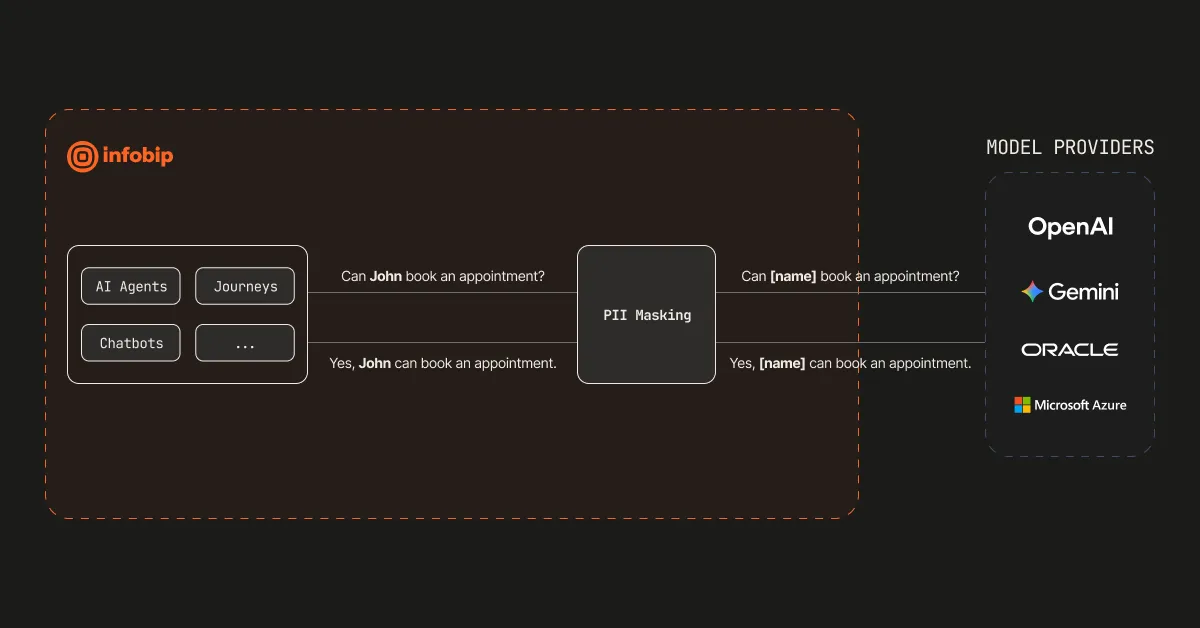
- AI services: A masking layer can protect PII in requests sent to an external large language model (LLM), then restore the original values before returning the response.
How do you choose the right method?
Choose a PII masking method by looking at how the data will be used and where it will go. A support screen, test environment and analytics export have different requirements. Some tasks need a recoverable value or realistic links between records, while others need only a masked display. Answer these four questions before deciding which technique to apply.
- Must the original be recoverable? If yes, look at dynamic masking or tokenization. If no, consider redaction, substitution or a static masked copy.
- Must realistic relationships stay intact? Test data often needs formats and links between records to keep working. Substitution and static masking fit better than blanket redaction.
- Who needs access? List roles and the minimum each one needs. Role-based views point toward dynamic masking.
- Where will the data flow next? Follow the data into exports, integrations, reports and backups. A mask applied in one place does not protect a copy made somewhere else.
Most organizations use more than one method, applied to different systems and tasks.
What does Infobip’s PII Masking cover?
Infobip’s PII Masking is a company-wide capability for customer-facing AI services. It reduces exposure of sensitive information by masking PII before a request reaches an external large language model (LLM) and restoring the original values before the response is returned.
Current capabilities
- PII stays away from model providers: Selected PII in requests is masked before it reaches an external LLM.
- Complete responses: Original values are restored in the response before it is returned to the caller.
-
Client-level opt-in: Each client decides whether to turn masking on.
Granular control: Clients choose which types of PII are masked. - The current phase supports text-based masking in English (EN), French (FR), Spanish (ES), German (DE), Italian (IT), Portuguese (PT), and Dutch (NL).
Masking numbers in voice calls
Infobip number masking is a different service. It protects the privacy of people on phone calls. It does not mask fields in a data set.
When Infobip receives an inbound call, it sends a callback request to your platform. Your application then decides what happens next. It can play an audio file to the caller and hang up, or dial an external number and bridge the two calls once the other party answers. Infobip’s number masking blog post covers how this works for use cases such as ridesharing and delivery.
If you need to hide attributes in profile data, look at Customer Profiles. If you need to hide phone numbers during calls, look at number masking.
What are PII masking best practices and limits?
Choosing a technique is only one part of protecting PII. Teams also need to know where sensitive values live, define who can see them, and check whether the data appears in copies or derived outputs. The practices below help teams apply masking consistently and identify gaps that need other safeguards.
- Inventory sensitive data first. Include free-text fields and notes. You cannot protect data you have not found.
- Apply least-privilege access. Give each role the minimum access it needs and review permissions regularly. Infobip’s article on customer data platform security covers least-privilege and encryption alongside other safeguards.
- Check copies and downstream systems. Exports, backups, and integrations can carry unmasked values.
- Test derived data and exports. Computed fields, reports, and joins can reveal information a mask hides.
- Combine masking with other controls. Use encryption, auditing, and access management alongside masking.
Know the limits too. Microsoft’s documentation warns that dynamic masking doesn’t stop determined users with ad hoc query access from inferring values, and recommends auditing for that scenario. Masking alone does not guarantee compliance or prevent every exposure.
For how Infobip handles personal data, read the Infobip Privacy Notice.
Frequently asked questions
No. Redaction is one masking technique. It hides or removes some or all of a value. Masking also includes substitution, tokenization, and role-based dynamic views.
Static masking creates a masked copy of the data. Dynamic masking leaves stored data unchanged and masks it when users view or query it, based on their permissions.
It depends on the standard or platform. Some teams group tokenization under masking. Others treat it as a separate control because the original value can be recovered through a protected mapping. Check how your standards and auditors define it.
Not on its own. Under GDPR, pseudonymized data that could be attributed to a person remains personal data. Anonymous data must no longer be identifiable, and masking may not meet that standard.
No. Masking is one control among several. Compliance depends on your wider processes, access management, legal basis for processing, and the laws that apply to your organization. Ask your legal team to review your approach.