




On-premise vs cloud contact center: Key differences and how to switch
Compare on-premise and cloud contact centers side by side. Learn key differences in cost, scalability, AI capabilities, and security — plus a step-by-step migration guide.

Your contact center runs on infrastructure designed for a different era. Hardware that can’t scale past physical capacity. Systems that require agents on-site. Technology that makes adding WhatsApp or Instagram support a six-month project.
Meanwhile, your competitors use cloud-based solutions to answer customer questions on any channel, from anywhere, with AI handling the repetitive work. The gap isn’t about budget or team size. It’s about infrastructure.
On-premise contact centers were built when customer service meant phone calls from office desks. Cloud contact centers were built for omnichannel conversations, remote teams, and AI automation. One model creates constraints. The other removes them.
The shift is already happening. The cloud-based contact center market is expected to grow to $91.04 billion by 2030 at a compound annual growth rate of 24.2%. This growth reflects businesses moving from capital-intensive on-premise systems to flexible, AI-powered cloud platforms that scale with demand
This guide gives you everything you need to make an informed decision:
- Clear definitions of on-premise and cloud contact centers (and what CCaaS actually means).
- Side-by-side comparison of costs, scalability, AI capabilities, and security.
- Honest assessment of when on-premise still makes sense.
- Step-by-step migration guide with practical solutions to common challenges.
- Key features that separate great cloud platforms from mediocre ones.
- Where the industry is heading in 2026 and beyond.
Let’s start by defining what each model actually means because “cloud contact center” means different things to different vendors.
What is an on-premise contact center?
On-premise contact centers are customer service operations where all hardware, servers, and software are hosted on-site at a company’s physical location.
Businesses purchase and install dedicated physical infrastructure, including hardware and software: servers, PBX systems, networking equipment, software licenses, and specialized hardware. An in-house IT team manages installation, maintenance, security updates, and troubleshooting. The hardware capacity you purchase dictates your maximum agent count and call volume.
On-premise call center solutions were the industry standard for decades; built when “contact center” meant “call center”, primarily voice-only communication.
Today, on-premise contact centers face significant limitations. They’re increasingly expensive to maintain as hardware ages. Physical constraints limit growth, and scaling requires substantial capital investment. Most critically, these systems struggle to support remote workforces, omnichannel messaging across WhatsApp and social platforms, and AI-powered automation.
What is a cloud contact center (CCaaS)?
A cloud contact center is an internet-based platform that enables businesses to manage customer interactions across all channels without owning or maintaining physical infrastructure. This includes voice, SMS, WhatsApp, email, chat, social media, and more.
The industry term for this model is Contact Center as a Service (CCaaS). The provider hosts and manages all infrastructure, delivering contact center capabilities via the cloud. You access the platform through web browsers or mobile apps and pay subscription fees instead of large upfront capital expenses.
Agents work from anywhere with an internet connection. The provider manages servers, security, updates, and maintenance. You can scale capacity up or down instantly based on demand without installing new hardware.
Modern CCaaS platforms integrate AI chatbots, intelligent routing, real-time analytics, and workforce management as core features, not add-ons.

On-premise vs cloud contact center: Key differences
The choice between on-premise and cloud isn’t just about technology. It’s about how you want to operate, scale, and serve customers. Here’s how they compare across the factors that matter most.
Comparison table
| Factor | On-premise contact center | Cloud Contact Center (CCaaS) |
|---|---|---|
| Upfront cost | High: Hardware, servers, software licenses, installation. | Low: No infrastructure to buy, subscription-based. |
| Cloud contact center cost | Higher total cost: Large upfront investments (CapEx) + ongoing IT + hardware refresh cycles every 5-7 years. | Lower: Predictable OpEx, no hardware costs, pay per agent per month. |
| Deployment time | Weeks to months (hardware procurement, installation, configuration). | Days to weeks (configuration and integration only). |
| Scalability | Limited by physical capacity; scaling requires hardware purchases. | Elastic: Add or remove agents instantly based on demand. |
| Supported channels | Typically voice plus limited digital add-ons. | Omnichannel: Voice, SMS, WhatsApp, Viber, chat, email, Instagram, Facebook, Telegram. |
| Remote work | Difficult: Agents need on-site access or complex VPN setups. | Built-in: Agents work from a desktop or mobile app, anywhere. |
| AI and automation | Limited: Chatbots and AI require costly third-party integrations. | Native AI: Chatbots, agentic AI, real-time agent assist, predictive analytics. |
| Integration with external systems | Complex: Requires middleware, custom APIs, or expensive integration projects for CRM, CDP, and marketing tools. | Native integrations: Pre-built connections to CRM, CDP, marketing platforms via APIs with bidirectional data sync. |
| Maintenance | In-house IT team handles all updates, patches, and troubleshooting. | Provider manages updates automatically with no downtime. |
| Security and compliance | Full control but full responsibility for certifications (GDPR, HIPAA, PCI DSS). | Enterprise-grade security with built-in compliance certifications. |
Cost model shift
On-premise contact centers require high CapEx upfront, while cloud contact centers operate on OpEx with predictable monthly costs. Cloud contact center cost structures are transparent: pay per agent per month, adjust as you grow, and avoid surprise maintenance bills or hardware replacements every 5-7 years. The long-term savings compound as you eliminate infrastructure refresh cycles.
On-premise call center solutions typically cost more when you factor in IT staff salaries, maintenance contracts, utility costs, and inevitable hardware upgrades.
The AI gap
On-premise contact center systems were built before AI became essential. Adding AI capabilities requires expensive integrations and ongoing maintenance.
Cloud contact center platforms build AI into the core. Chatbots handle routine queries 24/7. Agent assist tools suggest responses in real-time. Predictive analytics anticipate customer needs. These capabilities update automatically as AI technology advances.
Omnichannel reality
Traditional on premise call center solutions struggle to unify channels. Each often runs as a separate system with separate queues and no shared context.
Cloud contact centers thread all interactions into a single conversation view. When a customer switches from chat to phone, agents see the full history. No repeating information.
Benefits of cloud contact centers
The comparison table shows the technical differences. Here’s what those differences mean for your business, your agents, and your customers.
- Lower total cost of ownership
Eliminate hardware capital expenses and reduce IT overhead. Cloud contact center cost models use predictable OpEx instead of the large CapEx investments required by premise solutions. No hardware refresh cycles every 5-7 years. No emergency replacement costs when equipment fails.
- Instant scalability
On-premise contact centers force you to build capacity for peak demand, leaving expensive infrastructure underutilized most of the year. Cloud contact centers let you scale agent capacity in hours. Add 50 agents for Black Friday, scale back in January. Pay only for what you use.
- True omnichannel customer experience
Support customers across voice, SMS, WhatsApp, Viber, email, chat, Instagram, Facebook, and Telegram in one unified workspace. When a customer starts in the chat and switches to phone, agents see full conversation history.
- AI-powered automation
Deploy chatbots that handle routine queries 24/7. Use agentic AI that completes multi-step tasks autonomously. Equip agents with AI copilots that surface knowledge articles, suggest responses, and detect sentiment in real-time.
- Support for a remote and hybrid workforce
Cloud platforms were built for distributed teams. Agents work from web browsers or mobile apps with full functionality regardless of location. On-premise contact centers require complex VPN setups with degraded performance.
- Faster deployment and time-to-value
On-premise deployments take 3-6 months. Cloud contact centers go live in 2-4 weeks. Faster deployment means faster ROI and the ability to adapt to market changes quickly.
- Continuous innovation
Cloud providers push updates automatically. New features, security patches, performance improvements arrive without disruption. On-premise systems require manual updates with scheduled downtime and risk of breaking integrations.
When on-premise contact centers still make sense
Cloud isn’t the right answer for everyone, at least not immediately. Here are scenarios where on-premise infrastructure still has advantages.
- Highly regulated industries with strict data residency requirements
Some governments or industry regulations prohibit storing customer data outside specific geographic boundaries. However, cloud providers increasingly offer regional data centers that meet these requirements. Verify whether a hybrid cloud contact center model or region-specific deployment solves the problem.
- Massive existing infrastructure investment with long depreciation cycles
If you made significant upfront investments in on-premise hardware recently with a 10-year depreciation schedule, the long-term financial case for immediate migration is weaker, though planning a phased migration makes sense.
- Highly specific customization needs that cloud platforms can’t accommodate
Legacy integrations with proprietary systems or specialized hardware dependencies can make migration complex. Evaluate whether these customizations still serve business goals or if they’ve become technical debt.
The hybrid cloud contact center solution
For businesses with some of these constraints but still wanting cloud benefits, hybrid cloud contact center models bridge the gap. Keep sensitive data or specialized functions on-premise while moving digital channels, chatbots, and remote agents to the cloud.
Common hybrid approaches:
- Voice on-premise, digital channels in cloud: Keep existing PBX infrastructure for voice while handling WhatsApp, SMS, chat, email, and social media through cloud platforms.
- Primary cloud with on-premise backup: Run main operations in the cloud, maintain on-premise infrastructure as disaster recovery.
- Geographic hybrid: Deploy cloud in regions with flexible regulations, keep on-premise where data residency requirements mandate it.
Infobip offers hybrid cloud contact center deployment options with 40+ data centers worldwide.
How to migrate from on-premise to cloud contact center
Comparing on premise vs cloud contact center is one thing. Actually making the switch is another. Migration sounds daunting. You’re changing the nervous system of customer service while keeping it operational. But with the right approach, you minimize disruption and see benefits quickly.
Step 1: Audit your current setup
Before evaluating cloud vs premise based contact center solutions, document everything:
- Which channels you support and current volumes.
- Existing integrations (CRM, ticketing, WFM, analytics).
- Custom workflows and routing rules.
- Compliance requirements (GDPR, HIPAA, PCI DSS).
- Agent count, skills, schedules.
- Pain points agents and supervisors experience.
This audit clarifies what you’re giving up from your on-premise contact center versus what you’ll gain from cloud.
Step 2: Define your future-state requirements
Clarify what is cloud contact center capability you need versus what your current on-premise system provides:
- Channels: Which channels do customers want that you don’t support? WhatsApp and SMS often top the list. Most on-premise call center solutions struggle to add digital channels cost-effectively.
- AI capabilities: Where can automation help? This is where the on premise vs cloud contact center difference becomes most apparent.
- Integrations: Verify the cloud platform offers native integrations or robust APIs.
- Compliance: Confirm the platform meets industry requirements.
Step 3: Choose your migration approach
Three common strategies work for different situations when migrating from on-premise call center solutions to the cloud:
Option A: Full migration
Move all channels and agents at once. Best for teams under 50 agents or simple setups with minimal integrations. Fastest path to full cloud benefits but highest short-term risk.
Option B: Phased channel-by-channel migration
Start with one digital channel like chat or WhatsApp. Prove the platform works. Migrate additional channels, then eventually voice. This approach reduces risk, allows learning, and maintains business continuity. Recommended for enterprise deployments.
Option C: Hybrid cloud contact center model during transition
Keep voice on-premise initially. Move digital channels to the cloud. Migrate voice when ready. This hybrid cloud contact center approach is especially useful if voice requires complex hardware dependencies or if you want to depreciate existing equipment fully before switching.
Step 4: Plan data migration and integration
Critical challenges of migrating on-premise call center to cloud:
- Clean customer data before migration (remove duplicates, outdated records).
- Transfer agent skills, languages, performance history.
- Migrate knowledge bases (FAQs, guides, macros).
- Test CRM integration thoroughly.
- Archive data older than 12-24 months separately.
Step 5: Train your team
The cloud contact center cost of poor training shows up in prolonged ramp time and lower productivity.
- Agent training: Allocate 2-3 days minimum for hands-on practice with the new interface. Cover how to handle omnichannel conversations, use AI assist tools, manage multiple channels simultaneously, and access knowledge bases quickly.
- Supervisor training: Focus on analytics dashboards, queue management, real-time coaching workflows, and reporting capabilities. Supervisors need to understand the platform deeply to support agents.
- IT and admin training: Platform administration, user management, troubleshooting common issues, managing integrations, and configuring routing rules.
Step 6: Go live with a pilot, then scale
Don’t flip the switch for everyone at once:
- Start small: Launch with a pilot team of 10-20 agents on one channel. Choose your strongest agents who adapt well to change. They’ll become internal champions.
- Monitor closely: Track KPIs daily during pilot: first response time, resolution time, customer satisfaction, agent occupancy, and technical issues. Compare against baseline from Step 1.
- Gather feedback: Daily check-ins with pilot agents and supervisors. What works? What’s confusing? What’s missing? Fix issues before expanding.
- Iterate quickly: Address problems immediately while the pilot runs. Configuration tweaks, additional training, workflow adjustments.
- Scale in waves: Roll out to next team, next channel, next region. Each wave benefits from lessons learned in previous ones.
Following these cloud contact center best practices ensures smooth adoption and minimizes disruption during your transition.
Common challenges of migrating an on-premise call center to a cloud contact center
Understanding these challenges helps you plan solutions before they become problems:
Challenge: Agents resistance
Solution: Involve agents early in vendor selection. Let them test the platforms during evaluation. Emphasize how new tools reduce repetitive work and make their jobs easier. Celebrate early wins publicly.
Challenge: Integration delays
Solution: Use middleware or APIs as bridges. Consider a phased approach that doesn’t require all integrations on day one. Prioritize critical integrations like CRM, defer nice-to-have systems.
Challenge: Data quality issues
Solution: Clean data before migration, not during. Allocate 2-4 weeks for data hygiene as a separate project. It pays dividends beyond migration.
Challenge: Unexpected downtime
Solution: Run parallel systems briefly during transition. Schedule cutover during the lowest-traffic periods (overnight or weekends). Have a tested rollback plan if problems occur.
Challenge: Underestimating time and cost
Solution: Build in buffer time. Double your initial estimates for integration testing. Don’t compress training to meet arbitrary deadlines. Factor in full migration costs when comparing on premise vs cloud contact center total investment.
Once you’re migrated, focus on features that differentiate great platforms from mediocre ones.
Key features to look for in a cloud contact center
Not all cloud contact centers are created equal. When evaluating what is cloud contact center capability you actually need versus vendor marketing, prioritize these features:
Omnichannel support (not just multichannel)
The difference matters. Multichannel means separate queues for voice, email, chat. Omnichannel means threaded conversations where customers switch channels mid-conversation and agents see unified history.
Look for platforms supporting voice, SMS, WhatsApp, Viber, email, chat, Instagram, Facebook, and Telegram in one workspace. Verify conversation history threads across all channels, not just within each channel separately.
AI chatbots and agentic AI
AI capabilities separate modern cloud contact centers from basic platforms:
- Basic: Rule-based chatbots that answer FAQs using keyword matching.
- Better: NLU-powered chatbots that understand intent, not just keywords.
- Best: Agentic AI that autonomously completes multi-step tasks. Process returns, reschedule appointments, update account information, and troubleshoot technical issues.
Ask vendors for specific examples of what their AI can do autonomously versus what requires agent handoff.
Intelligent routing and ACD (Automatic Call Distribution)
Route conversations based on skills (languages, expertise), availability and workload, customer value (VIP routing), historical performance, and sentiment analysis to escalate frustrated customers faster.
Simple round-robin routing wastes intelligence you have about customers and agents. Intelligent routing improves first-contact resolution.
Real-time analytics and customizable reporting
Dashboards showing channel performance, agent metrics, queue health, and sentiment trends in one view. Build custom reports tailored to your KPIs. Cloud platforms update data in real-time while on-premise call center solutions often show delayed data from overnight batch processes.
CRM and CDP integrations
Native integrations with Salesforce, HubSpot, Zendesk, and Microsoft Dynamics ensure bidirectional data sync. Agents see customer history instantly, and contact center actions update CRM automatically. Verify integrations are truly native, not third-party bolt-ons requiring separate maintenance.
Workforce management (WFM) tools
Built-in or integrated WFM capabilities include forecasting based on historical patterns, agent scheduling optimized for demand, adherence tracking, and time-off management. WFM tools reduce over-staffing and under-staffing: the two biggest drivers of cloud contact center cost inefficiency.
IVR and self-service capabilities
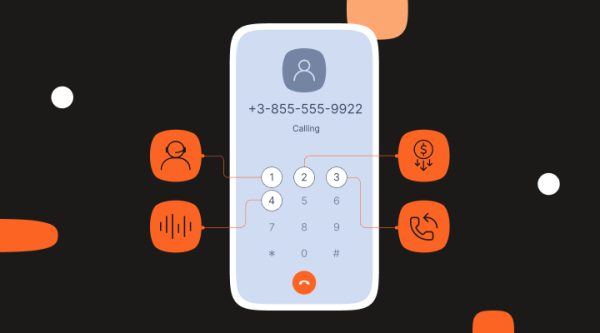
Modern IVR goes beyond frustrating phone trees. Conversational IVR powered by speech recognition lets customers describe issues naturally. AI routes calls based on intent or resolves simple requests without agent involvement. Self-service portals work across all channels, not just voice.
Security certifications and compliance
Verify the platform meets your industry requirements: GDPR, HIPAA, PCI DSS, SOC 2, ISO 27001. Ask where customer data is stored and confirm encryption standards.
This is where cloud vs premise based contact center security often surprises evaluators. Enterprise cloud platforms typically exceed on-premise security because they invest at scale in certifications that individual businesses can’t match.
API access for customization
Robust APIs let you build custom integrations, automate workflows, and extend platform capabilities without vendor dependency. Look for well-documented REST APIs with comprehensive functionality.
Ask about rate limits, authentication methods, and webhook support for real-time notifications. APIs separate platforms you can grow with from platforms you’ll outgrow.
These features matter today. But where is the industry heading?
Cloud contact center trends shaping 2026
The cloud contact center market is evolving fast. Understanding where the industry is heading helps you evaluate vendors and future-proof your investment when comparing on premise vs cloud contact center solutions.
Agentic AI: Beyond chatbots to autonomous agents
First-generation chatbots answered questions. Today’s agentic AI completes tasks autonomously, processing returns with refunds, rescheduling deliveries, updating account information with verification, and troubleshooting technical issues by running diagnostics. They escalate only when encountering true exceptions requiring judgment or empathy.
Agentic AI fundamentally changes what is cloud contact center ROI by handling complete workflows, not just answering simple questions. This dramatically impacts cloud contact center cost efficiency and agent capacity planning.
On-premise call center solutions can’t match this without expensive, complex integrations that become obsolete as AI advances. Cloud platforms build agentic AI into the core and improve it continuously.
AI copilots for agents: Real-time intelligence
Think of AI copilots as expert advisors sitting next to every agent:
- Knowledge surfacing: Surface relevant knowledge articles as conversations unfold. Agents don’t search documentation while customers wait.
- Response suggestions: Recommend next-best responses based on customer intent and conversation history. New agents perform like experienced ones.
- Auto-summarization: Summarize long conversations instantly. Agents switching channels or taking over from AI see context immediately.
- Sentiment detection: Flag frustration in real-time. Recommend de-escalation tactics before situations escalate.
- Background automation: Auto-fill forms, update CRM records, create tickets while agents focus on the customer conversation.
This technology widens the gap in cloud vs premise based contact center agent productivity. Cloud platforms deploy AI copilots across all agents instantly. On-premise contact centers require per-agent software installations and ongoing maintenance.
Conversational AI across all channels
NLU (Natural Language Understanding) powered chatbots now work consistently across WhatsApp, Viber, Instagram, Facebook, SMS, and web chat. Customers get the same intelligent automation regardless of where they reach out.
This omnichannel AI consistency matters for brands. Train one AI model. Deploy it everywhere. Customers experience the same brand voice and capability on every channel.
Most on-premise call center solutions lack this capability entirely. They were built for voice. Adding chatbots to digital channels means separate tools with separate training and inconsistent experiences.
Predictive analytics and proactive engagement
AI anticipates customer needs before they reach out:
- Churn prediction: Detect patterns suggesting cancellation risk. Proactively offer retention incentives or solutions before customers leave.
- Usage pattern analysis: Identify customers likely to have questions about recent purchases. Send helpful resources preemptively.
- Service issue detection: Spot product defects or service problems from conversation trends. Alert product teams and reach out to affected customers before they complain.
- Capacity forecasting: Predict volume spikes with greater accuracy. Optimize staffing and reduce cloud contact center cost from over-staffing or under-staffing.
This shift from reactive to proactive service delivery represents one of the biggest advantages when evaluating what is cloud contact center capability versus traditional models.
Hyper-personalization powered by CDPs
Cloud contact centers integrate deeply with Customer Data Platforms (CDPs) to access unified customer profiles. Agents see purchase history, preferences, sentiment, lifetime value, channel preferences, and previous interactions across all touchpoints.
AI uses this data to personalize automated responses. High-value customers get different treatment from one-time buyers. Frustrated customers get routed differently from satisfied ones. Product recommendations match actual purchase history.
The hybrid cloud contact center model keeping customer data on-premise while running conversations in cloud becomes increasingly common, satisfying data residency requirements while enabling advanced personalization.
Market growth accelerates
The cloud-based contact center market is expected to grow to $91.04 billion by 2030 at a compound annual growth rate of 24.2%. Three factors drive this growth:
- Remote work requirements: Businesses need platforms that support distributed teams. On-premise contact centers can’t compete here.
- AI capabilities: The gap between what cloud platforms offer and what on-premise systems can deliver widens monthly. AI advances too quickly for traditional upgrade cycles.
- Digital channel adoption: Customers demand support on WhatsApp, social media, and messaging apps. Adding these channels to on-premise call center solutions is prohibitively expensive.
The migration from on premise vs cloud contact center isn’t slowing. It’s accelerating as AI capabilities and channel requirements make cloud the only practical option for modern customer service.
Transform your customer experience with Infobip’s cloud contact center
Everything we’ve discussed, omnichannel support, AI automation, intelligent routing, and real-time analytics, comes together in Infobip’s cloud contact center platform, powered by AgentOS.
We use it ourselves: Infobip runs our own customer support with 600+ agents across 40+ data centers worldwide. We experience the platform as customers do and continuously improve based on real-world operation. When you choose Infobip, you’re choosing a platform we trust for our own business.
True omnichannel workspace: Agents manage voice, SMS, WhatsApp, Viber, email, chat, Instagram, Facebook, and Telegram in one unified interface. No channel switching. No lost context. This addresses the core limitation of on-premise call center solutions: the inability to unify digital and voice channels cost-effectively.
AI-powered from the ground up: Chatbots, agentic AI, agent assist tools, automated ticketing, and intelligent routing reduce agent workload. When evaluating which cloud contact center AI capabilities are available, see them in action rather than relying on vendor promises.
Hybrid cloud flexibility: Deploy fully in cloud, use a hybrid cloud contact center model, or choose region-specific deployment. Your data stays where regulations require while you access cloud innovation. This flexibility matters for businesses with data residency constraints.
Deep integration: Native connections to Salesforce, HubSpot, Zendesk, Microsoft Dynamics, plus robust APIs for custom integrations. Connect your entire customer service stack without middleware complexity.
Enterprise security: GDPR, HIPAA, PCI DSS, SOC 2, and ISO 27001 certified. Enterprise-grade security that often exceeds what individual businesses can achieve with on-premise contact centers.
Transparent pricing: Predictable cloud contact center cost structure with no hidden fees, no hardware refresh cycles, no emergency replacement costs.
FAQs about on-premise vs cloud contact centers
A cloud call center handles voice calls only, phone-based customer service delivered from the cloud. A cloud contact center is truly omnichannel, supporting voice plus digital channels like SMS, WhatsApp, email, chat, and social media in one unified platform. When comparing on premise vs cloud contact center solutions, verify whether vendors offer true omnichannel capability or just voice with limited digital add-ons.
Cloud contact center cost varies by agent count, channels, and features. Per-agent-per-month fees range from $80-150 for basic platforms to $120-200 for enterprise platforms with AI. Implementation fees run $5,000-$50,000+ depending on complexity. Total cost of ownership is typically 30-50% lower than on-premise over 5 years when you factor in eliminated hardware costs and reduced IT overhead.
Yes. Leading cloud based solutions meet or exceed on-premise contact center security standards with encryption in transit and at rest, compliance certifications (GDPR, HIPAA, PCI DSS, SOC 2, ISO 27001), multi-factor authentication, and redundant infrastructure. Enterprise cloud providers often invest more in security at scale than individual businesses can achieve with on-premise infrastructure.
Common challenges of migrating on-premise call center to cloud include agent resistance to change, integration complexity with legacy systems, data quality issues, and potential service disruption. Solutions: involve agents early in vendor selection, use phased migration approaches, clean data before migration, and run parallel systems during transition. Proper planning and phased rollout minimize these risks.
Yes. A hybrid cloud contact center keeps some functions on-premise while moving others to cloud. Common approaches include keeping voice on-premise while handling digital channels in cloud, or running primary operations in cloud with on-premise backup. This flexibility helps businesses with regulatory constraints or existing infrastructure investments when comparing on premise vs cloud contact center approaches.