





How to switch from SMS to RCS in 2026
To upgrade from SMS to RCS, you need to adopt a systematic approach, which includes evaluating the market, customer channel preferences, followed by technical readiness.

Rich Communication Services (RCS) is redefining enterprise communication by empowering businesses with interactive and rich media capabilities, an upgrade to the traditional SMS channel. As RCS for Business adoption continues to grow globally, many brands are now looking to upgrade from SMS to RCS to improve engagement and enable two-way, conversational communication. In this blog, we will guide you through a step-by-step process on how to change from SMS to RCS.
Changing from SMS to RCS
For end users
RCS for Business Messaging allows users to enjoy a rich communication experience by adding images, videos, and GIFs in their messages, which is not available in traditional text messaging. However, to enjoy these features, users must upgrade to RCS following a few simple steps.
Step 1: Check device and OS compatibility
Before enabling RCS, your customers need to confirm that their mobile device and operating system support it.
- Android users: Users must ensure that their mobile phone has the latest Android version, and Google Messages is set as the default messaging app.
- iPhone users: RCS is supported on iPhones running iOS 18 or higher. So, if your customer has the required version, they can enable RCS in the Messages app.
Step 2: Check carrier support
Carrier support is the most important factor when it comes to adopting RCS. Although most major carriers now support RCS, the availability can vary by region. Even if a user’s device is compatible with RCS, they can only activate the feature if the carrier in their region enables RCS on the network.
Step 3: Enable RCS on mobile phone
Users can activate RCS on their mobile phone once the device and carrier requirements are met. RCS can be enabled directly from the messaging app. No additional apps or downloads are required as RCS works inside the default messaging app.
On Android
- Open the Messages app > Google account profile picture > Messages settings > RCS chats > switch for Turn on/off RCS chats.
- If prompted, verify your phone number to activate RCS on your device.
- When verification is complete, the status appears as Connected
On iPhone (iOS 18+)
- Go to Settings> Tap on Apps> Select Messages> Tap on RCS Messages> Toggle the switch to Enable RCS.
- Once activated, RCS features will automatically be used when messaging supported contacts.
For businesses
Moving from SMS to RCS is not a hard switch, but a phased, data-driven approach that adapts to where your customers already are. Unlike consumers, enterprises must account for market readiness, carrier support, audience capability, compliance, and ROI before rolling out RCS at scale. Here’s what to keep in mind as you start plan to switch to RCS from traditional SMS channel.
Understand RCS adoption and market readiness
Before starting your RCS for Business Messaging campaigns, you must perform a market analysis to check its availability and usage in the region where your customers are. RCS adoption levels vary by market, making it critical for businesses to prioritize regions where momentum is strongest.
The US: from early adopter to RCS growth leader
The United States has become a lighthouse market for RCS, especially in 2025. With Apple’s support accelerating adoption, RCS usage has grown significantly across iOS and Android devices. According to Google, over 1 billion RCS messages are now sent every day in the US, marking a major shift in how brands and consumers interact through messaging.
This rapid growth makes the US a key market for enterprises planning RCS at scale. Additionally, RCS adoption is particularly strong across Europe, Latin America, and India, where Android penetration is high and carrier support is well established. These regions are already seeing RCS used at scale for promotions, customer care, and transactional messaging — making them ideal starting points for brands looking to move beyond SMS.
Reachability depends on carrier connectivity
RCS availability is tied to carrier support, which continues to expand globally. Major operators such as Vodafone, Orange, T-Mobile, AT&T, and others already support RCS, while additional networks are being added over time. Rather than treating this as a limitation, it’s best approached as a reachability check.
Before launching, you can review where RCS is supported and where Infobip already provides connectivity — and plan your rollout market by market. (we are creating map for connectivity so we can link it there then).
Know your audience with capability checks
Even in RCS-ready markets, not every device is RCS-capable. That’s why understanding your audience at a device level is key. With Infobip’s RCS capability check, you can see how many phone numbers in your own database are RCS-capable before launching a campaign. This helps you:
- Accurately estimate reach
- Optimize campaign design
- Predict costs more reliably
For users who are not RCS-capable, messages can automatically fail over to SMS, MMS, or another channel, ensuring no loss in reach or experience.
Become a verified RCS sender (Agent approval)
Sending messages on RCS requires you to have a verified RCS for Business sender, which is your brand’s identity. Without creating and validating your sender ID, you cannot send any messages on RCS. Here’s a step-by-step process to become a verified sender.
- Create RCS sender in the Portal: The guided flow walks you through everything step by step. We’ll need your brand name, contact and use case, and with your logo and banner handy, it takes just around 5 minutes.
- Testing different RCS format: Preview rich cards, carousels, buttons, videos — see how your messaging looks on actual devices.
- Launching your RCS sender: Submit launch requirements, and we’ll notify you as soon as your sender is approved. You’re ready to run your first campaign.
Manage consent, privacy, and compliance
RCS requires user opt-in but the good news is that existing SMS opt-ins are valid for RCS. If users have already consented to receive SMS messages, you can proceed with RCS messaging.
Recipients must always have a clear way to opt out of RCS messages.
- Send a short confirmation or “thank you” message
- Clearly explain how they can opt back in later if they change their mind
- Once a user opts out, you must stop sending messages until they explicitly opt back in
Integrate RCS into an existing messaging stack
Nowadays, most businesses use more than one communication channel, which can be a combination of WhatsApp, RCS, Viber, SMS, and more. RCS should be used as a channel that makes your existing omnichannel communication process strong, not as a replacement.
According to our Messaging Trends Report, there has been a 500% increase in the use of RCS as part of an omnichannel messaging strategy. To add RCS to your existing messaging mix, you can use a programmable API from any CPaaS provider such as Infobip. The Messages API integrates multiple messaging channels into one interface from which you can manage your communication process seamlessly. By bringing your channels under a unified platform, you can:
- Simplify orchestration: Intelligent routing of messages based on customer preference, channel capability, and cost-efficiency.
- Create an omnichannel experience: If a user clicks an interactive button in an RCS message, the follow-up confirmation can arrive via SMS.
Navigate message policies and content guidelines
Being a channel governed by rules of carriers and regulatory bodies, RCS has strict content guidelines, which prohibit sending certain types of content. For example, messages related to counterfeit goods, tobacco, animal cruelty, political content, and similar others cannot be sent on RCS.
Apart from content types, you also need to follow some specific guidelines regarding the interactive elements, file size, and more. Here are some key tips you should follow:
- Keep rich media files optimized for size to ensure fast loading times.
- Design button layouts to be clear and actionable on all screen sizes.
To ensure your messages meet the required guidelines and get smoothly delivered, you must conduct some tests before executing your actual campaigns.
Select and design business use cases
Once you have integrated RCS into your existing messaging stack, you need to identify the goals you want to achieve. For example, your goal can be to drive sales, generate more leads, or streamline your support, which you should align with the RCS for Business use cases. Here are some of the common use cases of RCS for Business:
Promotional campaigns
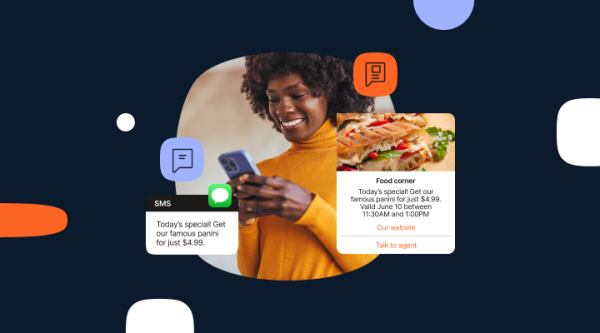
Use rich messaging features such as carousels, videos, and images to create eye-catching communication that results in a higher click-through rate. RCS for Business allows you to add powerful call-to-action buttons to drive higher conversion or generate leads.
Transaction updates
Go beyond plain SMS with images of products, real-time status updates, and quick action buttons for modifying delivery preferences. Send notifications and reminders to your customers on RCS about their transactions.
Customer support
Enhance your customer experience with a two-way communication feature of RCS for Business. Add RCS for Business as your CTA on your messaging ads and Google campaign. Your customers can ask questions, provide feedback, or share screenshots/videos of an issue directly.
Ensure security, verification, and brand trust
Trust is often a concern for brands when using digital messaging channels for sensitive communication. However, in reality, RCS offers better security compared to traditional SMS channels. With features such as verified sender ID, messages arrive with your official brand name, logo, and a verified RCS checkmark, which assures the customer that the message is being sent by a legitimate brand, thereby reducing instances of phishing.
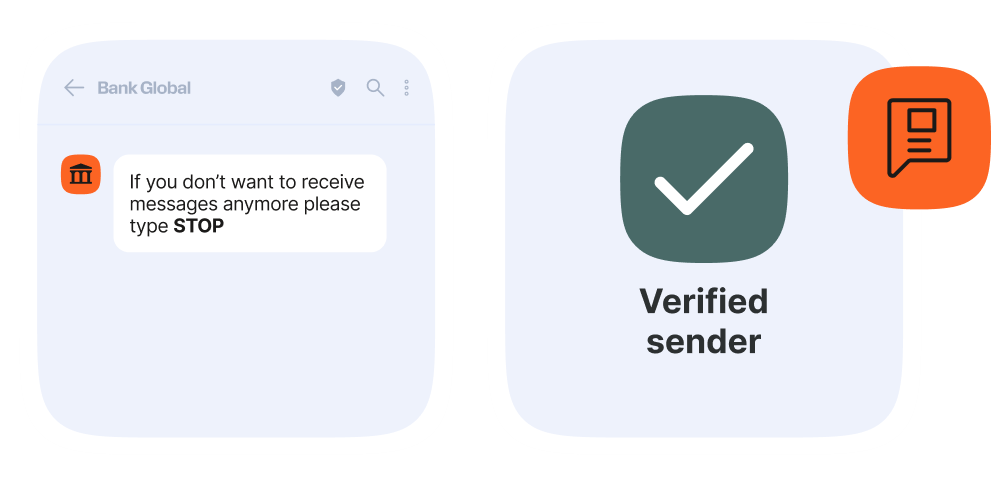
RCS for Business comes with advanced encryption, which provides added security to your communication. As brands opting for RCS for Business need to go through several validation processes set by carriers and Google, there are very few chances of any kind of security risk.
Transition strategy: Gradual migration, not replacement
Before you decide to change your messages from SMS to RCS, you must note that moving to a new communication channel should be a phase-by-phase approach. Here’s how you can start with your first RCS for Business campaign.
- Run a capability check to understand your audience.
- Inform customers that you’re now available on RCS, explain what the channel offers, and set clear expectations for the type of interactions they can have within the chat.
- Start with a pilot campaign by sending some less critical messages on RCS with SMS as a fallback option.
- Track the performance of your campaign against key metrics like deliverability, click-through-rate, and conversions.
- Based on proven ROI, expand to the next use case (e.g., adding marketing promotions).
By adopting a gradual approach, you can maintain your communication continuity and minimize any kind of operational risk. Once you are satisfied with the performance, you can change from SMS to RCS completely.
Evaluating costs, ROI, and scalability
Cost is one of the most important factors that businesses consider when choosing a messaging channel. So, if you are planning to switch from SMS to RCS, you must understand the different types of pricing structures of the messaging channels. Here’s a basic comparison of SMS and RCS to help you determine which channel best fits your business needs and delivers the strongest ROI.
| RCS | SMS |
|---|---|
| Reach locations where carriers support it. | Universally accepted channel, so higher reach and guaranteed delivery across all devices and networks. |
| Allows rich and interactive communication using images, videos, Gifs. | Plain text message that works anytime, anywhere. |
| Helps building increased trust using verified sender IDs with your logo, colors, and brand name. | Familiar and recognized by customers. |
| Advanced analytics. | Basic reporting. |
RCS pricing varies by market and carrier. While the basic RCS messaging may cost you similar to SMS, the conversational features of RCS are available at a higher price point. RCS pricing varies by market and carrier. RCS Basic is often priced similarly to SMS, while RCS Single can be around 20–30% higher.
RCS Conversational is usually about twice the price of SMS but includes a 24-hour session window for unlimited exchanges, making it cost-effective for two-way conversations. Some carriers price RCS as a premium product because of features like verified branded senders, delivery receipts, interactive media, and integrations with Google Wallet or Calendar, while others keep it lower to drive adoption. Although the cost per message may be higher, richer features and stronger engagement usually mean fewer messages are needed to achieve the same results.
For example, Digitaleo matched SMS campaign performance while sending three times fewer RCS messages. As RCS provides advanced analytics, you can see exactly when messages are delivered, viewed, and clicked, giving you powerful insights to tailor your approach and engage your audience effectively.
Infobip’s role in enabling enterprise RCS
As mentioned above, implementing RCS for Business involves going through a lot of procedures and following multiple compliances, which can be challenging for enterprises. Therefore, brands need a strategic partner like Infobip that can do all the complex work while they focus on their key business.
Infobip, a leader in RCS for Business, plays a key role in helping enterprises leverage the power of RCS to supercharge their campaigns. Through our seamless connectivity with global carriers and RCS technology providers, we ensure your RCS sender gets activated without any blockers. Our platform allows you to manage all your RCS campaigns from one dashboard, access advanced analytics, and take data driven decisions.
FAQs
RCS (Rich Communication Services) is the evolution of SMS – it supports images, videos, verified sender IDs, read receipts, and interactive buttons inside the phone’s native messaging app. It delivers app-like experiences without requiring third-party downloads.
RCS improves engagement, trust, and customer experience through branded, rich-media conversations. It lets companies move beyond plain text toward measurable, two-way interactions that boost conversion and satisfaction.
No. Businesses can run RCS and SMS campaigns in parallel. A hybrid approach ensures that every customer receives your messages – either in rich RCS format or via standard SMS if RCS isn’t supported.
You can assess readiness by analyzing device data, carrier coverage, and market adoption rates. Modern CPaaS platforms provide visibility into which contacts can receive RCS before launching.