




Automated customer service: Guide to customer service automation, benefits, and examples
A guide to automated customer service in 2026, from how it works and where it helps to the metrics, use cases, and risks that matter.

Automated customer service is any customer service task a system completes without a human agent doing the work. That can mean answering a question, looking up an order, routing a ticket, or resolving a request from start to finish. The point is not to remove people from customer support. It is to take repetitive volume off the team so humans spend time where judgment actually matters.
That definition has held for a decade. What changed is what “completes the task” now means. A rule-based bot could recognize a keyword and paste a link. An AI agent can read the account, check the order, apply the refund policy, issue the refund, message the customer, and log the whole thing. Same category. Completely different ceiling.
| Point | Summary |
|---|---|
| What it is | Customer service handled by an automated system rather than a live agent, across chat, email, voice, and messaging apps. |
| How it works | The system reads the customer intent, checks it against your data and rules, then resolves, acts, or escalates to a human with the full conversation attached. |
| Biggest benefit | Always-on resolution of high-volume, low-complexity requests, which is where most support cost sits. |
| Biggest risk | A customer who needs a person and cannot reach one. Every automated flow needs a visible way out. |
| Where to start | The single highest-volume, lowest-complexity request your team handles. Automate that one, measure it, then widen. |
What is automated customer service?
Automated customer service uses technology to perform customer service tasks with limited or no human agent involvement. In practice, that means an automated system handles the work a person would otherwise do: triaging a request, answering a frequently asked question, pulling up account information, sending a status update, or collecting customer feedback after the fact.
The tasks that automate well share a shape. They are high volume, they follow a repeatable pattern, and the correct answer can be derived from data you already hold. “Where is my order” is a perfect candidate. “I have been a customer for nine years and I am furious about the invoice” is not, and should never be routed anywhere except to a person.
Customer service automation is not one technology. It is a stack of them, and the difference between the layers of that stack is the difference between a bot that frustrates people and an automated support experience that customers actively prefer.
Rule-based automation, AI chatbots, and AI agents: What actually changed
Most confusion about automation in customer service comes from collapsing three very different things into the word “bot.” They are not the same, they fail in different ways, and they belong at different points in the customer journey.
| Layer | What it does | Where it works | Where it breaks |
|---|---|---|---|
| Rule-based automation | Matches keywords or menu selections to a scripted response. Deterministic. Fully predictable. | Opening hours, return policies, IVR menus, order status lookups, autoresponders. | Anything phrased in a way you did not anticipate. It has no model of intent, only a lookup table. |
| AI chatbots | Uses natural language processing to interpret what the customer meant, then answers from a knowledge base or a defined flow. | FAQs at scale, guided flows, lead qualification, information collection, first-line triage. | Multi-step work. It can tell you the refund policy. It cannot go and issue the refund. |
| AI agents | Interprets intent, decides on a course of action, calls the systems it needs, executes the steps, and reports back. It acts rather than answers. | Complete workflows: authenticate, look up, decide, act, notify, log. Complex or chained customer requests. | Situations that need accountability, empathy, or a judgment call outside policy. These belong to a human, always. |
The shift from the second row to the third is the whole story of the last two years. It moves the question from “can automation answer this” to “can automation finish this,” and it moves the ceiling on what automated customer support is worth from deflection to resolution.
How does automated customer service work?
Whatever technology sits underneath, an automated customer service system follows the same five-step arc. Understanding it matters, because almost every bad automation experience is a failure at a specific one of these steps rather than a failure of the idea.
| Step | What happens | What it depends on |
|---|---|---|
| 1 | The customer makes contact | The customer reaches out on their channel of choice: live chat, WhatsApp, email, voice, or in-app messaging. Nothing works if the automation only exists on the one channel your customers do not use. |
| 2 | The system reads the intent | Natural language processing interprets what the customer is actually asking for, not just which keywords they used. Named entity recognition pulls out the specifics: the order number, the location, the product. |
| 3 | The system checks context | The automated system looks up who this customer is, what they have bought, what they contacted you about last week, and what channel they prefer. Automation without context is just a faster way to ask people to repeat themselves. |
| 4 | The system resolves or acts | It answers the question, surfaces the article, updates the record, processes the transaction, or completes the workflow. A chatbot resolves by answering. An AI agent resolves by doing. |
| 5 | The system escalates cleanly | When the request exceeds what automation should handle, it routes to the right human with the full conversation history, the customer data, and the reason for escalation already attached. A handover that makes the customer start over is worse than no automation at all. |
Each interaction feeds the next. Conversation logs show you which intents the system misreads, which flows customers abandon, and which questions your knowledge base cannot answer, which is how customer service automation gets better instead of just getting older.
The state of customer service automation
The market pressure here is simple. Customer expectations moved faster than support headcount ever could. People expect an answer at eleven at night, on the channel they already have open, without repeating their account number three times, and they will leave over it.
Meanwhile a large share of customer service operations still run on a model designed for the telephone: a queue, a menu, and a room full of agents answering the same forty questions. That model is expensive at every level. It costs money in headcount spent on work that does not need a person, it costs satisfaction in hold times, and it costs retention when the person who finally answers has no idea what the customer already told the automated system.
What is genuinely new is not that businesses want to automate customer service. It is that the technology finally does what the category has been promising since the first chatbot: not deflection, but resolution.
What are the benefits of automated customer service?
The benefits of automated customer service are usually listed as though they are independent. They are not. Almost all of them are downstream of one thing: taking predictable work off people who are expensive, finite, and asleep at 3am.
1. Always-on support
Automated customer support is not constrained by contact center opening hours, staffing rotas, or time zones. A customer in Singapore gets the same answer at the same speed as a customer in Dublin, at any hour. This matters most for the requests that are urgent to the customer and trivial to you: a password reset at midnight, a delivery window on a Sunday, a booking change on a public holiday. Left to a queue, those become complaints. Automated, they become non-events.
2. Lower operational costs
The mechanism is specific: every request an automated system resolves is a request that never consumed agent minutes. If forty percent of your volume is “where is my order,” and an automated system handles it end to end, you have not made your agents faster. You have removed forty percent of the work. That is a different order of saving than any efficiency initiative can produce, and it compounds during peak season when marginal agent capacity is at its most expensive.
3. Speed and efficiency
Automation collapses the tasks that are slow only because a human has to do them by hand. Pulling up a record, cross-referencing an order, checking a policy, and typing a reply is four minutes of agent time and about four hundred milliseconds of machine time. Respecting the customer’s time is consistently one of the strongest drivers of a positive customer experience, and this is the most direct way to do it.
4. Customer satisfaction and loyalty
Faster first responses, shorter resolution times, and consistent answers across every touchpoint are what customer satisfaction is actually made of. Consistency deserves particular attention: an automated system gives the same answer to the same question every time, which is something a team of two hundred agents across four sites can never quite manage. Add customer data and the automation can also personalize, acting as a shopping assistant that knows what someone bought last time rather than a menu that treats every customer as a stranger.
5. Agent satisfaction
Agents do not quit because the work is hard. They quit because the work is repetitive and the queue never ends. Automating high-volume, low-value customer queries leaves the work that is actually interesting: the complex case, the upset customer, the problem nobody has seen before. And when the automation hands over with the conversation history and customer profile already attached, the agent starts the conversation informed rather than apologizing for asking the customer to repeat themselves.
6. Scalability
Scale is where the economics break for human-only customer support. Doubling volume means doubling headcount, and headcount takes months to hire and train. An automated system absorbs a tenfold spike on Black Friday the same way it handles a Tuesday. Just as importantly, automation is testable: you can change a flow, measure the effect on resolution rate, and roll it back in an afternoon. You cannot A/B test a support team.
7. Omnichannel capabilities
Automation lets you meet customers on the channels they already use rather than the ones you find convenient: live chat, email, in-app messaging, Instagram, RCS, voice, and messaging apps like WhatsApp. The value is not the channel count. It is that the conversation is the same conversation regardless of where it happens, because the customer data sits underneath all of them. A customer who starts on WhatsApp and calls an hour later should not have to explain themselves twice.
Automated customer service examples
Not every example of customer service automation involves AI, and pretending otherwise makes the category harder to start with than it needs to be. Here are ten automated customer service examples, roughly ordered from simplest to most capable.
- Rule-based keyword chatbots. The entry point. They recognize a keyword and point the customer at the right information source. Unglamorous, cheap, and still the correct answer for a small set of well-defined questions.
- AI chatbots. They interpret intent using natural language processing rather than matching strings, which means they handle the customer who says “my thing arrived broken” as well as the one who says “return.” They answer simple customer queries, qualify leads, and collect information before a human ever sees the conversation.
- Intelligent routing. Automation prioritizes urgent or high-value tickets and directs them to the agent best equipped to handle them, based on skill, language, capacity, and conversation history. It replaces the support team manually sifting through a shared inbox.
- Automated email response and ticketing. An automated email response acknowledges the inquiry, sets an expectation, and attaches a ticket number, while the system tags and categorizes the request behind the scenes. It is the cheapest possible fix for the “did anyone even receive this” problem.
- Interactive voice response (IVR). Automated voice handling that greets callers, identifies what they need, answers common questions, and routes the rest. Modern IVR is conversational rather than menu-driven, which removes the “press 4 to hear these options again” experience everyone rightly hates.
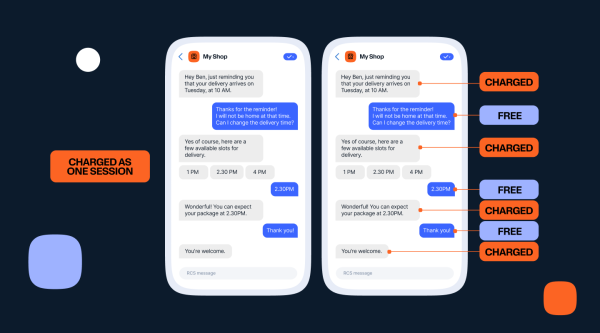
- Automated notifications and proactive updates. A shipping delay, an outage, an appointment tomorrow. Proactive messages prevent the contact entirely, which is the cheapest ticket you will ever handle: the one nobody opens.
- AI knowledge base. A centralized knowledge base that surfaces the right article on demand rather than making the customer search for it, and which also feeds the chatbot and the agent. One source of truth. Three consumers.
- Automated customer surveys. Customer feedback requests triggered at the moment the interaction ends rather than a week later. Timing is most of what determines whether anyone responds.
- Automatic translation. Real-time conversion of a conversation into the customer’s language, so a single support team can cover markets it has no native speakers for.
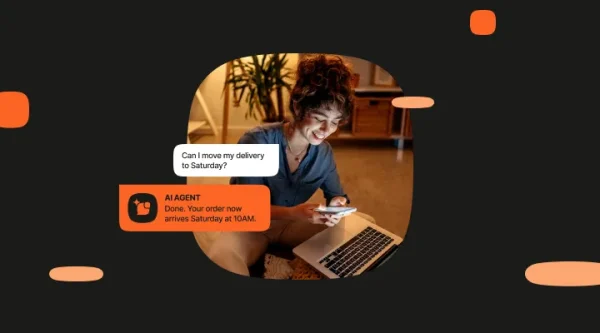
- AI agents. The category that changes the maths. An AI agent does not hand the customer an article about how to change their booking. It changes the booking, confirms it on the channel they contacted you from, and updates the record.
Automated customer service tools and software
Automated customer service tools tend to be sold as a single product, which obscures the fact that a working automated support system is four different things doing four different jobs.
- The conversation layer. Chatbot building platforms and AI agents. This is what the customer talks to. It is the part everybody shops for and the part that matters least if the other three are missing.
- The data layer. A customer data platform holding a unified profile: who this person is, what they have bought, every conversation they have had with you, across every channel. Automation without this layer is confidently wrong.
- The human layer. A cloud contact center that receives escalations with full context and gives your customer service agents suggested responses and next-best actions. Automation is only as good as its worst handover.
- The channel layer. The messaging infrastructure itself: SMS, RCS, email, voice, live chat, in-app messaging, WhatsApp, Viber, Instagram. Deliverability and reach are unglamorous and decide whether any of the above reaches the customer.
The practical test when evaluating customer service automation tools is not which one has the best chatbot builder. It is whether the four layers actually share state, or whether you are being sold four products and an integration project.
Customer service automation use cases
Five examples of customer service automation as it works in production, each framed as the situation and the solution.
Improve lead generation
Situation: you need a new communication channel that provides 24/7 conversational support, improves the customer experience, and turns support conversations into qualified pipeline instead of dead ends.
Solution: deploy an AI chatbot over a verified WhatsApp Business Platform account. The bot digitalizes the customer journey, cuts waiting time to zero, resolves the inquiry, and passes qualified leads into the journey with the context attached. Because the conversation runs in one system, the lead does not arrive as a name and an email. It arrives with everything the customer said.
Optimize service and support
Situation: support is scattered across channels and tools, the contact center cannot see what happened on WhatsApp, and every escalation starts from zero.
Solution: unify every digital channel on one platform, then connect the cloud contact center solution, the AI chatbot, and the Conversational CDP modules so they share the same customer profile. Routine customer requests resolve automatically. Everything else lands with a human who already has the history. The result is fewer handoffs, shorter resolution times, and a support team that stops working blind.
Moving to Infobip helped us take full control of our contact center. The faster resolution resulted in a remarkable customer satisfaction improvement. In fact, we were able to accelerate our resolution time by 144x!

Dayse Ponce Ferreira Lepore
Service and Technical Support Manager, Omnilink
Provide account status
Situation: customers want their account information instantly and without friction. Your contact center agents are spending their day reading balances aloud instead of resolving the issues that need their expertise.
Solution: build a chatbot that authenticates the customer and returns their account status on demand. Security is the whole ballgame here, so use biometrics or a verified identity check before any account data is disclosed. Done properly, this removes one of the highest-volume, lowest-value queues in financial services entirely.
Schedule appointments
Situation: appointment reservations arrive across half a dozen channels and land in as many different tools, so nobody has a single view of the calendar and customers get double-booked.
Solution: connect the cloud contact center with an AI chatbot and customer data segmentation so the reservation process runs in one place. Agents handle multiple appointment conversations at once, customers book on their favorite chat app, and confirmations and reminders go out automatically. Customer satisfaction rises for the boring reason that people stop missing appointments.
Connect people with lost property
Situation: your airline passengers occasionally misplace personal belongings, which causes real distress and generates a support contact that is urgent, emotional, and hard to route.
Solution: let passengers report the situation through your customer service chatbot. Using named entity recognition, the chatbot identifies both the intent and the location, then directs the customer to exactly the right place to receive help. This is a good illustration of where automation earns its keep in an emotional moment: not by pretending to sympathize, but by removing every minute of delay between the problem and the person who can fix it.
What are the disadvantages of automated customer service?
Automated customer service has real failure modes, and the vendors who skip this section are the reason so many customers assume any chatbot is going to waste their time. The pros and cons are worth stating plainly.
- The loss of the personal touch. Some customers want a person, and no automated system replaces that. Many still prefer human assistance when the stakes are high.
- Escalation failure. The worst automated support experience is not a bot that gets the answer wrong. It is a bot with no visible exit. An upset customer trapped in a flow becomes an angrier customer and often a former one. Every automated flow needs an obvious route to a human.
- Over-automation. Automating a process that was already broken produces a broken process running faster. Automation exposes bad policy, it does not fix it.
- Context loss at handover. If the human picks up without the conversation history, you have added a step to the customer’s journey rather than removing one. This is a data architecture problem masquerading as an automation problem.
- Data security and compliance. Automated systems collect and process sensitive customer data at volume. Encryption, access control, and regulatory compliance are not optional extras, and an AI agent that can act on the customer’s account raises the stakes further.
- Maintenance debt. An automated system reflects the business it was built for. Change a store address, a policy, or a product line and the automation is wrong until somebody updates it. Automation is a system to maintain, not a project to finish.
None of these are arguments against automating customer service. They are arguments for automating it deliberately, with escalation paths, unified data, and someone accountable for keeping it current.
How to automate customer service in six steps
Like any digital investment, automating your customer service starts with a defined customer service strategy and measurable business goals, not with a tool purchase.
- Map the customer journey. Identify the channels customers actually use, the customer needs at each stage, and where the friction sits. You cannot automate a journey you have not described.
- Pick the tasks worth automating. Look for high-volume, repeatable customer service tasks with a data-derivable answer. Greeting, account lookup, order status, verification. Start with one.
- Reserve the rest for people. Explicitly name the customer service processes that require empathy, nuance, or a judgment call, and route them straight to a human. Complaints and billing disputes belong here.
- Choose tools that share data. The evaluation criterion is whether the conversation layer, the data layer, the human layer, and the channel layer share state. A no-code AI chatbot builder means you do not need engineering resources to launch, which matters more than it sounds.
- Test before you launch. Walk the flow yourself as a customer. Try to break it. Try to reach a human. Run mock inquiries to verify routing. Then align the customer service team on who owns the automation and who maintains it.
- Monitor, then widen. Track the metrics below, read the conversation logs for the intents the system misreads, fix them, and only then automate the next thing.
It is worth repeating the point the original version of this article got right: automated tools cannot help with everything. Your automated system needs to hand complex tasks to live agents seamlessly, with the relevant customer data and conversation history already attached. This is exactly why a chatbot is worth integrating with a cloud-based contact center rather than running it standalone. The handover is the product.
How to measure automated customer service
Measure before and after you automate a task, or you will have no idea whether it worked. These are the metrics that matter and, more usefully, what each one actually tells you.
| Metric | What it measures | What it is good for |
|---|---|---|
| Containment rate | The share of conversations the automated system finishes without a human. | The headline number for automation ROI. Watch it alongside CSAT: containment that rises while satisfaction falls means you are trapping people, not helping them. |
| Deflection rate | The share of contacts prevented entirely, usually by self-service or proactive notification. | Measures the tickets that never happened. Easy to overclaim: a customer who gives up is not a customer you deflected. |
| Customer satisfaction score (CSAT) | How satisfied a customer was with a specific interaction. | The guardrail on every other number here. Segment it by automation tool so you know which flow is the problem. |
| Customer effort score (CES) | How hard the customer had to work to get their issue resolved. | The most honest metric in automated customer support. It catches the flow that technically resolved the issue after eleven exchanges. |
| First contact resolution (FCR) | The share of issues resolved on the first interaction. | Tells you whether automation is resolving or just relaying. A high containment rate with low FCR means customers are coming back. |
| Average handle time (AHT) | How long an interaction takes end to end. | Useful for the human queue after automation takes the simple work away. Expect it to rise: your agents now handle only the hard cases. That is the system working. |
| Service level | The share of inquiries handled within a target timeframe. | The operational commitment. Automation should move this before it moves anything else. |
Beyond the numbers, read the conversations. Reviewing interactions between customers and bots surfaces the common issues, the misread intents, and the drop-off points that no dashboard will ever show you, and it doubles as training material for your customer service agents.
Automated customer service on AgentOS
Most automated customer service software sits on top of a support desk. AgentOS is built the other way round: it is an operating system for agentic customer experiences, where the intelligence layer and the channel layer are the same platform, and the modules share context rather than integrating with each other.
That distinction is the difference between an AI agent that can tell a customer about their order and one that can do something about it. In practice the modules involved in automating customer service are:
- Conversational AI agents. Autonomous agents that handle complete workflows from start to finish, connect to your systems and data sources, and learn from every interaction. Built in a studio, with control and visibility retained by your team.
- Chatbot Building Platform. AI chatbots deployed across every channel to answer FAQs, route conversations, collect information, and qualify leads, with no coding experience required.
- Cloud Contact Center. AI-to-human handovers arrive with complete context: customer history, suggested responses, and next-best-action recommendations the moment an agent takes over.
- Conversational CDP. Unified real-time customer profiles enriched with conversational insights, engagement patterns, and sentiment, which is what makes personalized service possible instead of aspirational.
- Journey orchestration. Connects support, marketing, and sales into a single journey so automation across departments shares context and coordinates handoffs.
- Insights and analytics. Sentiment and intent trends, agent productivity, and channel performance, plus automated diagnostics that flag issues before they escalate.
All of it runs over the channel layer directly: SMS, RCS, email, voice, live chat, in-app messaging, WhatsApp, Viber, Instagram, and more, on infrastructure built for carrier-grade reliability and enterprise compliance. Create an AI agent once and activate it across every channel from one platform.
Frequently asked questions about customer service automation
Automated customer service is any customer service task completed by technology rather than a human agent, such as answering a frequently asked question, routing a ticket, providing an account status, or resolving a request end to end. It typically combines rule-based automation, AI chatbots, and AI agents across channels like chat, email, voice, and messaging apps.
An automated system reads the customer’s intent using natural language processing, checks it against your customer data and business rules, then either resolves the request, performs the action required, or escalates to a human agent with the full conversation history attached. Every interaction feeds back into the system, improving accuracy over time.
The main benefits of automated customer service are around-the-clock availability, lower operational costs, faster response and resolution times, higher and more consistent customer satisfaction, reduced agent workload on repetitive work, the ability to scale without scaling headcount, and consistent omnichannel coverage.
The pros are speed, cost, consistency, and 24/7 availability. The cons are the loss of the personal touch, the risk of trapping customers in a flow with no route to a human, context lost at handover, data security obligations, and the ongoing maintenance an automated system needs to stay accurate. Most of the cons are design failures rather than inherent limits.
An AI chatbot interprets what a customer means and answers, usually from a knowledge base or a defined flow. An AI agent interprets, decides on a course of action, calls the systems it needs, and executes the steps. The chatbot tells the customer the refund policy. The agent issues the refund.
A working automated customer service system needs four things rather than one product: a conversation layer, a data layer, a human layer, and a channel layer. The question worth asking any vendor is whether those four share data natively or require an integration project.
Yes, and usually sooner than expected. Small teams feel repetitive volume more acutely because there is no slack in the rota. Automating a single high-volume request, such as order status or opening hours, with a no-code chatbot builder tends to return time immediately without any engineering resource.
It depends entirely on the platform. Automated systems process sensitive customer data at volume, so encryption, access control, and compliance with regulations such as GDPR are the baseline. Where an AI agent can act on a customer’s account, identity verification before disclosure and a full audit trail of what the agent did become essential rather than optional.