


Knowledge base chatbots: What they are, how to build one, and how RAG makes them accurate
Ask a chatbot something outside its script and most either loop back to a canned response or invent an answer that sounds right but isn’t. A chatbot knowledge base fixes that by grounding every response in your actual content.

When a chatbot doesn’t have the information it needs, it has limited options: it may give a vague response, redirect the user, or generate an answer that sounds convincing but is incorrect. None of these outcomes builds trust. A chatbot knowledge base solves this. Instead of guessing, the chatbot retrieves the answer from your actual documentation and generates a response grounded in it.
This matters because customers expect instant, accurate answers on every channel. One hallucinated policy detail can cost you more than a slow reply ever would. Retrieval-Augmented Generation (RAG), the architecture that grounds these answers, has become the default approach behind AI chatbots in 2026.
What is a chatbot knowledge base?
A chatbot knowledge base is a structured repository of content that an AI chatbot retrieves from to answer questions accurately. Typical content includes product docs, FAQs, policies, help center articles, and internal wikis.
A knowledge base on its own is a static, browsable repository. Users search it manually, scan a list of articles, and hope the third result answers their question. A chatbot is the conversational interface: it takes a question in natural language and responds in kind. A knowledge base chatbot combines both. The user asks a question conversationally and gets a direct answer, instead of a list of articles to search through themselves.
In 2026, this category is no longer a fixed destination. Knowledge base chatbots sit on a broader spectrum, from simple retrieval to full AI agents that reason across multiple data sources and take action. A knowledge base chatbot answers what it can find. An AI agent decides what to do with what it finds. Where your use case sits on that spectrum shapes which platform capabilities actually matter to you.
How knowledge base chatbots work: RAG explained
Most guides tuck this section below the build steps, treating it as an afterthought. That’s a mistake. This is the architecture decision that determines whether your chatbot is trustworthy at all.
Retrieval-augmented generation (RAG) in plain terms
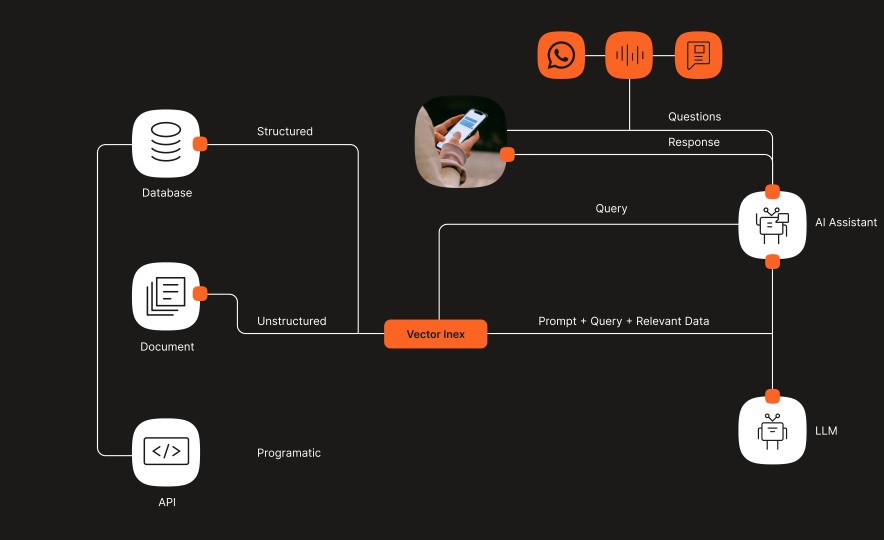
RAG works in three steps. First, the system converts a user’s query into a vector, a numerical representation of its meaning, not just its keywords. Second, it runs a semantic search against your knowledge base to find the passages most relevant to that meaning. This works even when the wording doesn’t match exactly. Third, a large language model (LLM) takes those retrieved passages as context and generates a natural-language answer grounded in them.
The result: the chatbot isn’t answering from general training data. It’s answering from your documentation, retrieved fresh for every query.
Why RAG prevents hallucination
Without RAG, an LLM-based chatbot answers from whatever it learned during training. That training data may be outdated, generic, or simply wrong for your business. RAG constrains the model to respond based on retrieved source content. Mature implementations also attach source attribution to each answer, showing which article or document it came from.
The second safeguard is the confidence threshold. When the retrieval step doesn’t surface a passage that confidently matches the query, a well-built system doesn’t force an answer. It escalates instead of guessing. That single design choice separates two very different chatbots. One says, “I’m not sure, let me connect you with someone who can help.” The other fabricates a policy that doesn’t exist.
RAG vs. fine-tuning
Fine-tuning retrains the model’s weights on your data. That’s useful for adjusting tone or style, but expensive to redo every time your content changes. RAG retrieves from a live, updatable knowledge base at query time, so updating a policy document or FAQ takes effect immediately. No retraining cycle required.
RAG is the more practical architecture for knowledge that changes often: pricing, product availability, and support policies. Fine-tuning has its place for specialized domain language or brand voice, but it isn’t a substitute for keeping factual answers current.
Static RAG isn’t the end state either. For a look at RAG systems that decide when and how to retrieve rather than following a fixed pipeline, see our guide to agentic RAG.
How to create a chatbot knowledge base
Building the knowledge base itself follows a repeatable process, whether you’re starting from scratch or migrating existing documentation.
1. Gather your source content
Start with what you already have: FAQs, product documentation, policy documents, help center articles, and internal wikis. Prioritize the content that answers your highest-volume questions first rather than trying to digitize everything on day one. A focused set of accurate documents outperforms a large set of stale ones.
2. Connect your knowledge sources
Most modern chatbot platforms accept document uploads (PDF, DOCX, TXT) and URL crawling, pulling content directly from an existing help center or website. Infobip’s chatbot builder currently supports two ingestion methods: document upload and URL crawling.
3. Let the platform chunk and index content
Once you connect your content, the platform breaks it into smaller passages (chunking) and converts each into a vector embedding for semantic search. This happens automatically in a well-built system, no manual tagging or keyword mapping required. You upload the document; the platform makes it retrievable.
4. Test, monitor, and improve
Launch with your highest-priority content, then watch what the chatbot can’t answer. Every real conversation becomes a data point for what’s missing from your knowledge base.
No-code, low-code, or pro-code: Build your way
Not every team building a knowledge base chatbot has the same resources. A no-code visual builder lets non-technical teams assemble a chatbot through drag-and-drop elements and direct document upload, no developer required. Teams that want more control over custom logic can use low-code JavaScript within the same builder. Engineering teams building complex, enterprise-grade workflows can go pro-code with Python, using frameworks like LangGraph and AutoGen for multi-step orchestration.
If you’re evaluating the technical implementation in depth, Infobip’s AI chatbot builder module within AgentOS documents all three build paths. For hands-on setup, check the developer documentation for exact configuration steps.
Customer-facing vs. internal knowledge base chatbots
Most knowledge base chatbot vendors specialize in one side of this divide. Customer support platforms build for external use cases. Internal knowledge tools build for employees. Few platforms serve both from the same underlying builder. That matters if your organization needs both types of chatbot.
External: Customer support and self-service
Customer-facing knowledge base chatbots handle the questions that would otherwise reach a support queue: order status, policy clarifications, product specifications, troubleshooting steps. Every answer traced back to a source document reduces the risk of a chatbot promising something your policy doesn’t actually cover.
Internal: Employee knowledge access
Internal knowledge base chatbots serve a different audience with the same underlying mechanics. Think HR policy questions during onboarding, IT troubleshooting steps, and compliance documentation employees need fast, without digging through a shared drive. The retrieval and grounding logic is identical. Only the knowledge base and access permissions change. A platform that supports both use cases from one builder means your team configures the pattern once and reuses it. You’re not learning two separate tools for what is functionally the same problem.
What happens when the chatbot can’t answer?
Every knowledge base has gaps. Some questions the chatbot genuinely can’t answer from available content. Others need reasoning across multiple systems instead of a single retrieved passage. What happens next determines whether the experience holds up.
A well-built system uses a three-tier model. First, the knowledge base chatbot attempts the answer using RAG. If confidence is low, or the query needs multi-step reasoning, the chatbot escalates to an AI agent. Multi-step reasoning might mean cross-referencing an order history with a return policy. The AI agent can reason across multiple data sources and take action, rather than only retrieve information. If the situation still needs human judgment, a human agent takes over.
That handoff is where most implementations fall apart. Done right, the human agent receives the full conversation history, the customer’s CDP profile, and session data. The customer never has to re-explain what they already said.
The handoff does not include AI-generated suggested responses for the agent to approve. The agent works from the preserved context and their own judgment, not a pre-written answer. That distinction matters for accountability. A human agent who takes over a conversation is making their own call, informed by full context, not rubber-stamping an AI suggestion.
Deploying knowledge base chatbots across channels
A knowledge-grounded chatbot is only as useful as the channels it reaches. Most competing platforms in this space deploy on one to three channels, typically web chat plus email. That forces you to rebuild or duplicate your knowledge base if you want to reach customers anywhere else.
The AgentOS chatbot builder supports 10 native channels from one configuration. Those channels are SMS, RCS, Apple Messages for Business, Viber, WhatsApp, Facebook Messenger, Instagram, Telegram, LINE, and Live Chat. You don’t rebuild your knowledge base or your conversation logic per channel.
For global deployments, the same knowledge base needs to work across markets without duplication. AgentOS supports 130+ languages with automatic detection. A single knowledge base serves customers in their own language, without maintaining separate content per market.
Choosing a knowledge base chatbot platform
Once you understand how these systems work, the harder question is evaluating which platform to build on. Here’s what to ask:
RAG architecture and hallucination prevention
Ask vendors directly how responses are grounded, not just whether they use “AI.” What happens when confidence is low? Does the system escalate, or does it produce an answer regardless? Source attribution and clear escalation triggers are the two signals to check. They separate a genuinely RAG-grounded system from one that just layers generative AI on top of a search box.
Knowledge source flexibility
A platform that only accepts a proprietary content editor limits how fast you can launch. Look for document upload, URL crawling, and a clear roadmap for API and third-party system connections, not just a single ingestion method.
Omnichannel and multilingual reach
One knowledge base should work everywhere your customers are, not just on the channel the platform was originally built for. Ask how many channels the platform natively supports, rather than bolts on through a third-party connector. Also check whether it handles languages automatically or only through manual configuration per market.
Security and compliance
Knowledge base chatbots handle customer data and, in internal deployments, employee data too. Ask specifically about SOC 2 Type II and ISO 27001 certification, GDPR compliance, and data residency options. Also confirm whether every AI-generated response gets logged in an audit trail. Infobip’s AgentOS platform holds SOC 2 Type II and ISO 27001 certification and is GDPR compliant.
Analytics and knowledge gap detection
Fallback rate, containment rate (the share of conversations resolved without a human handoff), and visibility into top unanswered queries tell you where your knowledge base has gaps and where to invest next. A platform with a native Conversational CDP personalizes every knowledge-grounded response with the customer’s own history and context, not just the retrieved document. Infobip is the only chatbot builder with a native CDP; most competitors connect one through a third-party integration instead.
Real results from knowledge-grounded chatbots
LAQO Insurance deployed an AI chatbot connected to its knowledge base to handle routine customer queries. The result: 30% of all queries resolved by the chatbot automatically, with 90% resolved within 3–5 interactions.
Farm Superstores rolled out a WhatsApp chatbot grounded in its support content and cut operational costs by 60%.
Bolt used a WhatsApp-based sign-up journey to replace a five-stage web form, increasing driver registration completions by 40%. This result centers on conversion, not knowledge retrieval. But it demonstrates the same underlying principle: a conversational interface that gives people direct answers converts better than forcing them to hunt through static pages.
Getting started with a knowledge base chatbot
- Step 1: Start with your highest-traffic FAQs and documentation. Don’t try to digitize your entire knowledge base on day one. Identify the questions your support team answers most often and connect that content first.
- Step 2: Pick a platform with native RAG and a clear escalation path. The architecture matters more than the feature list. Confirm how the system handles low-confidence queries and what happens when the chatbot genuinely doesn’t know the answer.
- Step 3: Launch on one channel, monitor knowledge gaps, and expand. Deploy where your customers already expect instant answers, typically WhatsApp, then use fallback analytics to identify what content to add before expanding to more channels or use cases.
Infobip’s AI chatbot builder module within AgentOS combines RAG-powered retrieval, three-tier escalation, and omnichannel reach in one platform. It escalates to AI agents and human takeover through Cloud Contact Center. Your knowledge base chatbot doesn’t need to be rebuilt every time you add a channel or a market.