




WhatsApp Flows for Business: Build custom in-app customer journeys (2025 guide)
Discover how WhatsApp Flows can improve your customer journey. In this blog, we’ll explain what they are, how to set them up, and explore the top use cases.

WhatsApp Flows let you deliver app-like, multi-step journeys inside the WhatsApp chat your customers already use. No tab switching. No drop-offs. Just faster launches, higher conversions, and lower support costs.
What if you could design a full WhatsApp flow in less than a day, test variations, and go live without writing a line of code. With Infobip AI Agent, you can. In this guide, we explain what WhatsApp Flows are, how to build them in three different ways, and the top WhatsApp Flows use cases to drive growth.
What are WhatsApp Flows
WhatsApp Business Flows guide users through tasks like browsing products, filling out forms, booking appointments, placing orders, and sharing feedback without leaving the chat. By using these dynamic Flows, WhatsApp allows you to deliver app-like interactions, and keep context intact from hello to pay, and improve customer engagement through business messages.
Flows are built from visual screens, reusable components such as text, input fields, lists, and logic to deliver a personalized experience or dynamically update content.
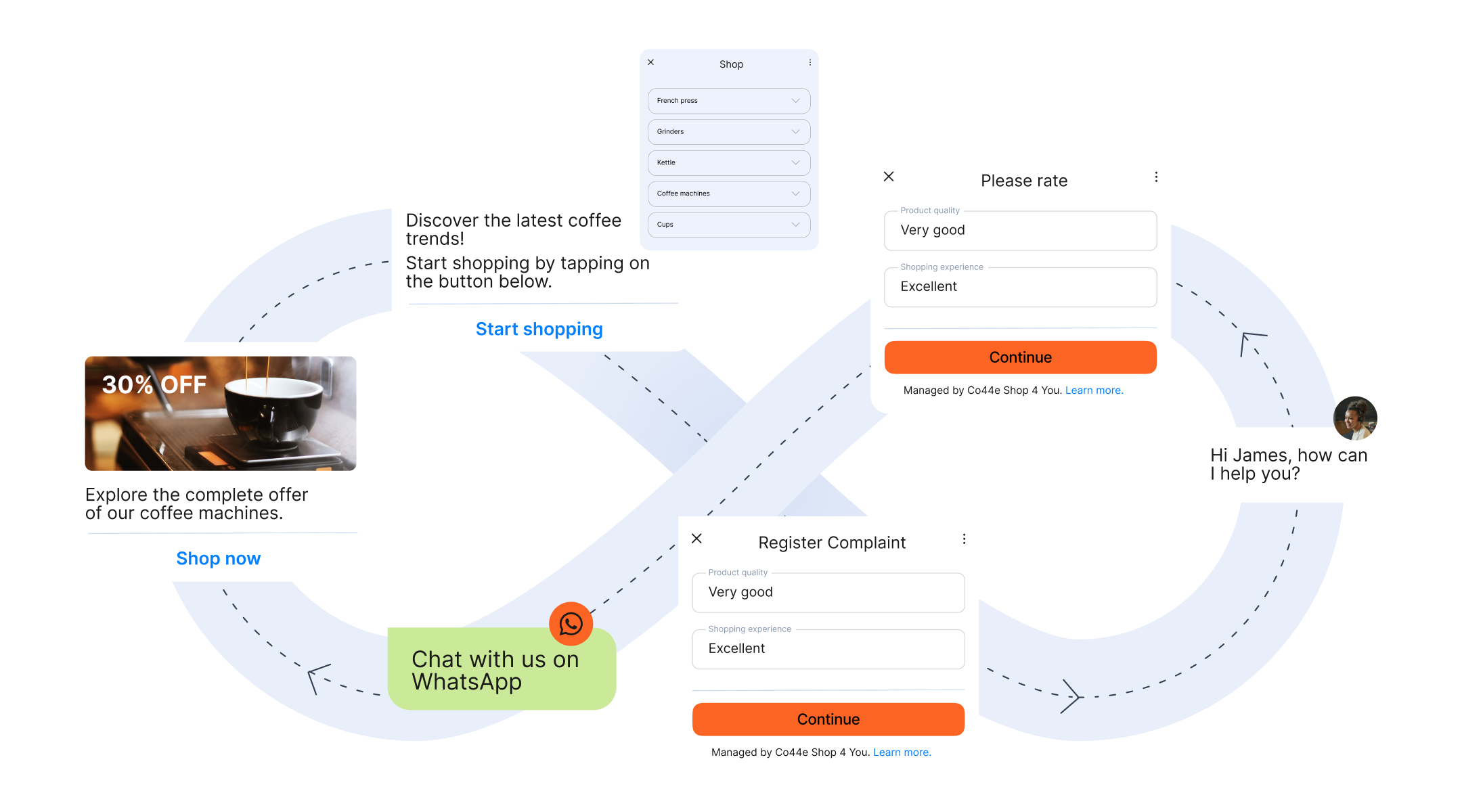
Flow types: static vs dynamic
- Static flows: Simple, form-like flows for structured data collection such as generating leads, event registrations, or product interest. They behave like Google Forms inside WhatsApp. You can create them end-to-end with Infobip AI Agent’s flow builder. Static flows support all components except images and do not require any backend connection.
- Dynamic flows: Website-like experiences inside WhatsApp with real-time interactions, backend data exchange, and support for images. Use dynamic flows for advanced use cases like appointment scheduling, order management, or transactional workflows. Infobip AI Agent can generate the initial structure. Backend connections and final dynamic flow configuration must be completed in Meta’s WhatsApp Business Manager.
Why WhatsApp is the home of conversational experiences
WhatsApp reaches over three billion monthly users and consistently outperforms email and SMS on engagement. Businesses using WhatsApp report higher open rates and faster response times.
Here’s what our customers are achieving with WhatsApp Flows:
How to build WhatsApp Flows: Three methods
1. Build in hours with Infobip AI Agent
Infobip AI Agent is the industry’s first AI powered WhatsApp Flows builder. It turns plain-language prompts into ready-to-publish flows, so you go from idea to live in less than a day.
What you can do:
- Describe your journey and let AI Agent generate screens, components, and logic.
- Edit on the fly, reuse components, and preview before publishing.
- Start simple with 2–3 screens, then iterate daily without developer time.
- Generate variants to A/B test different wording or layouts.
Best for: marketers and CX managers who need speed, flexibility, and no-code creation.
2. Build with Meta Flow Builder
Meta’s drag-and-drop Flow Builder lets you design flows on a visual canvas with templates, validations, and test previews; ideal for teams comfortable with visual design tools who want to control each step and are familiar with the WhatsApp Flows Meta documentation.
Best for: simple to moderate flows when you prefer a familiar visual interface inside WhatsApp Manager.
3. Build with JSON and the Flows API
For complex, dynamic flows and deep back-end integrations, developers can write flow definitions in JSON and deploy them programmatically via the WhatsApp Flows API. This method supports CI/CD, version control, and integration with systems such as CRM, order management, and payment gateways.
Best for: advanced use cases that require real-time data, personalization at scale, and automation across systems.
Which method should you choose
- Need a live flow and simple innovative solutions by tomorrow: Start with Infobip AI Agent.
- Want visual control with templates: Use Meta Flow Builder.
- Building advanced journeys with back-end logic: Use JSON and the WhatsApp Flows API.
Pro tip: Begin with a simple 2–3-screen flow, measure completion and conversion, then expand step by step.
WhatsApp Flows components
These components let you create intuitive, app-like interactions inside WhatsApp:
1. Inputs
- Text input: capture names, short answers.
- Number input: collect quantities, IDs, phone numbers.
- Email field: validate email format in-form.
- Masked fields: enforce patterns for IDs or dates.
2. Selections
- Radio buttons: single-choice selection.
- Checkboxes: multi-select for preferences or add-ons.
- Dropdown lists: compact selection for longer lists.
3. Scheduling and commerce
- Calendar and date picker: choose appointment dates.
- Time selector: book time slots and reschedule.
- Quantity selector: set item counts or service units.
4. Navigation and actions
- Next and Back: step progression and error handling.
- Submit: finalize forms and trigger confirmation screens.
- CTA buttons: deep-link to help, policy pages, or external resources when needed.
5. Media and dynamic content
- Images and rich cards: showcase products and offers. Available in dynamic flows.
- Dynamic lists: populate options from back-end data in real time.
Note: Static flows support all components except images. Dynamic flows support the full component set with back-end connections.
Eligibility and prerequisites
A few setup requirements must be in place before you can build and publish WhatsApp Flows:
- Verified account: A verified WhatsApp Business Account with approved Meta Business Verification is required.
- Quality rating: Maintain a high-quality rating to ensure delivery and scale. Poor quality can limit reach.
- Business-initiated messaging: Enable and use approved template messages for outbound engagement.
- Regional availability: Feature availability varies by country. WhatsApp Payments is currently available in markets such as Brazil and India. Check for geographic restrictions before launching payment flows.
- Compliance and privacy: Obtain opt-in, inform users about data usage, and align with GDPR or local privacy laws.
Step-by-step implementation checklist
With eligibility confirmed, follow this quick checklist to launch with confidence:
- Obtain WABA approval and complete Meta Business Verification.
- Choose your BSP partner. Set up messaging with Infobip and connect your WhatsApp profile.
- Design the flow using Infobip AI Agent, Meta Flow Builder, or JSON and the WhatsApp Flows API.
- Test and preview end to end, including validations, error states, and edge cases.
- Integrate back-end endpoints for dynamic flows to fetch and submit data securely.
- Launch with click-to-WhatsApp entry points and flow template messages for proactive engagement.
- Monitor KPIs such as step completion, abandonment, conversion rate, and CSAT. Iterate weekly.
Once the framework is in place, apply it to high-impact use cases that drive measurable results.
Top WhatsApp Flow use cases and results
1. Lead generation
Qualify leads with targeted questions and progressive profiling. Route hot leads to sales automatically.
How to build this with AI Agent:
- Prompt: “Create a 3-screen lead capture flow that collects name, email, product interest and confirms submission.”
- Generate, preview, publish. Add a template message as the entry point.
2. Appointment booking and reminders
Guide users through date and time selection, confirm bookings, and automate reminders or rescheduling inside the conversation.
3. Login and account management
Offer password resets, profile updates, and preference management securely through structured screens and validations.
4. Surveys and customer feedback
Collect ratings, comments, and NPS in one flow. Use quick inputs such as stars or emojis to increase completion.
5. Quotes and subscription renewals
Gather details to provide quotes or renew policies with pre-filled data. Confirm changes and send receipts in-thread.
Manage and scale Flows in the Infobip Portal
As your library of journeys grows, you’ll need a simple way to manage and scale them from one place.
- Centralized management: Access the WhatsApp Flows page directly in the Infobip Portal. View all flows, monitor status, publish new journeys, deprecate or delete outdated ones.
- Template and ID handling: Copy the Flow ID and first screen name from the Portal to speed up deployments without digging through WhatsApp Manager.
- Governance: Manage roles, approvals, version control, and audit trails for safe scaling.
Note: Creating and editing dynamic flows is done in WhatsApp Manager. Use the Infobip Portal to manage the lifecycle and publishing.
With management streamlined, you can close the loop by adding in-thread payments where available.
Close every sale in chat with WhatsApp Payments
WhatsApp Payments removes friction at checkout by keeping users in chat. Customers can pay in-thread and track orders in one place, improving confidence and completion.
Availability and setup
WhatsApp Payments is currently available in markets such as Brazil and India. Know Your Customer (KYC) and local regulations may apply.
Measure and optimize performance of WhatsApp Flows
Once your flows are live, measure their impact and use these insights to improve every step:
Core KPIs
- Open rate and CTR on entry messages.
- Step completion and abandonment per screen.
- Conversion rate to goal, average time to complete, CSAT or NPS.
- Resolution rate and agent deflection for support flows.
Experiment and iterate
- A/B test copy, layout, and the number of steps. Simplify forms, reduce fields, and optimize CTAs.
Quality rating health
- Monitor template performance, handle opt-outs cleanly, and keep messaging relevant to maintain a high-quality rating.
ROI model
- Track revenue lift versus cost per conversation and agent time saved. Scale winning variants and retire underperformers.
As you iterate, choose the right tool for each job by knowing when to use flows, chatbots, or templates.
Flows vs chatbots vs templates: When to use what
- Flows vs chatbots: Use flows for structured, multi-step tasks such as bookings or forms. Use chatbots for open-ended Q&A, routing, and knowledge access. Combine both with Infobip AI Agent to hand off from bot to flow.
- Flows vs templates: Use templates to trigger outbound conversations. Use flows to complete tasks in-chat without context switching.
- Flows vs webviews or mini apps: Use flows for faster, low-friction journeys inside WhatsApp. Use webviews for highly custom UI or complex visuals.
Pricing and cost considerations
Clear choices make budgeting easier, so here is how WhatsApp Flows pricing works.
- Building flows: Creating flows with Infobip AI Agent or Meta Flow Builder is free. Costs accrue when you send messages.
- Message-based pricing: WhatsApp pricing varies by country and message type such as marketing, utility, authentication, and service. Template message fees apply per Meta’s structure.
- Budgeting: Estimate cost per completed flow. Use qualification steps, rate limits, and templates wisely to control spend.
Future roadmap and emerging trends
Looking ahead, AI and new components will make these journeys even smarter and faster to build.
- Generative AI personalization: Use LLMs to tailor steps, content, and branching based on intent and behavior. Infobip AI Agent can propose variants and help you test faster.
- Expanding components and regions: Meta continues to add new components and is expanding Flows to more markets.
- Autonomous optimization: AI Agent can analyze completion rates, predict drop-offs, and suggest changes to improve performance continuously.
FAQs about WhatsApp Flows
They are interactive, multi-step journeys inside WhatsApp that help businesses collect information, guide customers through tasks, and deliver tailored experiences without leaving the chat.
Use Infobip AI Agent for no-code, fast creation. Use Meta Flow Builder for a visual canvas. If you need more technical guidance, check the WhatsApp Flows documentation for details on using JSON and the Flows API for advanced, programmatic builds. You need a verified WABA and approved templates for outbound.
Common WhatsApp Flows examples include lead generation, appointment booking and reminders, surveys and customer feedback, login and account management, quotes and subscription renewals.
No for simple static flows with Infobip AI Agent. Developer support is recommended for dynamic flows and back-end integrations.
Building is free. Standard WABA messaging fees apply by country and conversation type. Session and template charges follow Meta’s WhatsApp Flows pricing models.
Flows require an approved WhatsApp Business Account. Some features such as WhatsApp Payments are limited to specific markets like Brazil and India.
Higher engagement and conversion, faster time to market, reduced support costs, and improved customer experience.
Build WhatsApp Flows in minutes with AI
No code. No complexity. Just results within minutes.