




WhatsApp Business API setup guide
Set up the WhatsApp Business API with Infobip. Follow this 2025 step-by-step guide covering requirements, onboarding, sender setup, and key best practices.

Did you know that WhatsApp messages routinely achieve open rates of 98%? Compare that to the average email open rate of 20%, and it becomes clear why businesses are rushing to adopt this channel.
But if you’re a growing business, you’ve likely hit a wall trying to manage thousands of customer conversations on a single smartphone. You can’t scale a global communication strategy with manual typing and a single device. That’s where the API comes in.
To unlock the full power of conversational commerce, including chatbots, multi-agent support, and automated notifications, you need to move beyond the standard app. You need the WhatsApp Business API.
In this WhatsApp Business API setup guide, we’ll walk you through exactly how to transition from manual messaging to automated scale. We’ll cover the differences between the app and the API, the requirements you need to get started in 2025, and a step-by-step tutorial on getting live with a Business Solution Provider (BSP) like Infobip.
To understand how all of this works in practice, let’s start with the basics of what the WhatsApp Business API actually is and how it differs from the app you may already be using.
What is the WhatsApp Business API?
The WhatsApp Business API is a programmable interface that allows medium-to-large businesses to connect their systems directly to the WhatsApp network. Unlike the standard WhatsApp Business App you download from the App Store, the API has no front-end interface. It is a pipeline that connects WhatsApp to your existing software, whether that’s a customer relationship management (CRM) tool, a customer data platform (CDP), or a customer support hub.
This connection enables you to:
- Automate conversations: Deploy chatbots to handle FAQs and qualify leads 24/7.
- Send high volumes: Broadcast marketing messages and utility notifications to thousands of opted-in users instantly.
- Integrate data: Sync conversation history with your customer profiles for a unified view.
Because the API requires technical integration, businesses must access it through a Meta Business Solution Provider (BSP) such as Infobip. We act as the bridge, ensuring your infrastructure is secure, compliant, and scalable.
Now that we’ve defined the API, it’s important to see how it compares to the standard WhatsApp Business App so you can decide which one truly fits your needs.
WhatsApp Business App vs. WhatsApp Business API
Before you begin the WhatsApp Business API setup, it’s crucial to confirm you are choosing the right tool. Many businesses confuse the free Business App with the API, but they are built for entirely different operational scales.
The WhatsApp Business App is designed for small, local businesses. Think of a bakery or a boutique consultancy. It lives on a phone (or paired web browser), relies on manual typing, and is limited to a specific number of devices. If you try to send mass broadcasts via the App, you risk getting your number banned for spamming.
The WhatsApp Business API is built for enterprise scale. It supports:
- Unlimited users: Enable hundreds of support agents to answer queries simultaneously from a single business number.
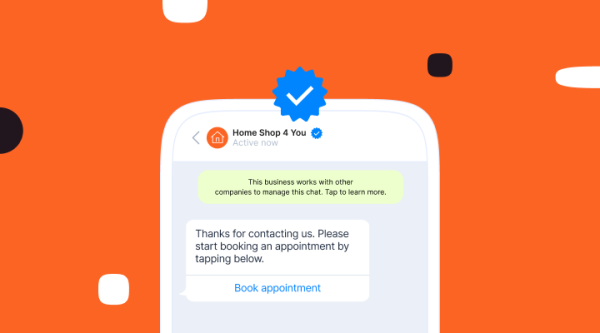
- Blue tick verification: The API is the only path to applying for the “Official Business Account” badge, which boosts trust.
- Advanced automation: Trigger messages based on user behavior (like abandoned carts) without human intervention.
If your support team is overwhelmed by message volume or you need to integrate WhatsApp into your tech stack, it is time to upgrade to the API. Read more about this in our WhatsApp eCommerce customer journey blog. Once we’re clear on the difference between the app and the API, the next question is: why is 2025 such a crucial moment to make the switch?

Why set up the WhatsApp Business API in 2025
If you’ve been on the fence about adoption, 2025 is the pivotal year to make the move. Meta has aggressively rolled out features that turn WhatsApp from a simple support channel into a full-funnel revenue driver.
By performing a WhatsApp Business API setup now, you gain access to:
- WhatsApp Flows: Build rich, interactive menus, forms, and appointment booking screens directly within the chat window. This reduces friction and keeps customers in the app.
- Business Calling API: You can now integrate voice calling capabilities directly into your workflows.
- Converged customer expectations: Customers no longer distinguish between marketing and support. They expect to receive a promotion, ask a question about it, and get an instant automated answer, all in the same thread, at 2 a.m.
Businesses that adopt the API today are not just opening a support line; they are building an automated sales engine that runs 24/7. If you’ve decided the timing is right, the next step is to make sure you meet all the requirements before you start the actual setup.
Requirements before starting the API setup
Before you begin the technical integration, you must have a few administrative blocks in place. Meta is strict about verifying business legitimacy to prevent spam, so having these ready will prevent delays during the WhatsApp Business API setup process.
Ensure you have the following ready:
- Facebook Business Manager account: You need admin access to your company’s Meta Business Portfolio. If you don’t have one, you can create it during the signup flow.
- A valid phone number: This number must be able to receive an SMS or voice call for verification. Crucially, it cannot be currently linked to a personal WhatsApp or WhatsApp Business App account. If it is, you must delete the account associated with that number first.
- Business website & domain: Your business needs a live website that matches the legal name of your entity.
- Legal business details: Have your official business name and address ready.
- Credit card: While you pay Infobip for the platform access, you will add a payment method directly to your WhatsApp Business Account (WABA) to pay Meta for conversation charges.
With these prerequisites in place, you’re ready to walk through the setup process step by step and get your WhatsApp Business API up and running.
Step-by-step WhatsApp Business API setup
The fastest way to perform a WhatsApp Business API setup is through the “embedded signup” method. This system-to-system connection allows you to get a number live in minutes rather than weeks.
Here is how to do it using the Infobip platform:
Step 1: Create your Infobip account
Since you can’t access the API directly, your first step is to log in to your BSP environment. Sign up for an Infobip account. Once logged in, navigate to the Channels and Numbers section of the dashboard.
Step 2: Connect with Facebook
Select “WhatsApp” and click “add number.” You will see an option to “connect with Facebook.”
This will launch a pop-up window directly from Meta. Log in using your personal Facebook credentials (the account that has admin access to your Business Manager).
Step 3: Select your business portfolio
Meta will ask you to select your business. Choose your existing Meta Business Portfolio. If you are new, you can create a new portfolio right there in the pop-up.
Next, you will create or select a WhatsApp Business Account (WABA). This is the container that holds your phone numbers and templates.
Step 4: Register your phone number
Enter the phone number you want to use for your business.
- Check: Ensure this number allows international calls/SMS.
- Verify: Select a verification method (text message or phone call). Enter the 6-digit code you receive.
Step 5: Set your display name
Enter the name that customers will see in their chat list.
Tip: This name must align with your website branding. If your legal name is “Smith Corp” but your website is “sisterswhobake.com,” use “Sisters Who Bake” as your display name.
Step 6: Finalize and wait for verification
Once you submit, your number is theoretically “live” in a limited state. You can immediately start sending messages to a small number of test users. Meanwhile, Meta runs a background check on your business. Once fully verified (usually within 24 hours), your messaging limits will increase, and you can start broadcasting to a wider audience.
Once your number is live, the focus shifts from setup to ongoing success, which starts with following best practices for compliance and message quality.
Best practices for API setup & compliance
Getting technically set up is only half the battle. To keep your number active and your quality score high, you must follow these operational rules.
Manage opt-ins strictly
Never message a user who hasn’t explicitly agreed to receive messages from you via WhatsApp. Learn more about WhatsApp opt-ins in this blog.
- Collecting phone numbers at checkout is not enough. You need a specific checkbox: “I agree to receive order updates on WhatsApp.”
- Unsolicited messages lead to “block” and “report spam” actions, which will tank your sender reputation.
Monitor your quality rating
In your Infobip dashboard, you will see a traffic light system (Green, Yellow, Red) for your phone number quality.
- Green: High quality.
- Yellow: Warning. Users are reporting your messages. Slow down and check your content.
- Red: Critical. Your number may be blocked or rate-limited by Meta.
Master template management
You cannot send free-form marketing messages whenever you want. To start a conversation with a customer (outbound), you must use a Message Template approved by Meta.
- Templates must be categorized correctly (Marketing, Utility, Authentication).
- Keep them concise and avoid clickbait language to ensure fast approval.
Even with strong foundations and best practices, you may still encounter issues along the way, so it’s useful to know how to troubleshoot the most common setup problems.
Troubleshooting setup issues
Even with a guided flow, issues can happen. Here are the most common blockers during a WhatsApp Business API setup:
- Display name rejected: This usually happens if the name doesn’t appear on your website or implies a partnership with WhatsApp (e.g., “WhatsApp support team”). Ensure the name matches your external branding exactly.
- Business verification failed: Meta often requires official documents like a certificate of incorporation or tax ID. Ensure the address on the document matches the address in your Business Manager exactly.
- Messaging limits: New numbers start in Tier 1 (1,000 unique customers/day). You cannot blast 50,000 people on Day 1. You must warm up the number by gradually increasing volume over a few days.
When your setup is stable and any issues are resolved, you can start thinking beyond the technical aspects and explore how to use the API to drive real business outcomes.
Use cases of the WhatsApp Business API
Once your setup is complete, the API opens up diverse opportunities across your business:
- Promotional: Send personalized product recommendations, back-in-stock alerts, and abandoned cart reminders that recover lost revenue.
- Transactional: Automate flight status updates, bank transaction alerts, and appointment confirmations.
- Support: Use an intelligent chatbot to triage simple queries (like “Where is my order?”) and route complex issues to human agents seamlessly.
Fast, secure, and scalable WhatsApp API setup
Transitioning to the WhatsApp Business API isn’t just a technical upgrade, it’s a shift in how your business talks to customers. Instead of juggling messages on a single device and reacting to every request manually, you move to always-on, automated, and personalized conversations at scale. From the first touch to post-purchase support, every interaction can be triggered, tracked, and optimized.
Meta’s ecosystem comes with strict rules, verification steps, and compliance checks, but you don’t have to navigate them alone. As a Tier 1 provider, Infobip gives you:
- A fast, guided onboarding with Embedded Signup
- Reliable, global infrastructure built for high volumes
- Tools to design flows, automate journeys, and monitor performance
- Expert support to keep your sender reputation healthy and compliant
With the right setup, WhatsApp becomes more than a channel, it becomes a core pillar of your customer experience and revenue strategy. Now is the moment to build that foundation.
FAQs
With the Embedded Signup flow, you can register a number and start testing in as little as 10-15 minutes. Full business verification by Meta typically takes 24 hours.
You generally need proof of business verification (business license or tax ID), a verified Facebook Business Manager account, and a valid phone number not currently in use on the WhatsApp App.
Yes. Because WhatsApp is owned by Meta, all API assets (WABA) must be owned by a verified Meta Business Portfolio.
The App is a manual tool for small businesses on a single device. The API is a platform for medium-to-large businesses that supports unlimited users, automation, chatbots, and CRM integration.
Yes. However, you must first delete the account associated with that number on the WhatsApp Business App. Once deleted, the number is free to be registered on the API. Note: Chat history from the App does not migrate to the API.
Pricing is conversation-based. Charges apply per 24-hour session and vary by category: Marketing, Utility, Authentication, or Service. Service conversations (user-initiated) are often free or lower cost than marketing conversations.
You can send free-form messages only when responding to a user within the 24-hour customer service window. To initiate a conversation (or reply after 24 hours), you must use a pre-approved Message Template.
Start your WhatsApp Business API integration with Infobip today
Launch conversations your competitors can’t ignore.