




Customer experience journey mapping: From static maps to real-time journeys
Get to know customer experience journey mapping, the stages, how to build a map, and how to turn it into real-time, AI-orchestrated journeys across 15+ channels with Infobip.

Customer experience journey mapping starts with one customer goal. A map only works when it follows one real path from start to finish. If you try to map everything at once, the result gets too broad, too generic, and too hard to use.
That focus gives you one customer, one scenario, and one set of steps to study. From there, you can see where people drop off, where they hesitate, and where the experience breaks.
This blog explains what customer experience journey mapping is, which stages belong in the map, how to build it from real behavior, and how to turn it into a live journey instead of a one-time exercise.
What is customer experience journey mapping?
Customer experience journey mapping is the practice of visualizing every interaction a customer has with a brand across channels, touchpoints, and stages of the relationship. A strong map captures what the customer is trying to do, what they feel, where they get stuck, and where the brand can respond better.
It is broader than a purchase funnel. A useful map covers the full customer lifecycle, from first awareness through onboarding, support, retention, and advocacy. That wider view matters because customers do not experience a company as separate teams or separate systems, they experience one journey.
A journey map should do three things well. It should show the current experience, reveal the points of friction, and point toward a better future state. If it cannot help a team decide what to change next, it is only a diagram.
The stages of the customer experience journey
A complete customer experience journey map should cover the full lifecycle, not just the path to purchase.
Awareness is when a customer first notices a need or problem. The touchpoints here may include search, social content, ads, web pages, or a recommendation from someone else. The goal is to make the first interaction clear and useful.
Consideration is when the customer compares options and tries to understand whether a brand is the right fit. This is where product content, live chat, sales conversations, email, and messaging can reduce uncertainty.
Purchase or conversion is the moment the customer commits. The experience has to feel easy and trustworthy. If the customer has to work too hard, the journey fails.
Onboarding begins after the sale. It is where the promise becomes reality. Good onboarding helps customers reach value quickly, whether that means completing a setup, activating a service, or understanding the next step.
Retention and support is the everyday relationship. This stage includes service requests, proactive updates, issue resolution, renewal, and re-engagement. It is often the stage that determines whether customers stay or leave.
Advocacy happens when customers trust the brand enough to recommend it, review it, or buy again. A journey map should show what creates that confidence, not just what closes the first sale.
How to create a customer experience journey map
The steps below keep the work practical and grounded.
Step 1: Define the scope and objective
Start with one clear goal. That could be reducing onboarding drop-off, improving first contact resolution, increasing conversion, or lowering churn. A vague goal like improve customer experience is too broad to guide the work.
Define whose journey you are mapping and which moment matters most. A new buyer, an existing customer, and a frustrated support user all need different maps.
Step 2: Build research-based personas
The best journey maps reflect real behavior. Use interviews, surveys, analytics, support transcripts, and CRM data to understand what customers actually do and why they do it.
Keep the persona practical. It should help the team understand intent, context, and constraints. The point is not to create a fictional character, but to make the journey easier to see.
Step 3: Inventory touchpoints and channels
List every place the customer might interact with the brand. That can include web, mobile app, email, voice, live chat, WhatsApp, SMS, RCS, in-app messaging, and other service or marketing channels.
This step is where many maps become too narrow. Customers move across channels constantly, so the map needs to show that movement. A journey is rarely linear, and the channel mix is rarely simple.
Step 4: Map actions, emotions, and pain points
For each stage, capture what the customer is trying to do, what questions they have, what they feel, and where friction appears. This is where the map becomes more than a process chart.
Look for moments of truth. These are the interactions that carry disproportionate weight, such as a fast response after a cart is abandoned or a smooth handoff from bot to human support.
Step 5: Visualize the current state, then design the future state
A current-state map shows what is happening now. It exposes where the experience works and where it breaks. A future-state map shows the experience the team wants to create once improvements are in place.
Start with the current state. If the team skips that step, it ends up designing for an experience that does not exist yet.
Step 6: Validate, activate, and keep it live
Once the map is built, test it against data and real customer feedback. Confirm where the team has evidence and where it is still making assumptions. Then activate the parts that are ready and keep tracking them, because a map only matters when it changes what happens next.
Digital and AI-powered journey mapping
Digital journey mapping adds more data and more urgency. Customers leave behind behavioral signals at every step, which gives teams a better view of what is happening in real time. That often includes intent, not just clicks and page views.
Machine learning is part of that shift. AI makes that view more useful. It can identify patterns across large datasets, detect intent and sentiment in conversations, predict the next best action, and surface friction before it becomes churn. That does not replace human judgment, it gives teams better inputs.
This is where journey mapping moves from static documentation to continuous understanding. A map no longer has to rely on a quarterly workshop to stay relevant, it can reflect how customers behave today.
Why static journey maps fall short and what replaces them
Static maps still help teams align, but they age quickly. Customer behavior changes, channel preferences shift, and new touchpoints appear. A map that was accurate three months ago may already be incomplete.
The bigger problem is the gap between insight and action. Many teams discover the pain point, document it, and stop there. The customer still experiences the same friction because no live journey was built to fix it.
What replaces that is continuous orchestration. The map still matters, but it becomes the starting point for a journey that can react, route, adjust, and improve while it is running.
From map to orchestration: Activating the journey across channels
This is where Infobip earns the read. The Customer Engagement Platform within AgentOS helps teams move from a journey map to a live, automated journey that can respond to real customer behavior across channels. Journey orchestration, the Conversational CDP, AI agents, and the cloud contact center work as parts of one platform, not as disconnected tools.
The point is not to turn this into a product page. The point is to show what happens after a map is built, and why the map becomes more useful when it is tied to execution.
Unify the data behind the map
A journey only reflects reality if it is built on unified data. Infobip’s Conversational CDP within AgentOS brings together web, mobile, CRM, transactional, and conversational data from chatbot, messaging, and cloud contact center interactions into one profile.
That gives the team a map grounded in actual cross-channel behavior, not assumptions. It also helps reveal the gaps that only show up when you see the whole journey in one place.
Orchestrate the journey across 15+ channels
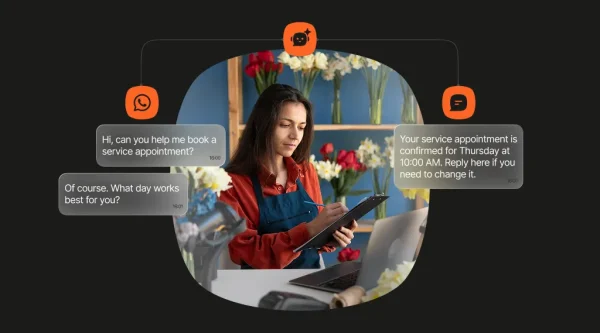
Mapped stages become more useful when they can run automatically across WhatsApp, SMS, RCS, email, voice and more. Triggers can come from real behavior such as an open, a click, or cart abandonment. Automatic failover helps the next step still reach the customer when the first channel does not. That is why the Customer Engagement Platform matters here. It connects the map to the channels that carry the journey forward.
That is the difference between a plan and a live journey. One sits in a deck. The other moves with the customer.
Put AI agents to work inside the journey
AgentOS can route each interaction to the best-fit resource. Routine questions can go to AI agents, guided flows can handle simpler tasks, and human teams can step in when the issue is more complex. Human-in-the-loop routing keeps the customer from getting stuck in the wrong place. In glossary terms, that is human in the loop.
In a journey map, escalation paths are lines on a page. In a live journey, they become the routing logic.
Let the journey optimize itself
Real-time orchestration also makes self-optimization possible. AgentOS can learn from engagement patterns to predict better send times and channel preferences, then adjust over time. That is where machine learning starts to matter in the journey itself.
That matters because customer behavior changes. A static map only updates when a team comes back to it. A live journey keeps learning while it runs.
Close the loop with journey analytics
The final step is measurement. Journeys run, analytics track delivery, open, click, conversion, retention, and journey-completion rates, and the results feed back into the next version of the journey. This is where journey orchestration stays honest, because the metrics show what is working and what still needs work. CSAT can also help show whether the journey actually felt better.
That is the closed loop the brief is pointing toward. Map, act, measure, refine. If the measurement stops after launch, the journey stops improving.
Customer experience journey mapping by industry
Different industries need different maps, even when the principles stay the same.
Retail and eCommerce
Retail journeys often start with discovery and end with repeat purchase. The critical moments are product comparison, checkout, post-purchase updates, and recovery after abandonment.
A strong retail map should show how a customer moves between web, messaging, email, and support. If the customer leaves without buying, the next step should feel timely and relevant, not generic. A retail team may see better repeat purchase behavior when the journey adapts to the customer’s channel preference, but verify the exact customer proof point before publish.
Financial services
Financial services journeys often depend on trust, clarity, and speed. The map should cover onboarding, verification, servicing, and support because those stages shape whether the customer stays engaged.
AI can help with routine questions, but the best journey still needs human escalation when the issue becomes complex. The experience has to be safe, clear, and easy to complete. This is where a clean orchestration layer helps the team keep context intact from one step to the next.
Telecom and insurance
Telecom and insurance journeys often involve high volume, recurring service needs, and a mix of proactive and reactive communication.
That makes conversational channels especially valuable. Customers can receive updates, answer questions, and resolve issues in the same thread instead of jumping between disconnected systems. In a live journey, that continuity matters more than a long explanation of the map.
Common journey mapping mistakes to avoid
- Mapping from assumptions instead of evidence. Use customer data, service transcripts, and interviews.
- Treating the map as a one-time workshop output. Review and update it as behavior changes.
- Ignoring conversational channels. Customers move between messaging, voice, email, and live chat.
- Mapping only the pre-purchase journey. The post-purchase journey often has the biggest impact on loyalty.
- Stopping at insight. A map is useful only when it changes what happens next.
- Automating a broken process. Fix the journey before scaling it.
Conclusion
Customer experience journey mapping is most useful when the map becomes a live journey. That is where the Customer Engagement Platform within AgentOS fits. It helps teams take the shape of the journey they designed and turn it into something customers actually experience.

Frequently asked questions
Customer experience journey mapping is the process of visualizing every interaction a customer has with a brand across channels and touchpoints. It helps teams see where the experience works, where it breaks, and what to improve next.
The main stages are awareness, consideration, purchase or conversion, onboarding, retention and support, and advocacy. A complete map should cover the full lifecycle, not just the path to purchase.
Start with one goal, build research-based personas, inventory touchpoints and channels, map actions and emotions, and then compare the current state with the future state you want to create. The map should be grounded in real data.
A customer journey map usually follows a specific persona through a defined scenario. A customer experience map is broader and can cover the overall experience without focusing on one path. Both are useful, but scope is the key difference.
Teams often use whiteboards, workshop templates, analytics tools, and customer data platforms. Some tools help you draw the map. Others help you act on it.
Digital customer experience journey mapping focuses on digital touchpoints such as web, app, messaging, and email. It uses behavioral data and AI to keep the map current as customer behavior changes.
AI can analyze large data sets, detect sentiment and intent in conversations, predict the next best action, and surface friction earlier. It helps teams move from observation to action faster.
Journey mapping is the act of visualizing the customer journey. Journey orchestration is the act of executing and adapting that journey in real time across channels.
Traditional maps should be reviewed regularly because customer behavior changes quickly. A better long-term approach is to connect the map to live data so it updates continuously.
A simple example is an abandoned cart journey. The customer browses a product, leaves before buying, receives a relevant follow-up on the preferred channel, and then gets a human handoff if they need help before completing the purchase.